Playing Patches (Play Mode)
ZOOM PFX-9003
15
H
INT
If you hold down one of the PATCH [Q]/[W] keys and then also press the
opposite key, the patches will be switched faster.
2.
To directly switch banks, use the CURSOR [
Q
]/[
W
] keys.
The CURSOR [Q] key switches to the next higher bank and the CURSOR
[W] key to the next lower bank.
N
OTE
While a rhythm pattern is playing, banks cannot be switched directly.
Changing the sound of a patch
After selecting a patch in play mode, you can use the sliders and the CURSOR
[E]/[R] keys to adjust the sound and level of the patch.
1.
To adjust the sound of the patch in play mode, operate sliders
1 – 3 while playing your instrument.
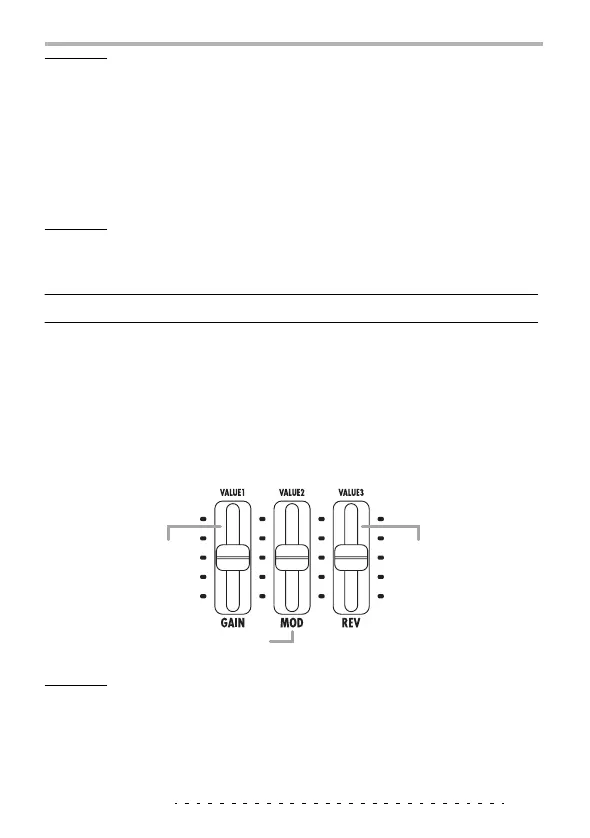
The parameters assigned to the sliders are as follows.
N
OTE
• Depending on the effect type selected for the DRIVE module, a parameter other
than GAIN may be assigned to slider 1.
• Which parameters are adjusted by sliders 2 and 3 depends on the effect type
currently selected for the respective module.
Mainly adjusts
distortion intensity
(GAIN) of the DRIVE
module.
Slider 1
Adjusts a major
parameter of the REV
module.
Slider 3
Adjusts a major parameter of the MOD module.
Slider 2



 To Next Page