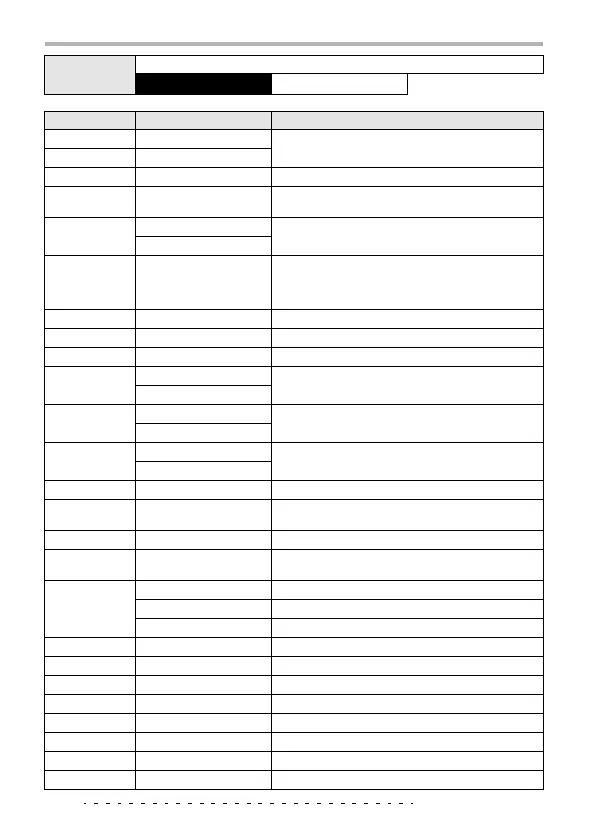
Effect Types and Parameters
ZOOM PFX-9003
46
ARRM-P
Uses the ARRM function to shift the pitch.
Parameter 1: TYPE
Parameter 3: TONE
Parameter description
Parameter name
Setting range Explanation
DEPTH
0 – 10 (other than EXCIT)
Adjusts the effect depth.
0 – 30 (EXCIT)
RATE
1 – 30
Adjusts the effect speed.
MIX
0 – 30
Adjusts the balance between direct sound and effect
sound.
FB
-10 – 10 (FLANGE, T-TRIP)
Adjusts the feedback amount.
0 – 10 (DELAY, ECHO)
POSI
AF/bF
Selects the connection point of the MOD module.
AF: After the EQ module
bF: Before the DRIVE module
COLOR
1 – 4
Selects the sound color.
CLIP
0 – 10
Emphasizes the modulation.
WIDTH
0 – 10
Adjusts the modulation width.
RESO
1 – 10 (A-WAH)
Adjusts the effect character intensity.
0 – 10 (STEP)
SENS
-10 – -1, 1 – 10 (A-WAH)
Adjusts the effect sensitivity.
1 – 50 (T-TRIP)
FREQ
1 – 10 (F-WAH)
Adjusts the frequency.
1 – 5 (EXCIT)
DIRMIX
0 – 10
Adjusts the direct sound mixing amount.
SHIFT
-12 – -1, dt, 1 – 12, 24
Adjusts the pitch shift amount. The "dt" setting results
in a detune effect.
TONE
0 – 10
Adjusts the tone.
BAL
0 – 30
Adjusts the balance between direct sound and effect
sound.
TIME
1 – 30 (SLOW-A, FILTER)
Adjusts the attack speed.
1 – 100 (DELAY, ECHO)
Adjusts the delay time in 10-ms steps.
0 – 63 (WIDE)
Adjusts the mic distance.
CURVE
1 – 10
Adjusts the attack curve direction.
RANGE
1 – 10
Adjusts the filter range.
TRMRAT
1 – 30
Adjusts the tremolo rate.
CHORAT
1 – 30
Adjusts the chorus rate.
CHOMIX
0 – 30
Adjusts the chorus mixing level.
RINRAT
1 – 30
Adjusts the ring modulator frequency.
VIBRAT
1 – 30
Adjusts the vibrato effect speed.
VIBDEP
0 – 10
Adjusts the vibrato effect depth.



 To Next Page