Windows 95/98/ME
02060320.fm 11.12.07/Ch,Kx Network T8 Control Unit – Version 2.0 4 - 3
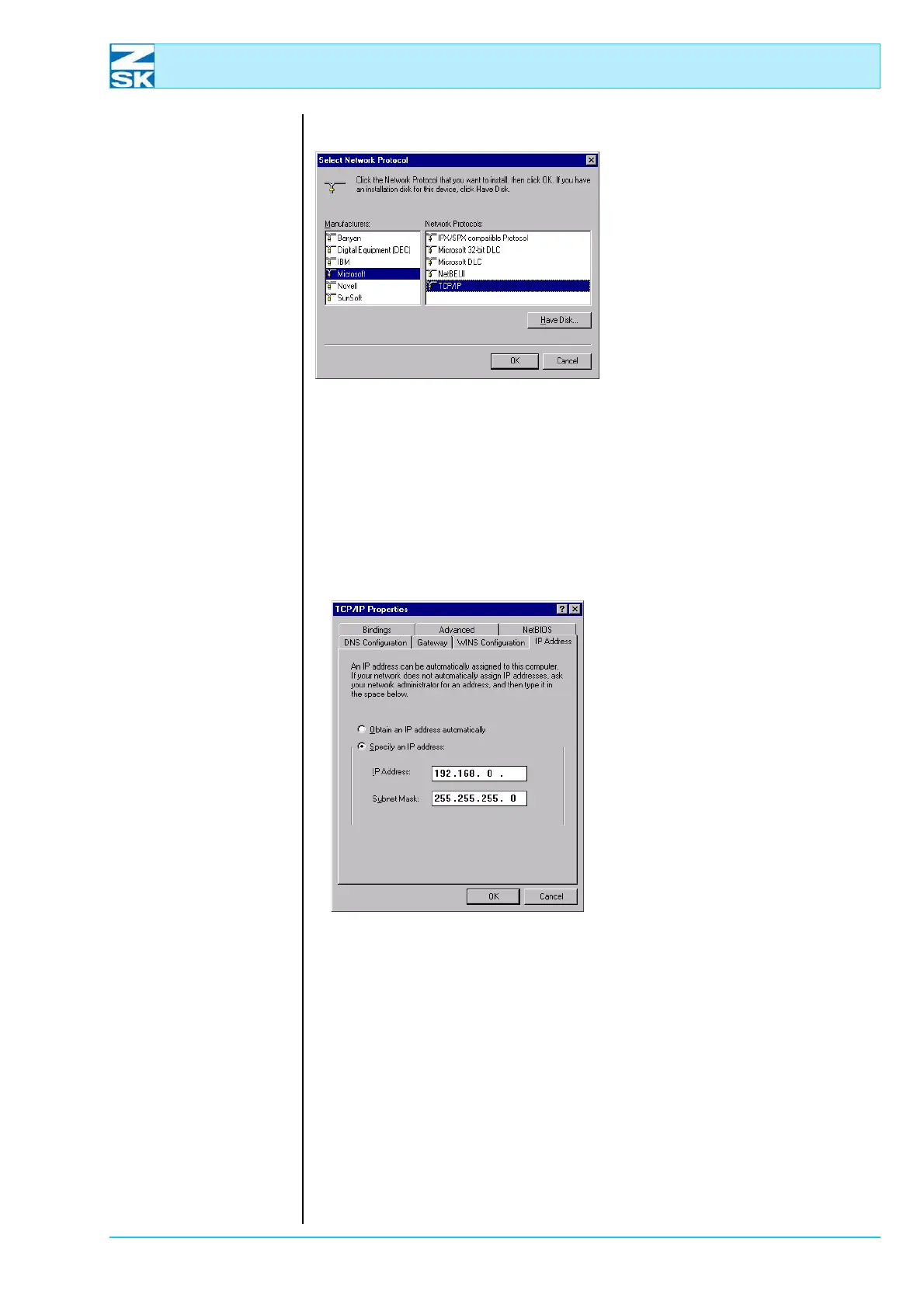
Figure 4.4:
Windows 95/98/ME,
Network
• In the window labeled Manu-
facturers, select Microsoft.
• In the window labeled Network
Protocols, select TCP/IP.
• Confirm the selection with
[OK].
D This takes you back to the Network dialog. The list of components
should now contain an entry for TCP/IP.
•In the Network dialog, select TCP/IP in the list of components and then click
Properties .
Figure 4.5:
Windows 95/98/ME,
TCP/IP Properties
• Select the IP address tab.
• Enable the option Specify an IP
address.
•Enter the IP address.
For small networks, use
192.168.0.x, replacing the x with a
different number between 1 and 254
for each network user.
Enter 255.255.255.0 as the Subnet
Mask.
When assigning the IP address, note
the remarks in Subsection 2.1 Nec-
essary operating system settings
(Windows) as well.
The settings on all the other tabs are correct when the TCP/IP protocol is config-
ured for the first time. For verification purposes, the default settings are illustrated
below:
00491526
00491527



 To Next Page