Windows 95/98/ME
4 - 8 Network T8 Control Unit – Version 2.0 02060320.fm 11.12.07/Ch,Kx
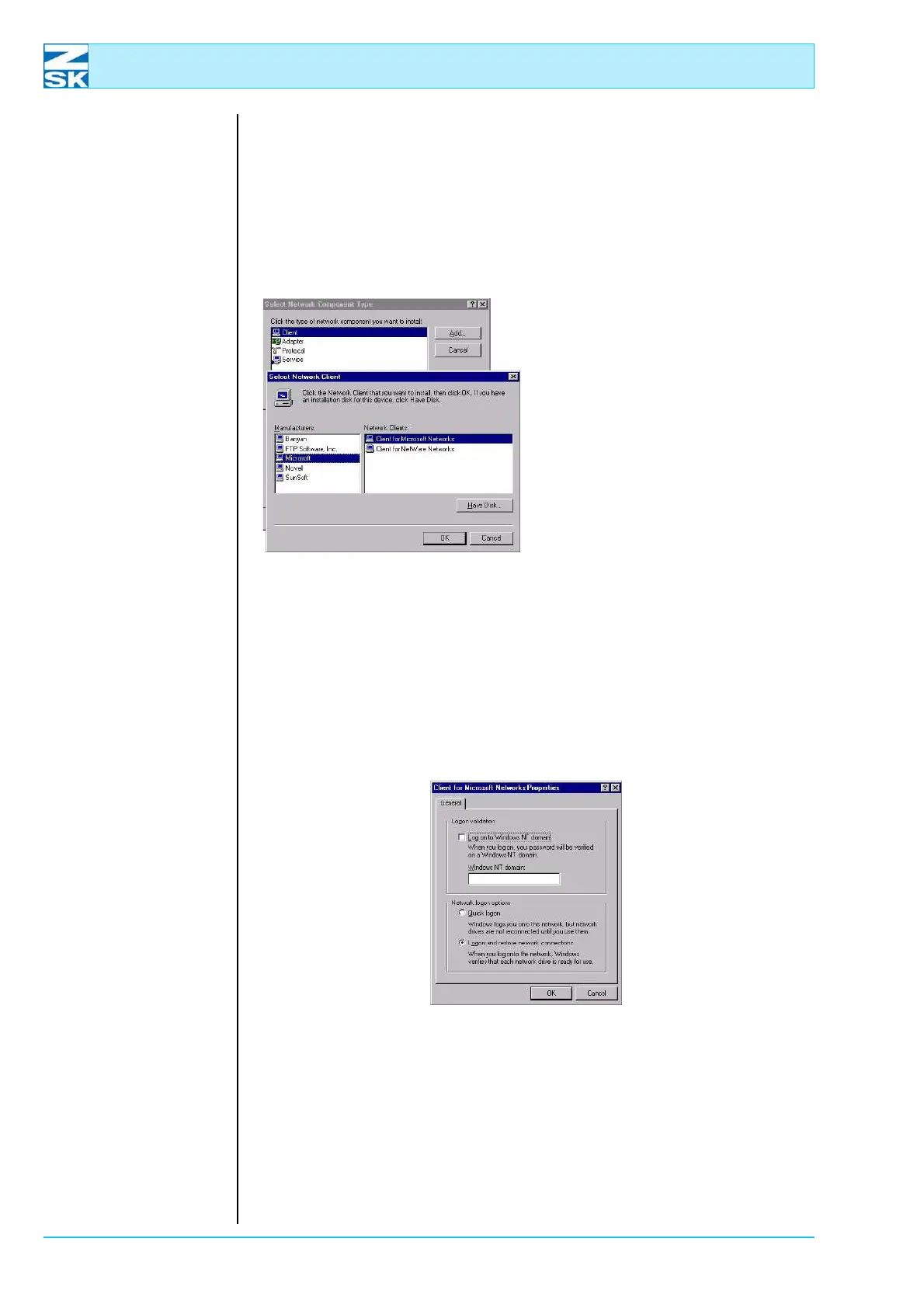
4.1.3 Installing Client for Microsoft Networks
The Network dialog must contain an entry for Client for Microsoft Networks. If
this entry is not there:
• Press the
[Add…] button in theNetwork dialog.
Figure 4.14:
Windows 95/98/ME,
Network,
Select Network
Component Type,
Select Network Client
• Then in the dialog
Select Network Component
Type, mark the Client entry and
press
[Add].
• In the dialog Select Network Cli-
ent mark the manufacturer Mi-
crosoft and the Network Client
Client for Microsoft Networks .
• Click
[OK] to confirm the selec-
tions and initiate the installation
routine.
Checking properties of the Client for Microsoft Networks:
•In the Network dialog, mark the entry for Client for Microsoft Networks and
click the Properties button.
Figure 4.15:
Windows 95/98/ME,
Network,
Client for Microsoft
Networks Properties
• Check the settings and click [OK] to close the dialog.
• Also close the Network dialog by clicking
[OK].
00491509
00491503



 To Next Page