Windows XP Home Edition
02060520.fm 11.12.07/Ch,Kx Network T8 Control Unit – Version 2.0 5 - 1
5. Windows XP Home Edition
5.1 Necessary operating system settings
NOTE
The individual steps and screenshots that you will encounter may
differ, depending on the computer configuration.
The operating system may have to be restarted between individual
steps of the installation routine.
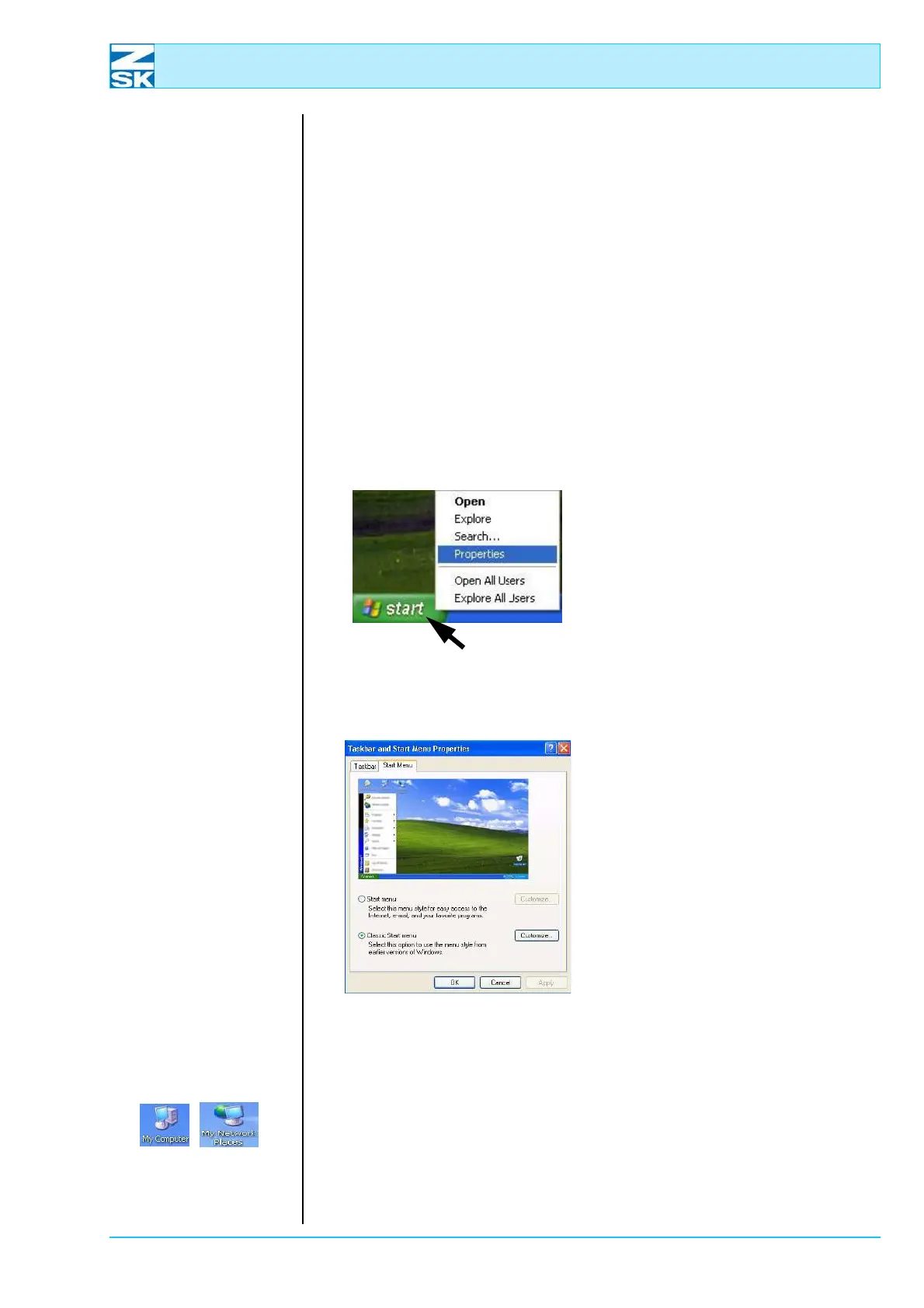
The description and screenshots below are based on the classic appearance of the
Windows Start Menu.
Figure 5.1:
Windows XP,
Context menu of the Start
button
Select the desired appearance:
• Position mouse on the
[Start]
button.
• Press the right mouse button and
select the Properties option in
the displayed context menu.
Figure 5.2:
Windows XP,
Taskbar and Start Menu
Properties
• In the dialog Taskbar and Start
Menu Properties enable the op-
tion Classic Start menu.
• Confirm the dialog with
[OK].
D The symbols for My Computer and My Network Places are now visible
on the Windows Desktop (basic screen). The classic start menu has now
been activated.
00491631
00491639
00491602
00491629



 To Next Page