Windows XP Home Edition
5 - 10 Network T8 Control Unit – Version 2.0 02060520.fm 11.12.07/Ch,Kx
5.2 Using guest accounts
Figure 5.18:
Windows XP,
System Properties,
Computer Name Changes
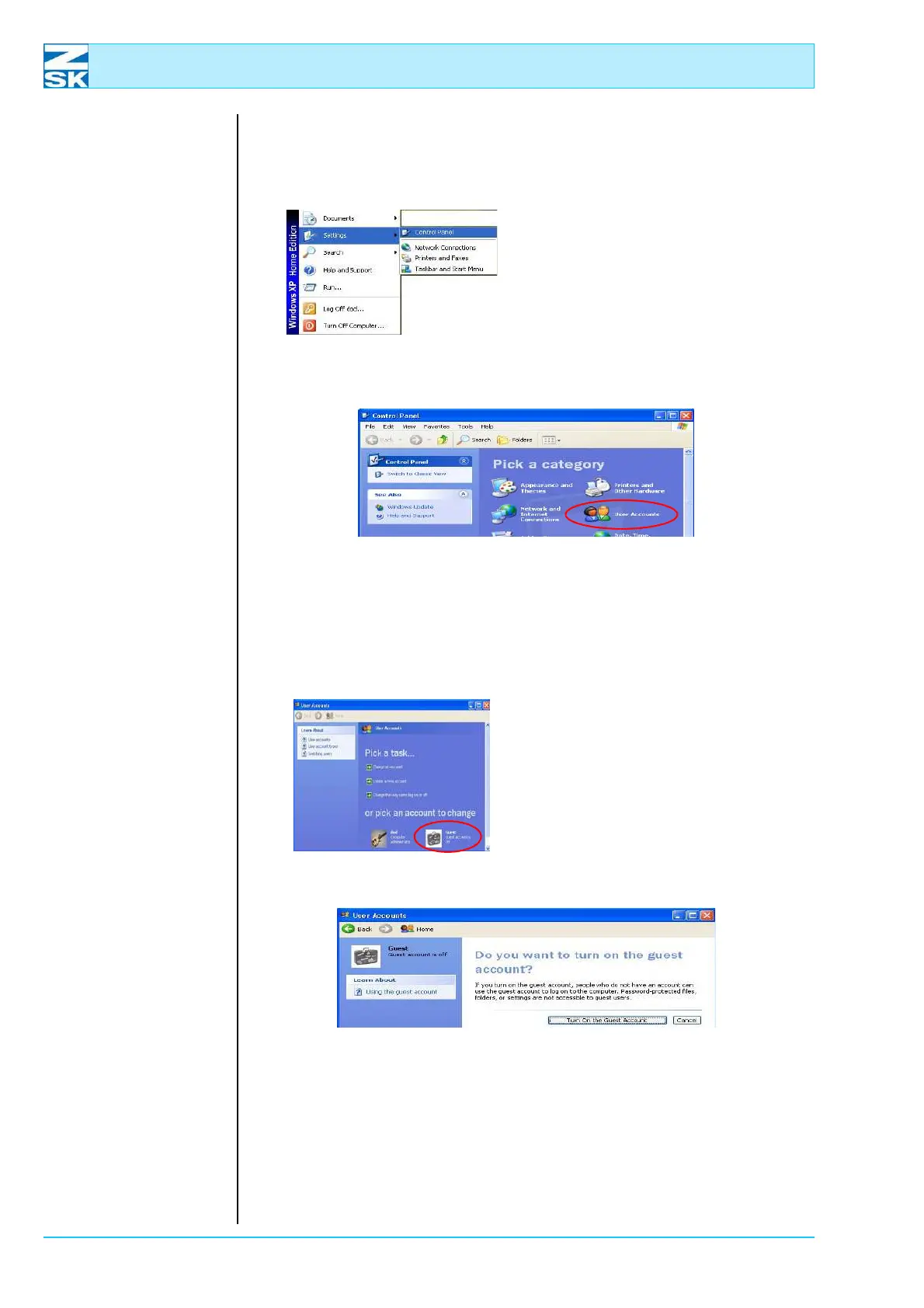
• Start the Control Panel program
with the Start Menu option
Settings.
Figure 5.19:
Windows XP,
Control Panel
• In the Control Panel double-click User Accounts.
D The status of the guest account is indicated in the following dialog.
Figure 5.20:
Windows XP,
Control Panel,
User Accounts
• To change the status, click the
symbol in the dialog.
Figure 5.21:
Windows XP,
Control Panel,
User Accounts
•
Enable the account by clicking Turn On the Guest Account.
• Close the User Accounts dialog and the Control Panel dialog
(e.g. with the shortcut
[ALT]+[F4]).
00491638
00491637
00491604
00491625



 To Next Page