Windows 95/98/ME
4 - 2 Network T8 Control Unit – Version 2.0 02060320.fm 11.12.07/Ch,Kx
4.1.1 Setting up the TCP/IP protocol
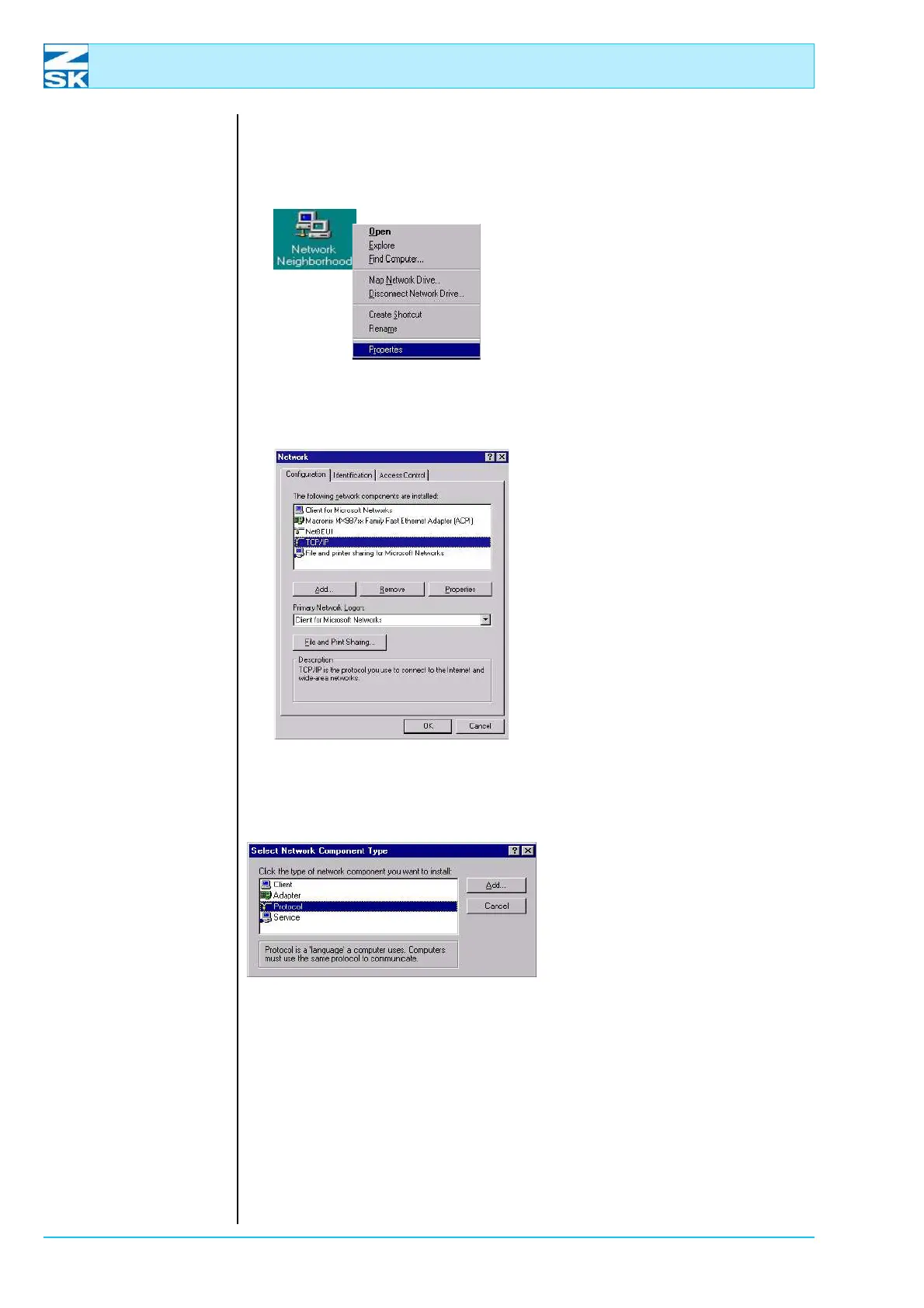
Figure 4.1:
Windows 95/98/ME,
Network Neighborhood
Properties, context menu
• Move the mouse pointer to the
Network Neighborhood symbol
and click the right mouse button.
In the context menu that is dis-
played, enable the
Properties option with the left
mouse button.
Figure 4.2:
Windows 95/98/ME,
Network
• Here you can check whether the
TCP/IP protocol is already in-
stalled.
• In this example the protocol is
already installed. You can check
the existing settings by selecting
TCP/IP in the list of components
and then clicking Properties.
• If TCP/IP is missing from the list
of components, the protocol has
not been installed.
• To do this, click on the
[Add…] button.
Figure 4.3:
Windows 95/98/ME,
Networking components
• Mark the entry Protocol.
• Click on
[Add…].
00491514
00491513
00491524
00491525



 To Next Page