Windows XP Home Edition
02060520.fm 11.12.07/Ch,Kx Network T8 Control Unit – Version 2.0 5 - 3
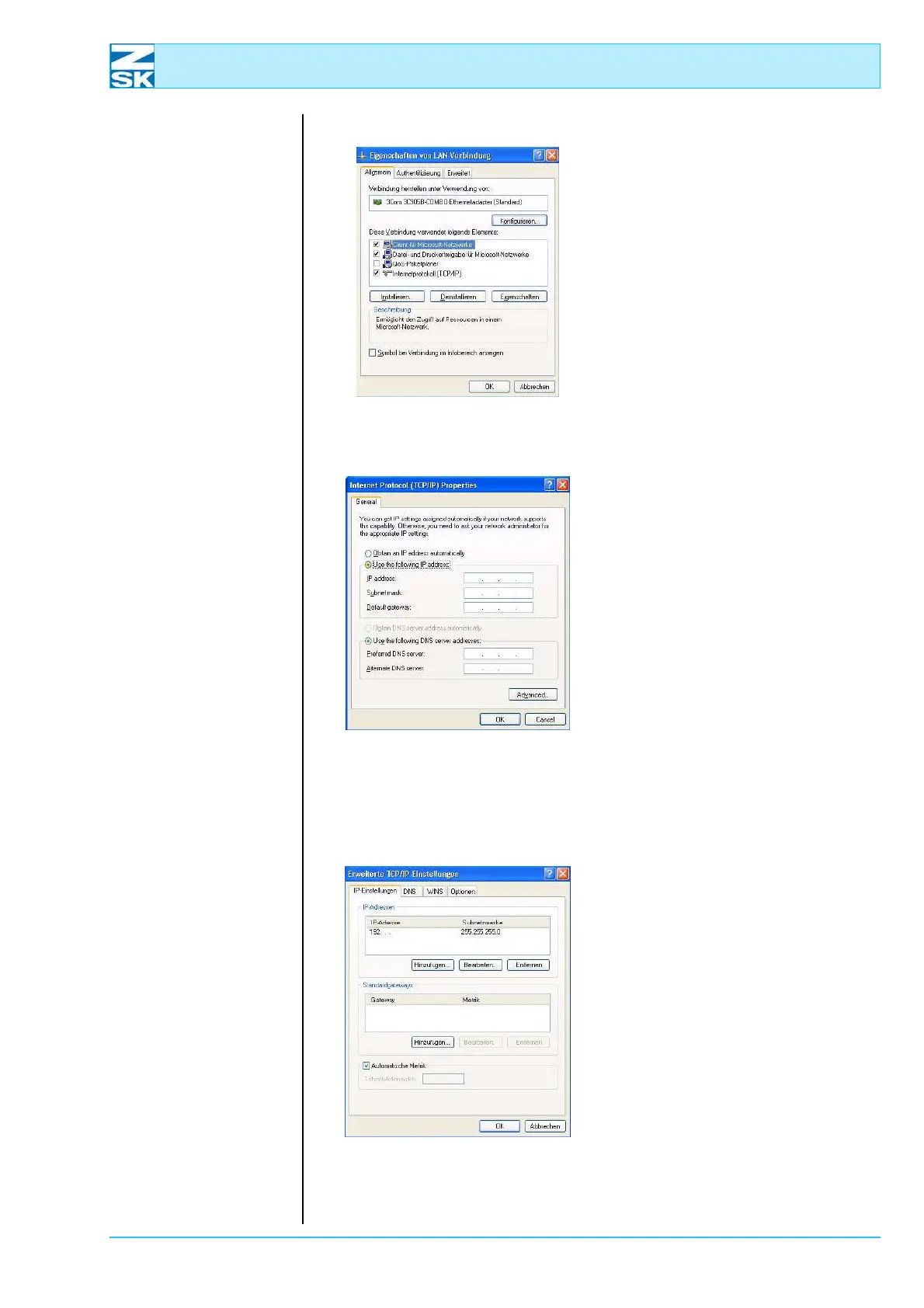
Figure 5.4:
Windows XP,
Local Area Connection
Properties
• With the mouse
select and activate Internet Pro-
tocol (TCP/IP).
• Then press the button
Properties in order to configure
the TCP/IP protocol.
Figure 5.5:
Windows XP,
Internet Protocol (TCP/IP)
Properties
• Enable the option Use the fol-
lowing IP address.
• Enter the IP address.
For small networks, use
192.168.0.x, replacing the x with a
different number between 1 and 254
for each network user.
Enter 255.255.255.0 as the Subnet
mask.
When assigning the IP address, note
the remarks in Subsection 2.1 Nec-
essary operating system settings
(Windows) as well.
Figure 5.6:
Windows XP,
Advanced TCP/IP Settings
Check the advanced TCP/IP set-
tings with Advanced ...:
D The previously entered IP
address 192.168.0.x
should already be visible
on the tab labeled IP Set-
tings. (see above)
00490612
00491614
00490624



 To Next Page