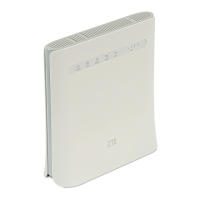
If you select Enable, and click Apply, the filter settings will appear as shown below:
Default Policy: Set how to handle the packet if none of the rules matches.
Accepted: Internet traffic is allowed by default. Only traffic from the selected applications
will be blocked from accessing the Internet. Traffic is identified by port numbers. In
particular, you need to know the port numbers and the protocol (TCP, UDP) used by
outgoing traffic.
Dropped: Internet traffic is blocked by default. Only traffic from the selected, pre-defined
or custom applications is allowed to access the Internet.


 To Next Page