Pannoramic DESK 1.18.1 User’s Guide 4 Software Description
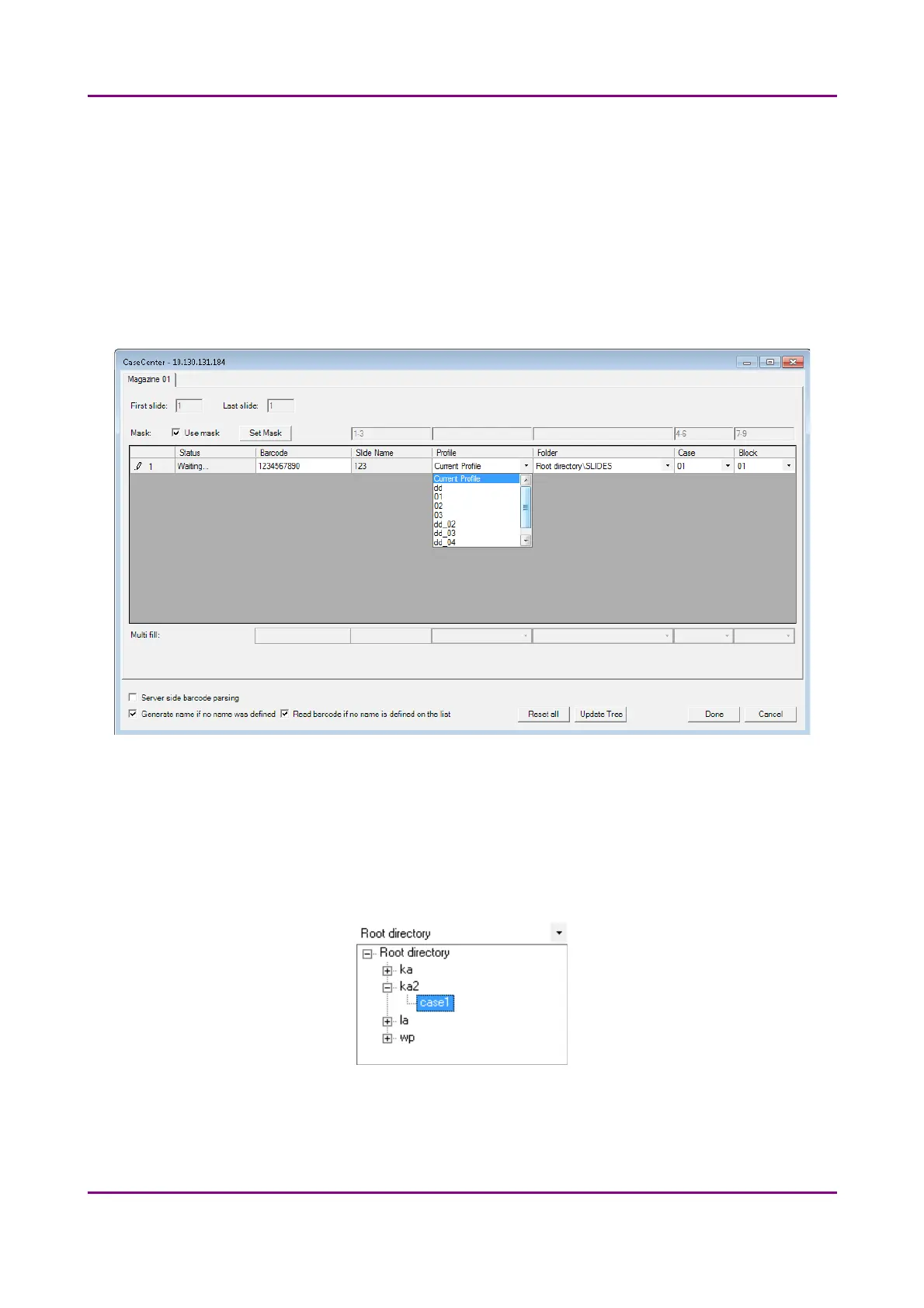
• Use masks for automatic fills. Activate the Use mask option and the mask fields
turn fillable. To save masks, click the Save Mask button, then fill the slide data
fields. To modify masks click Set Mask.
For example, by creating a string for the slide name field based on the characters of
the barcode, a unique name will be generated. The barcode '1234567890', and a
mask '1-3' result in the first four characters of the barcode will be displayed and set
as slide name (123). Case and Block fields can be set this way as well, if necessary.
NOTE: When filling slide data fields, press TAB to move to the next cell.
Figure 43 – Profile selection in the Scan To Server window
• Profile can be added by selecting a list entry from the Profile drop-down list.
• Select a folder where the slide will be scanned to. After clicking the Folder drop-
down menu, a path will be displayed in which the destination folder can be
selected.
Figure 44 – Folder selection
• If you do not use masks, fill in the Case and Block fields, or select an item from the
drop-down list.
May 29, 2014 - Rev. 1 3DHISTECH Ltd.
60(77)



 To Next Page