3D Systems, Inc.
33
SETTING USER AND PRINTER E-MAIL ACCOUNTS
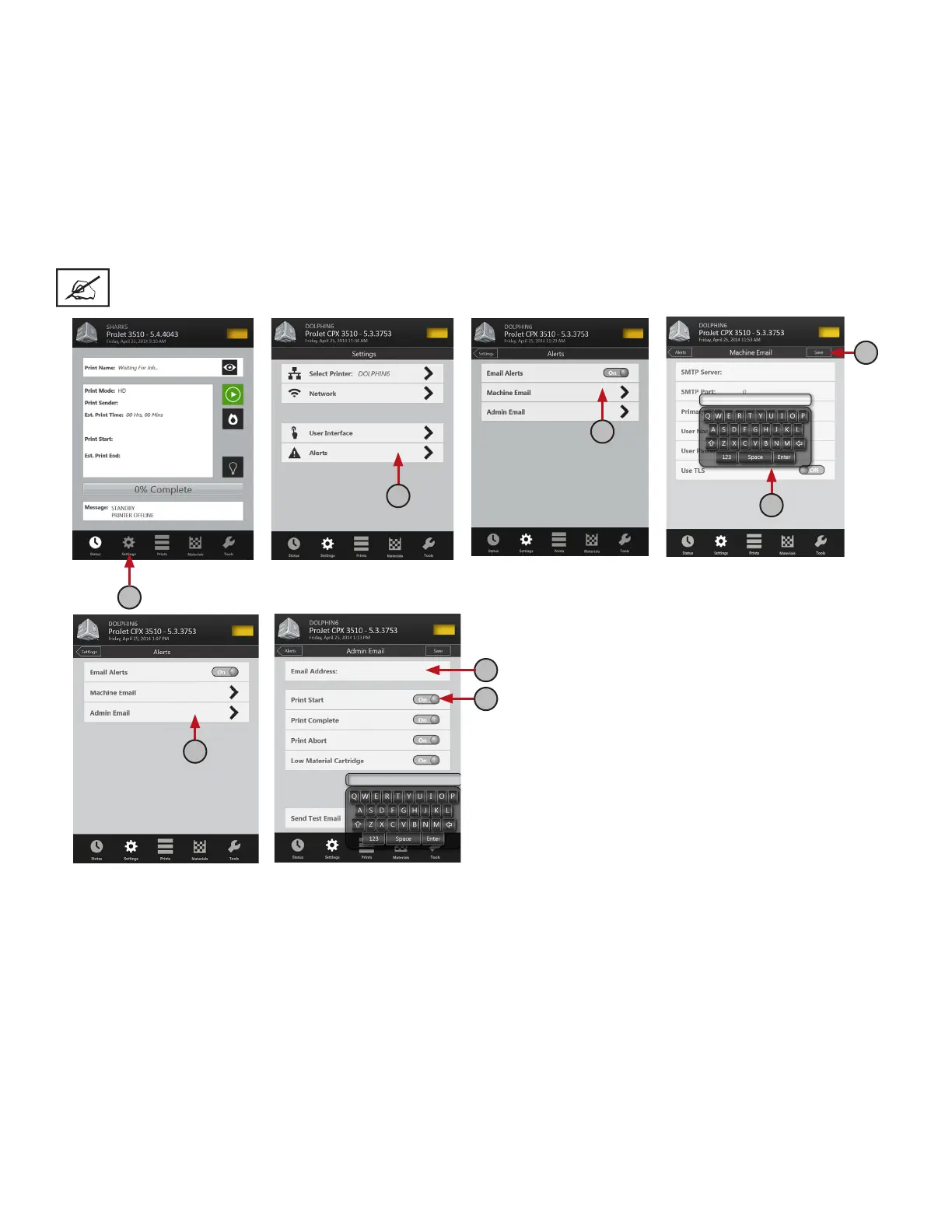
1. Press the “Settings” icon at the bottom of touchscreen (A).
2. Press “Alerts >” (B) and select “Machine Email >” (C).
3. Finger tap on the each option, the keyboard (D) will display allowing you to enter the SMTP Server; SMTP Port,
Primary DNS; User Name; User Password; Use TLS (see “Suggested Settings for Internal & External SMTP
Settings” below for settings).
4. Press “Save” to save your settings. (E)
5. Return to “Alerts >” and select “Admin Email > (F).” Finger tap on “Email Address,” the keyboard will display. Type
in your e-mail address where you want the “Printer Alerts” to be sent and press save. (G)
NOTE: The printer alerts can be control by the slide button turning the alerts on or off (H).
A
B
C
D
E
G
F
H










 To Next Page