3D Systems, Inc.
50
PRINTING BATCH SUBMISSION FOR PRODUCTION ENVIRONMENT
• The printer batch processor allows users to prepare/send jobs and inquire job status for multiple printers across networks without
using 3D Accelerator Client software, which requires human interactions. It is compatible with various 3D Systems’ supported 3D
Printers, including ProJet, InVision, and ThermoJet.
• The ModelerBatch.exe application reads the job parameters from the given parameter le (.ini le), then prepares, packs and
sends the jobs to a designated printer. The ModelerStatus.exe application allows the user to inquire the job status on a designated
printer for both current and previous jobs including “printing”, “pending”, “completed”, and “aborted”.
Printer Batch Processing / Setting Job Parameters via INI File
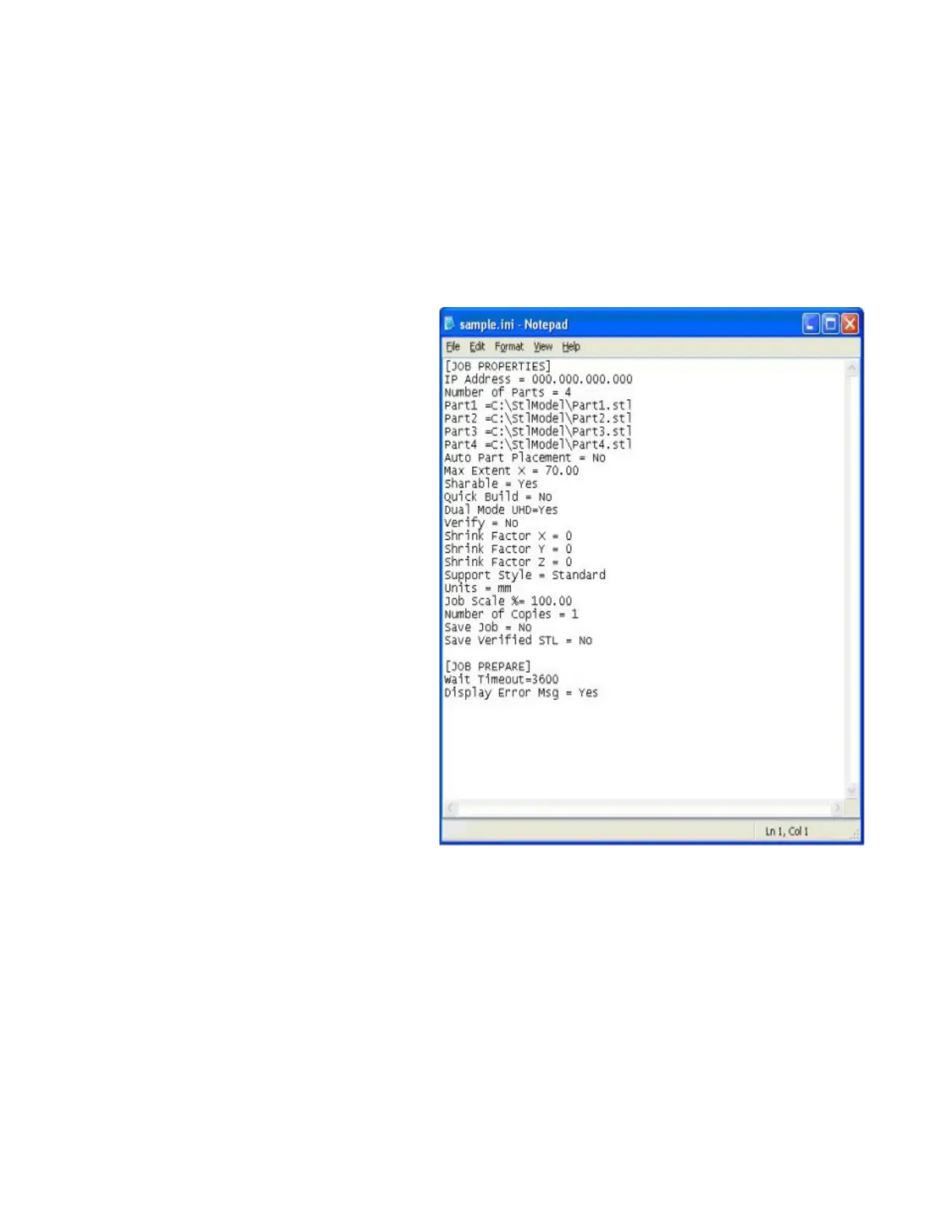
Before running the ModelerBatch
h.exe, a text le must be created that species the desired parameters for the pending job. See example below:
All the job parameters are categorized into two sections:
• Job Properties
• Job Prepare




 To Next Page