3D Systems, Inc.
44
Online/Ofine
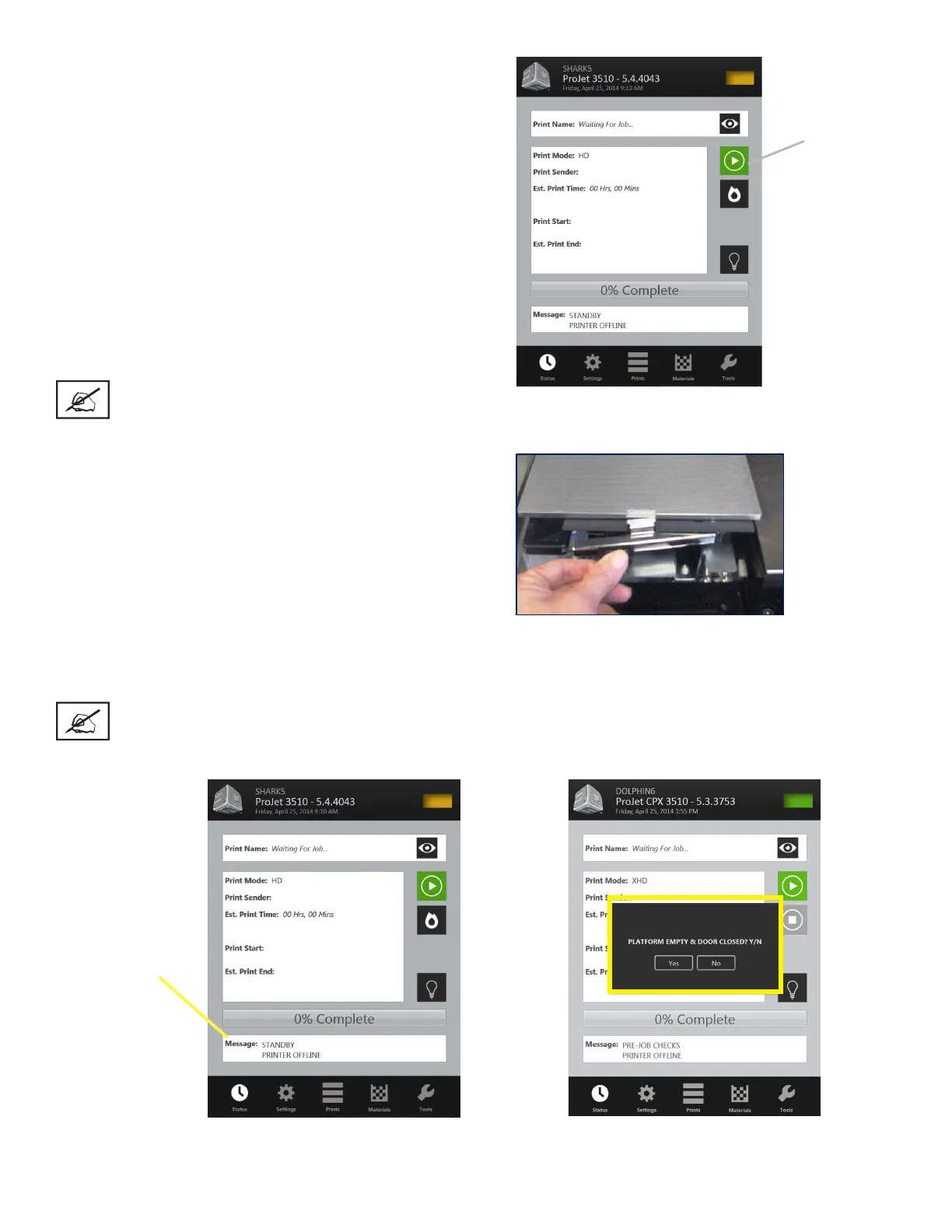
(Play Button)
• The build job submitted will be built when printer is ready unless:
- It is OFFLINE, in which case press the Play button on the
operator’s touchscreen.
- It does not have a clean build platform installed; install clean
one and press ONLINE.
- The Preparation Only option in the Submit dialog box was
checked. This causes the printer to wait until the build job was
conrmed before building enabling you to change the job in
the Preview window again before conrming.
NOTE See “Checking Printer Status” and “Conrming Build Jobs.”
• When the Operator panel shows PLATFORM EMPTY? Y/N, ver-
ify platform is clean and free of debris. If required, press NO and
remove build platform from the printer to replace.
• Close chamber door and press Online button to bring the printer online. A dialog box will display asking “PLATFORM EMP-
TY? Y/N, select YES. Otherwise, select No and install a clean platform. If the display shows please empty waste or next
build will exceed waste capacity, open the waste drawer and then close waste drawer; the job starts automatically.
NOTE If the message shows WAITING FOR JOB, no jobs are in the printer’s queue. Please return the
beginning of “Submit a Print Job” to the queue. Once in the queue, the job starts automatically.
Message Dialog
Box










 To Next Page