47
Special Set-Up Procedure - Column Bumper Installation
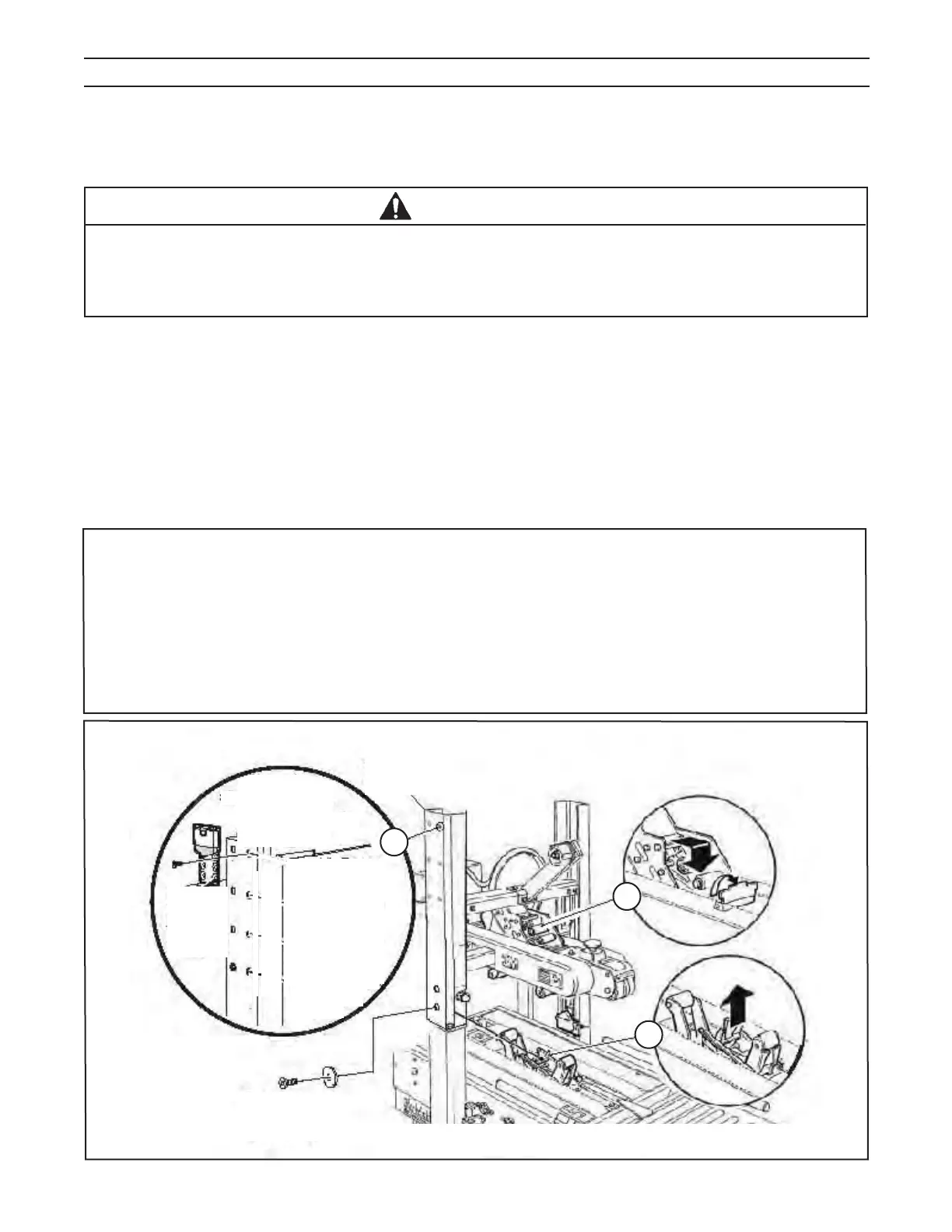
Installation Instructions - Column Bumper (A parts package is included with the unit for installation purposes).
The Column Bumper will be located on the column according to the size of the box that is to be taped
(Refer to Figure 13-10A).
1. Raise and Lock the Upper Drive Assembly. IMPORTANT: This procedure is for authorized personnel ONLY!
2. Turn off air supply and electric power.
3. Remove Guard (see Installation and Set-Up / Figure 7-7), the existing holes for
installing Column Bumper should be visible.
4. Remove Column Bumper and set screw parts package from the carton.
5. Position Bumper as needed (the recommended position is shown in Figure 13-10A).
6. After the new Bumper is installed, re-install the Safety Guard (see Installation and Set-Up Section/Figure 7-7).
7. Turn on air supply and electric power.
* NOTE - IMPORTANT:
- See Figure 15266 for Plate Change. When Column Adjusted to "Raised" Position -
Parts #40 and #41 are removed and replaced by Part #42.
- Some bumper positions may:
1) Allow upper and lower taping heads to come into contact with each other.
2) Create added stress to the bumper.
3) Cause a malfunction of the machine.
These events can potentially cause damage to the machine. For more information on bumper settings,
contact your 3M service representative.
13.11 Special Set-Up Procedure - Column Bumper Installation
Purpose of Column Bumper Special Set-up Procedure: Installing Column Bumpers restrict the operating range of
the upper assembly in proportion to the size of boxes to be sealed.
This installation results in an increase to the operating speed.
• To reduce the risk associated with mechanical and electrical hazards:
− Turn electrical and air supply off and disconnect before performing any adjustments,
maintenance or servicing the machine or taping heads
− Allow only properly trained and qualifi ed personnel to operate and/or service this equipment
WARNING
700rks
2010 January
(Shown is
after Safety
Guard is
Removed)
A
B
C
Figure 13-10 – Case Sealer Frame Changes
Safety Guard
Set Screws
& Washers
Safety Guard


 To Next Page