4 LEDs = 90%, 3 LEDs = 80%, 2 LEDs = 70%,
1 LED = 60%.
E
If the light intensity is below 100% (fewer than 5 LEDs
are ON), check the light guide for conta mination or
defects.
E
Either: clean the light guide of any contamination.
Or: clean the glare shield on the handpiece; see
“Care” for instructions about both procedures. Or:
replace the defective light guide with a new light
guide. Or: if the measures described above do not
result in any improvement, call 3M Customer Ser-
vice or the appropriate dealer.
Recommended Cure Techniques with 3M Adhe-
sives
• Rotate the light guide into the desired position for
polymerization.
• A barrier sleeve may be used. Note that sleeve can
impact power and irradiance of a curing light. It is
critical to ensure the sleeve is powder free and the
seam is not over the tip of the light guide and that
the sleeve fits well. Intermediate level disinfection
(manual disinfection with ready-to-use disinfectant
wipes) is indicated when a sleeve is used, otherwise
the light guide should undergo high level disinfection
(manual disinfection using disinfectant bath, see
“Reprocessing the Light Guide”).
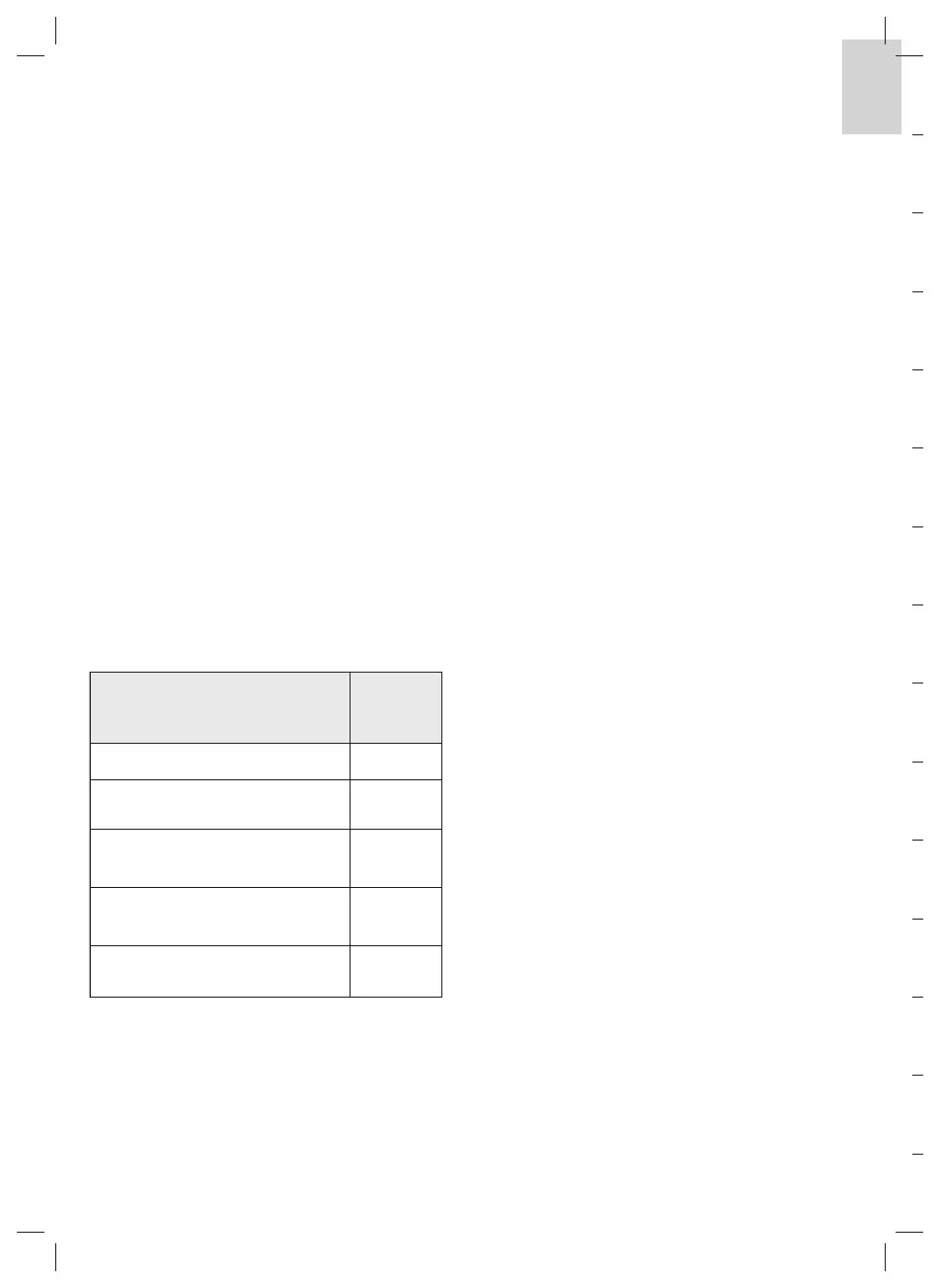
The following sleeves have been tested:
Sleep Mode
Once the handpiece is placed in the charger, all
internal functions and LEDs are automatically turned
off as the handpiece switches to sleep mode. This
reduces the power consumption of the battery to a
minimal level. Outside the charger, the handpiece
is also switched to sleep mode, if it is not used for
approx. 5 min.
E
To terminate the sleep mode press the START
button.
-
The sleep mode termination signal (two short
audible signals) is emitted indicating that the
handpiece is ready for operation; the handpiece
displays the latest selected exposure mode and
time settings.
Acoustical Signals
-
Handpiece
An acoustical signal is emitted
• every time a button is pressed,
• every time the light is turned ON,
• 1 time after 5 sec exposure time, 2 times after 10 sec,
3 times after 15 sec.
Exception: in continuous mode; an acoustical signal
is emitted every 10 seconds.
Two acoustical signals are emitted
• every time the sleep mode is terminated by pressing
the START button,
• every time the light is turned OFF.
A 2 sec-error signal is emitted, if
• the handpiece over-heats,
• the battery lacks sufficient charge.
The acoustical signals from the handpiece can be
turned off (except for the 2-sec error signal).
Follow these instructions to turn them off. Put the
handpiece in sleep mode, e.g., by setting it in the
charger. Take the device from the charger; press
first the TIME button, then the START button.
This changes the sleep mode of the handpiece back
to active and the status “Acoustical signals activated”
to “Acoustical signals deactivated”. The acoustical
signals can be reactivated by following the same
procedure.
Sleeve Impacts
Power or
Irradiance
Cure Sleeve
®
Tip Covers (short) – Kerr No
Complete Curing Light Sleeves-Demi
– Kerr
No
TIDIShield™ Custom Fit Curing Light
Sleeves – TIDI Products
No
SmartLite
®
Max Lens Cover Sleeve –
Dentsply
No
Curelastic™ Cure-Light Sleeve
(Steri-Shield)
Yes


 To Next Page
 Loading...