bdiRDI
JTAG interface for RDI Debuggers, BDI1000 User Manual 24
© Copyright 1999-2003 by ABATRON AG V 1.10
5 Working with RDI Debuggers
5.1 ADW/AXD from ARM Ltd.
5.1.1 Configuration
In order work with ADW/AXD from ARM Ltd. copy the RDI interface DLL (bdirdi.dll) to the \bin subdi-
rectory of your ARM Software Development Toolkit directory.
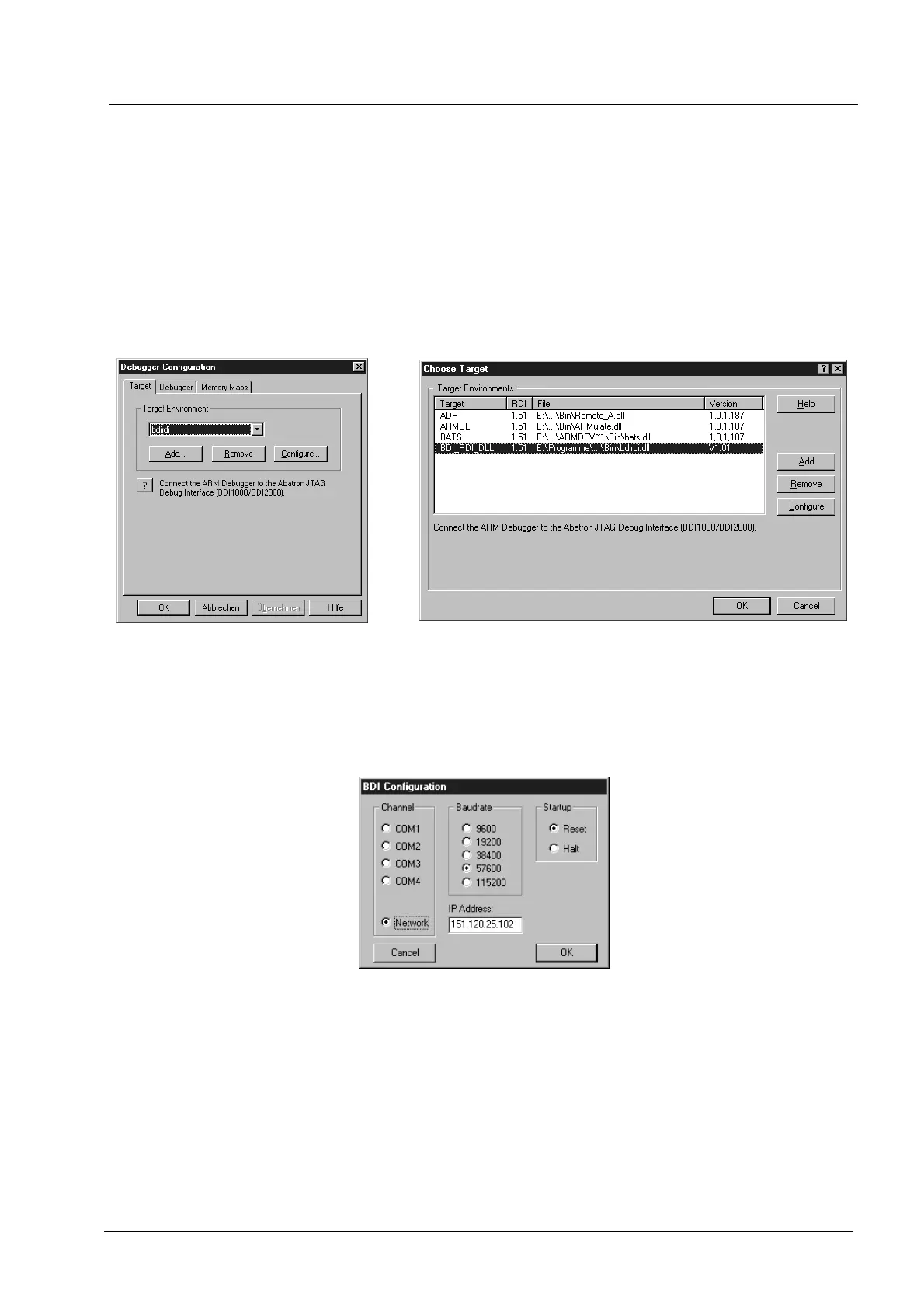
Start the ARM debugger and select "Options >> Configure Debugger..." / "Options >> Configure Tar-
get...". This opens the "Debugger Configuration" / " Choose Target" dialog box. Add BDIRDI to the
list of "Target Environment".
To setup the communication parameters, press button "Configure...". This opens the "BDI Communi-
cation Setup" dialog box. Enter the appropriate communication parameters.
The Startup mode defines how the BDI interacts with the target when the debugger starts. If Reset
is selected (default), the BDI forces a hardware reset of the target when the debugger attaches. The
Halt mode is useful when you would like to connect to a running target. The BDI simply stops the
target when the debugger attaches. This way you can investigate the current status of the target.
AXD
ADW


 To Next Page