Operating Instructions
Busch-AudioWorld
®
Installation and electrical
connection
Operating Instructions | 1473-1-7955 — 27 —
Fig. 20: Selecting the antenna connection
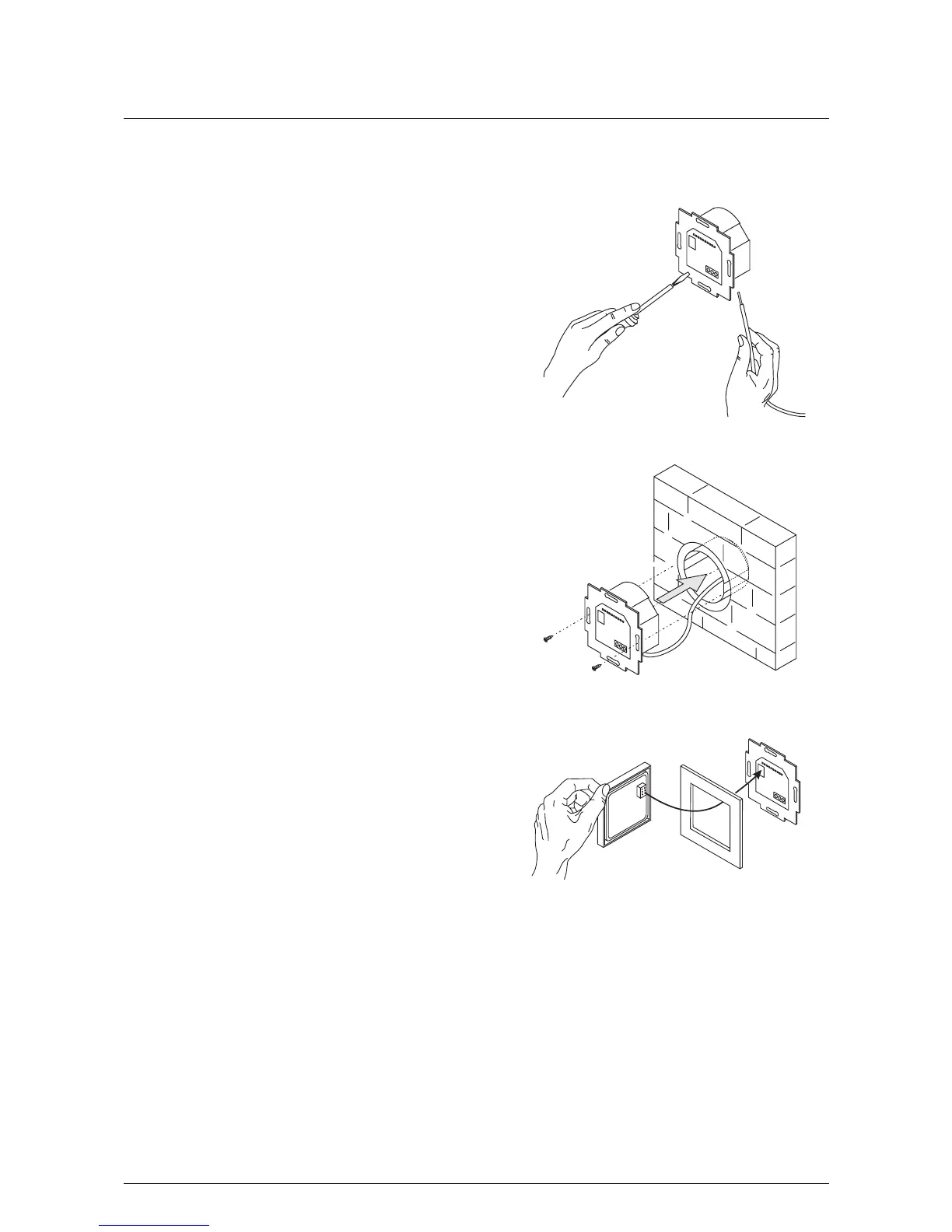
3. Connect the cables to the flush-mounted insert.
– For the connection assignment see chapter
"Electrical connection" on page 28.
Fig. 21: Connecting the cables
4. Mount the flush-mounted insert.
Fig. 22: Mounting the flush-mounted insert.
5. Plug the attachment together with the frame onto the
flush-mounted insert.
– Make sure that the plug-in connection on the rear side
does not get jammed.
– If mounting is difficult, check whether a burr has
formed at the lock-in opening of the flush-mounted
insert and remove it.
Fig. 23: Mounting the display
The device is now mounted.
Pos: 84 /#Neustruktur#/Online-Dokumentation (+KNX)/Steuermodule - Online-Dokumentation (--> Für alle Dokumente <--)/++++++++++++ Seitenumbruch ++++++++++++ @ 9\mod_126889866 8093_0.docx @ 52149 @ 2 @ 1



 To Next Page