Info/illustrationAction
xx2400000693
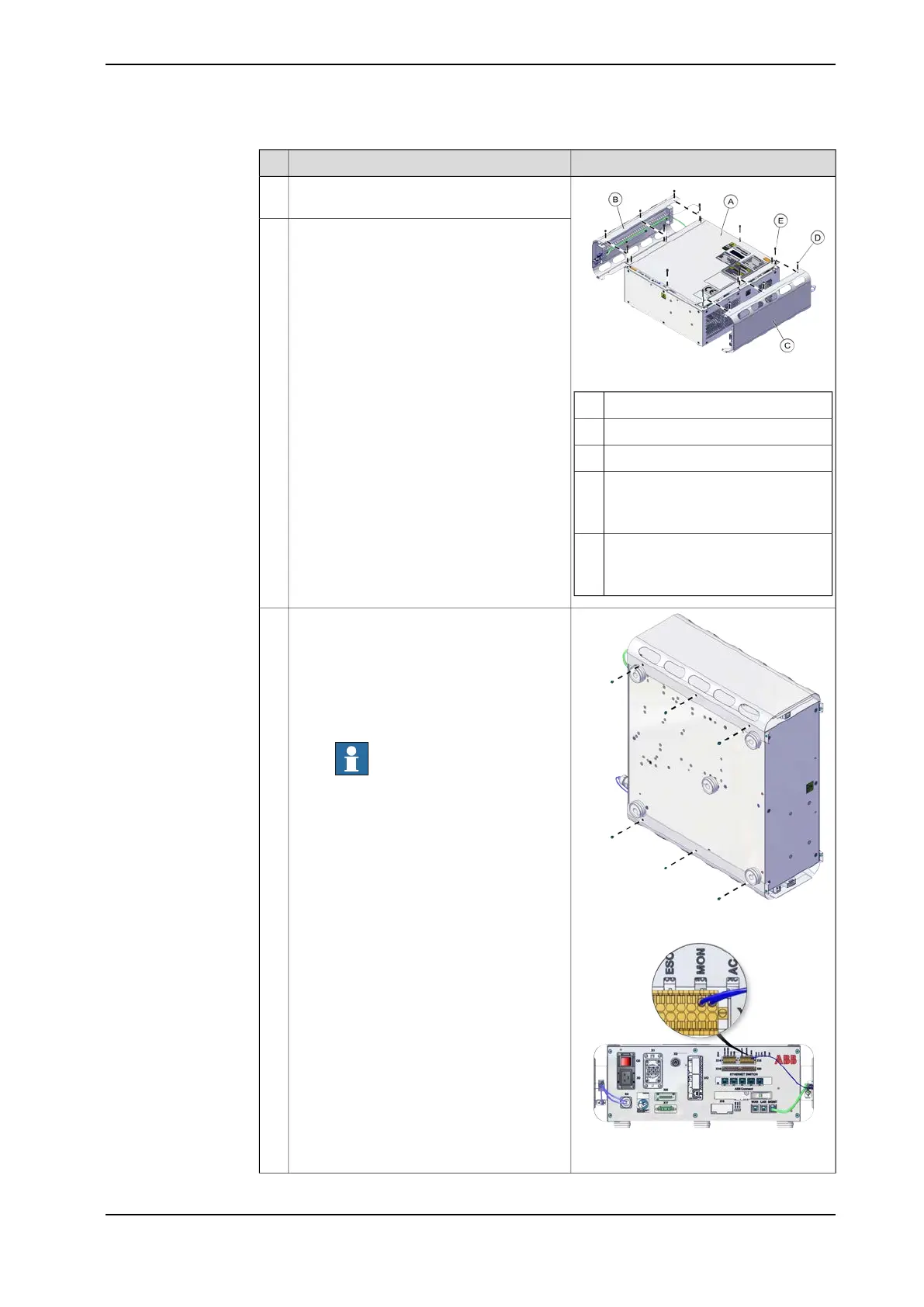
Desktop mounting kit top coverA
Left side cover unitB
Right side cover unitC
Torx countersunk screw M3x6 (6
pcs)
Tightening torque: 0.6-0.8 Nm
D
Torx countersunk screw M4x10 (8
pcs)
Tightening torque: 1.7-1.8 Nm
E
Assemble the desktop mounting kit top
cover.
2
Assemble the side covers with adapter
cables and fasten them with screws on the
top.
3
xx2400000694
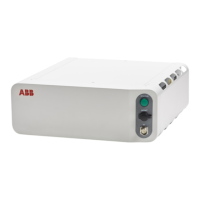
Place the controller upright and install the
right and left cover unit. Lock them with
screws on the bottom side and connect the
cables.
• K2.X15.3
• K2.X15.4
• X4
Note
Do not hold the TPU connector (X4)
during any moving or transporting of
the controller.
• MGMT
4
xx2400000695
Continues on next page
Product manual - OmniCore C30 Type A 75
3HAC089064-001 Revision: A
© Copyright 2024 ABB. All rights reserved.
3 Installation and commissioning
3.4.5 Mounting the controller with desktop mounting kit [3001-2]
Continued



 To Next Page