SETUP AND PAIRING
PAIRING YOUR HEART MONITOR
TO THE myMERLIN™ APP
Pairing your heart monitor with the myMerlin
™
app takes about 10—15 minutes and is only
needed when initially setting up the app. Before you attempt to pair, make sure you have a
strong internet connection and that your Bluetooth
®
setting is ON. Also be sure to keep the app
open during the pairing process.
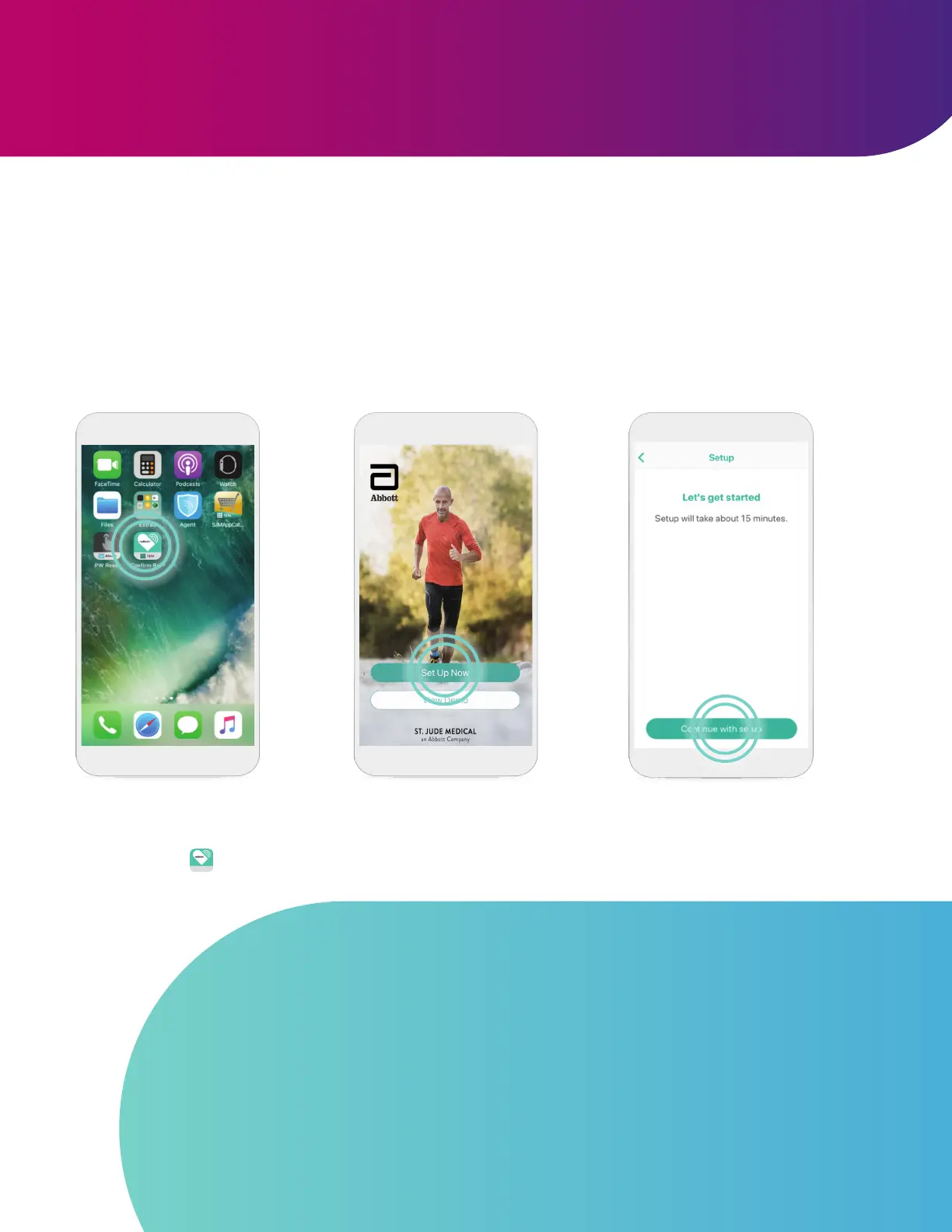
STEP 1
Unlock your phone and tap the
Confirm Rx
™
app to open it.
STEP 2
Tap Set Up Now.
STEP 3
Tap Continue with setup.
GOOD TO KNOW…
If you are on Wi-Fi
‡
and are having issues with setup, try turning OFF Wi-Fi
‡
temporarily and using cellular data instead. If you are on cellular data and having issues
with setup, try turning OFF your cellular data temporarily and using Wi-Fi
‡
instead.
While pairing:
• Make sure your phone remains nearby (within 1.5 meters or 5 feet)
• Turn OFF other Bluetooth devices that are paired with your phone
• Do not close the myMerlin app or go to another app
13












 To Next Page