DOWNLOADING THE APP
DOWNLOADING THE
myMERLIN
™
APP ON iPHONE
‡
Now that your iPhone
‡
is connected to the internet, download the myMerlin
™
app.
You will need a good internet connection, via Wi-Fi
‡
or a cellular data network, for this
process. These steps will guide you through the download:
DON’T FORGET!
Once you’ve downloaded the
myMerlin
™
app, you will need to pair
your iPhone
‡
to your heart monitor.
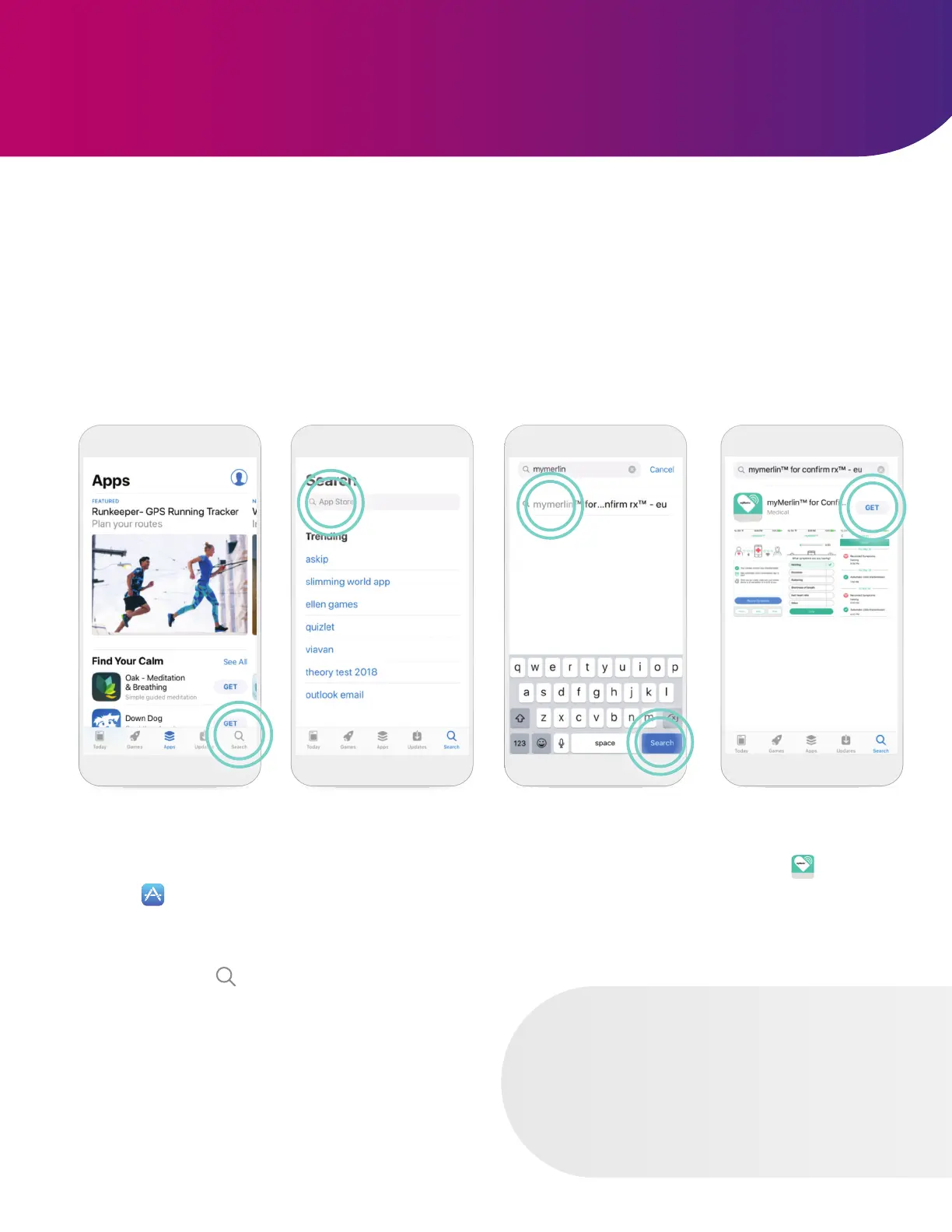
STEP 1
Open the App Store
‡
by tapping the App
Store
‡
icon.
STEP 2
Tap the Search icon
at the bottom of your
screen (image above).
STEP 3
Tap the App Store
‡
search bar at the top
of your screen.
STEP 4
Type ‘myMerlin for
Confirm Rx’ in the
search bar. Then, tap
Search, or select from
the list of apps.
STEP 5
Tap Get to download
the app .
7












 To Next Page