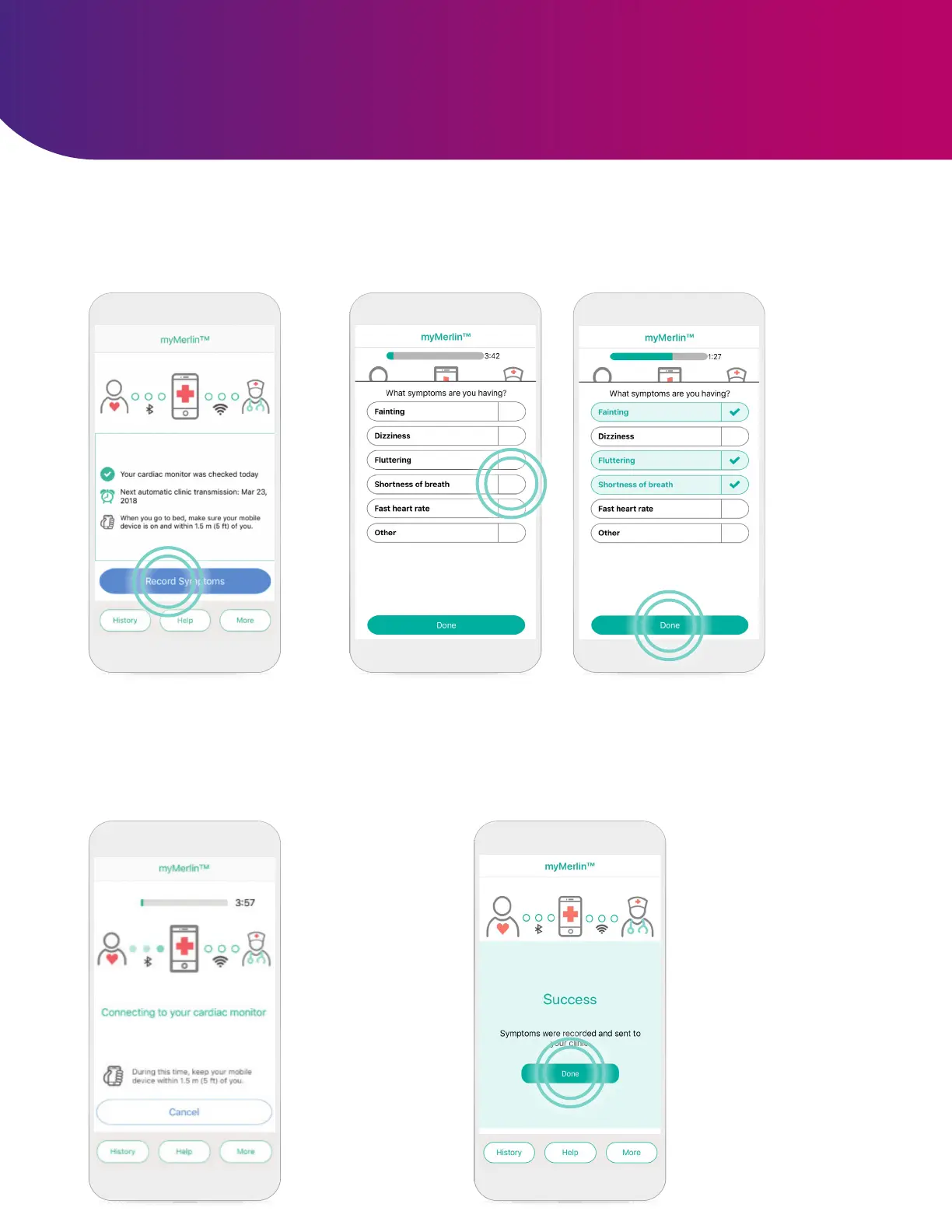
RECORDING SYMPTOMS
STEP 3
After you tap
Done, the app
will automatically
connect with your
heart monitor.
STEP 4
The symptoms will be
sent to your doctor,
based on the individual
schedule your doctor
sets for you. A Success
message displays after
your phone has sent the
information.
Tap Done to return to
your Home screen.
The myMerlin™ app is not intended for emergency use. In case of emergency, call emergency
services or contact your doctor. The myMerlin
™
app allows you to record your symptoms as they
happen and send that information directly to your doctor. Be sure to use this feature only when
you’re experiencing symptoms or your doctor requests a transmission. To do so, follow these steps:
STEP 1
Open the app and tap
Record Symptoms.
STEP 2
To select a symptom you’re experiencing, tap it. Each
symptom you select will turn green. Once you have
selected all of the symptoms you’re feeling, tap Done.
16












 To Next Page