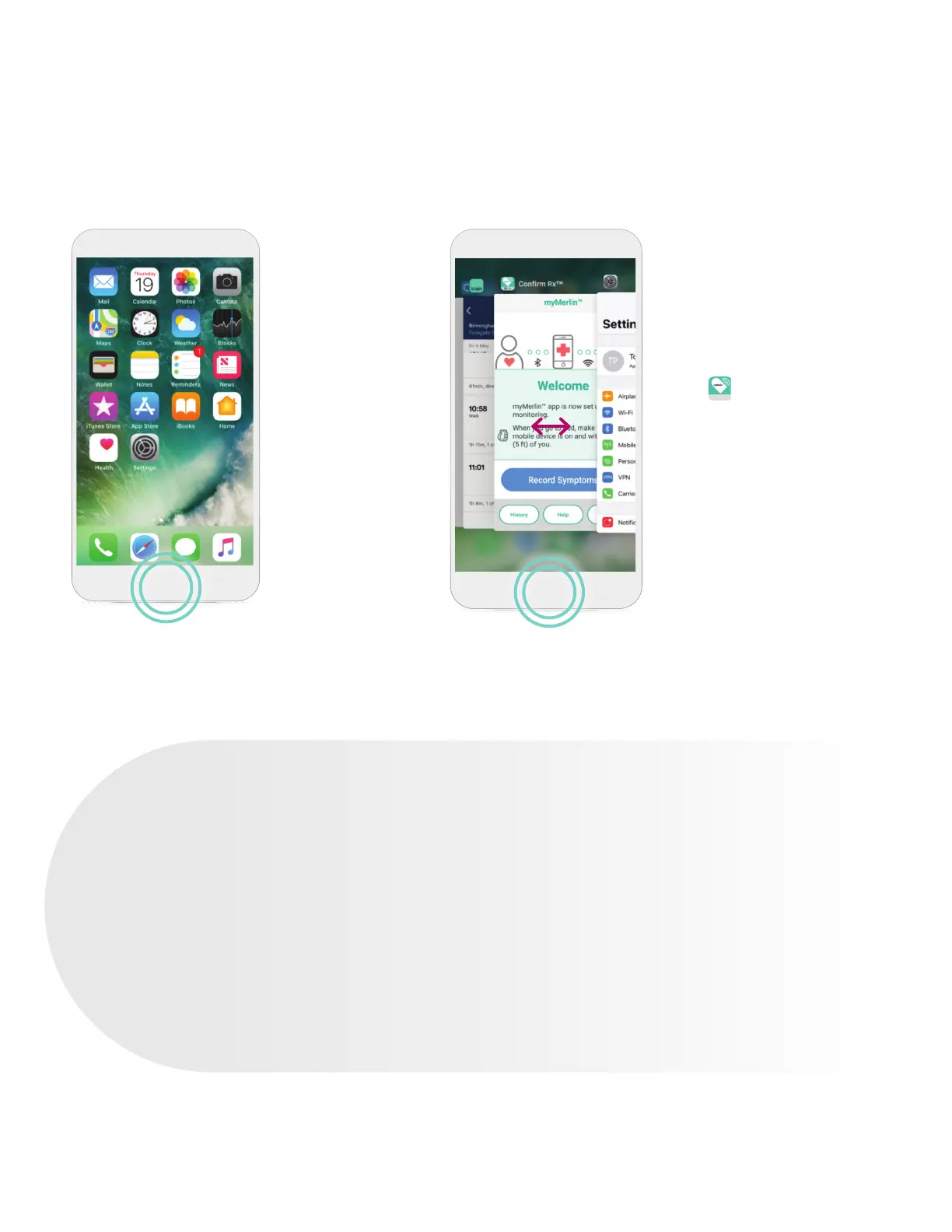
STEP 1
Press the
Home button
on your phone
twice quickly.
KEEP THE
myMERLIN
™
APP OPEN IN THE BACKGROUND
STEP 2
Swipe your finger right until
you see the myMerlin
™
app.
If you do not see the app
displayed, go to your home
screen, locate and tap the app
icon to open it.
STEP 3
Once you’ve confirmed that
the myMerlin
™
app is open,
press the Home button once
to return to the Home screen.
Never swipe the myMerlin
™
app up. This will force close
the app which will prevent it
from working as intended.
WHAT IS THE HOME BUTTON?
Depending on which model of iPhone
‡
you have, the Home button may be a
physical button located just under the
phone’s screen, which takes you back
to the “Home” or main screen of your
iPhone
‡
. On newer iPhone
‡
models, swipe
up from the bottom of the screen to
return to the Home screen.
TIP: IF YOU DON’T HAVE A
HOME BUTTON…
Swipe up from the bottom of the
screen to the middle of the screen
and hold until the App Switcher
display shows on the left side of
your screen.
19












 To Next Page