CONNECTING YOUR iPHONE
‡
TO THE
INTERNET USING CELLULAR DATA
If you are not near a Wi-Fi
‡
network, your iPhone
‡
can still connect to the internet using
cellular data. Typically, your phone will automatically make this switch for you.
You’ll know you’re connected to a cellular data network if you see one of these symbols
on the top left corner of your screen: LTE, 4G, 3G.
If you do not see any of these symbols, your cellular data may be turned OFF.
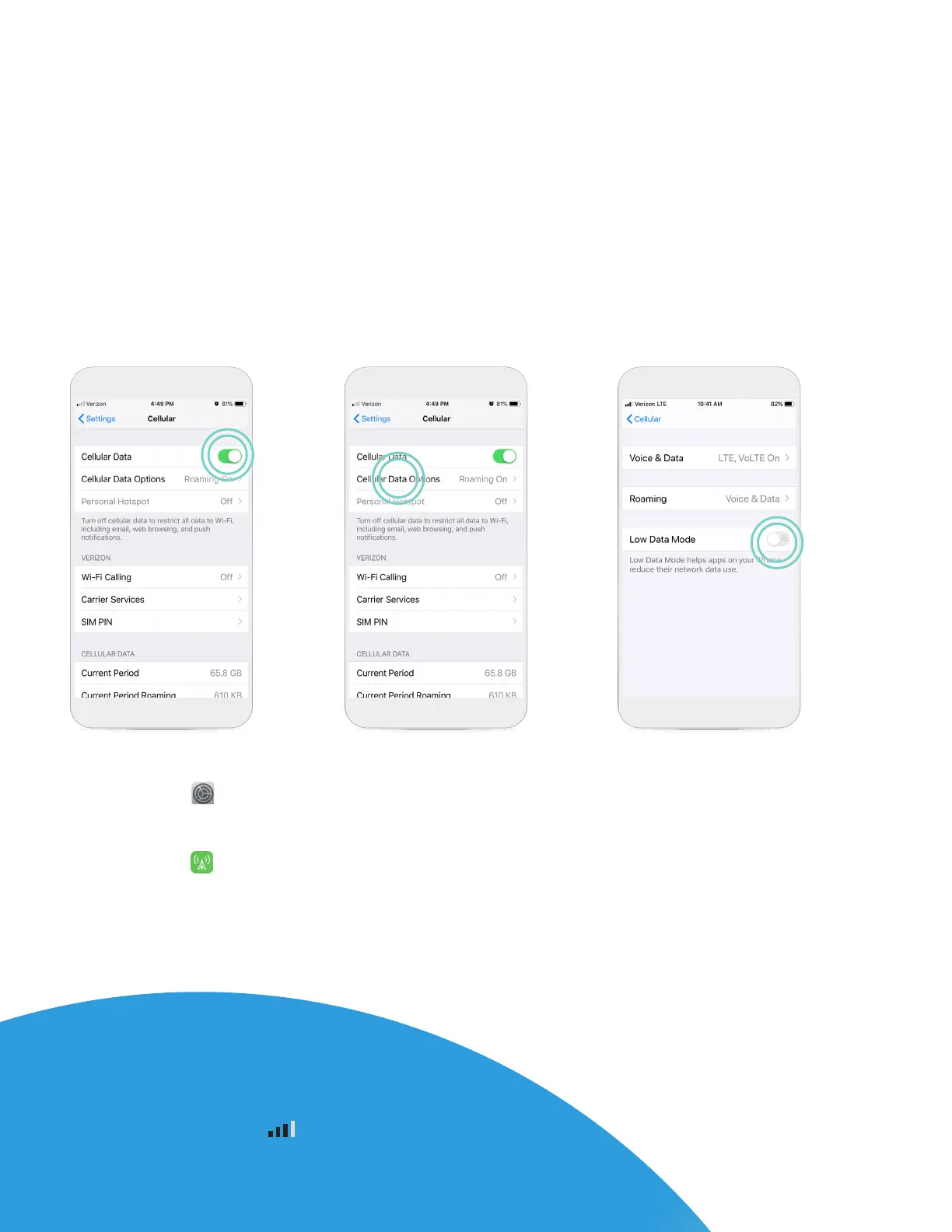
To turn cellular data ON, follow these steps:
STEP 1
Tap Settings .
STEP 2
Tap Cellular .
STEP 3
Tap the Cellular Data slider to
turn it ON/Green (image above).
STEP 4
Tap Cellular Data
Options.
STEP 5
If using iOS
‡
13 or
later, ensure Low Data
Mode is OFF.
GOOD TO KNOW…
Cellular data signal strength can vary by network
and/or location. You can see the strength of your
cellular data by the bars at the top of your
screen. If your cellular data signal is weak, try moving
to a dierent location for a better connection.
6












 To Next Page