Camera
99
3. Confirm the settings by clicking Apply and exit the
menu with OK.
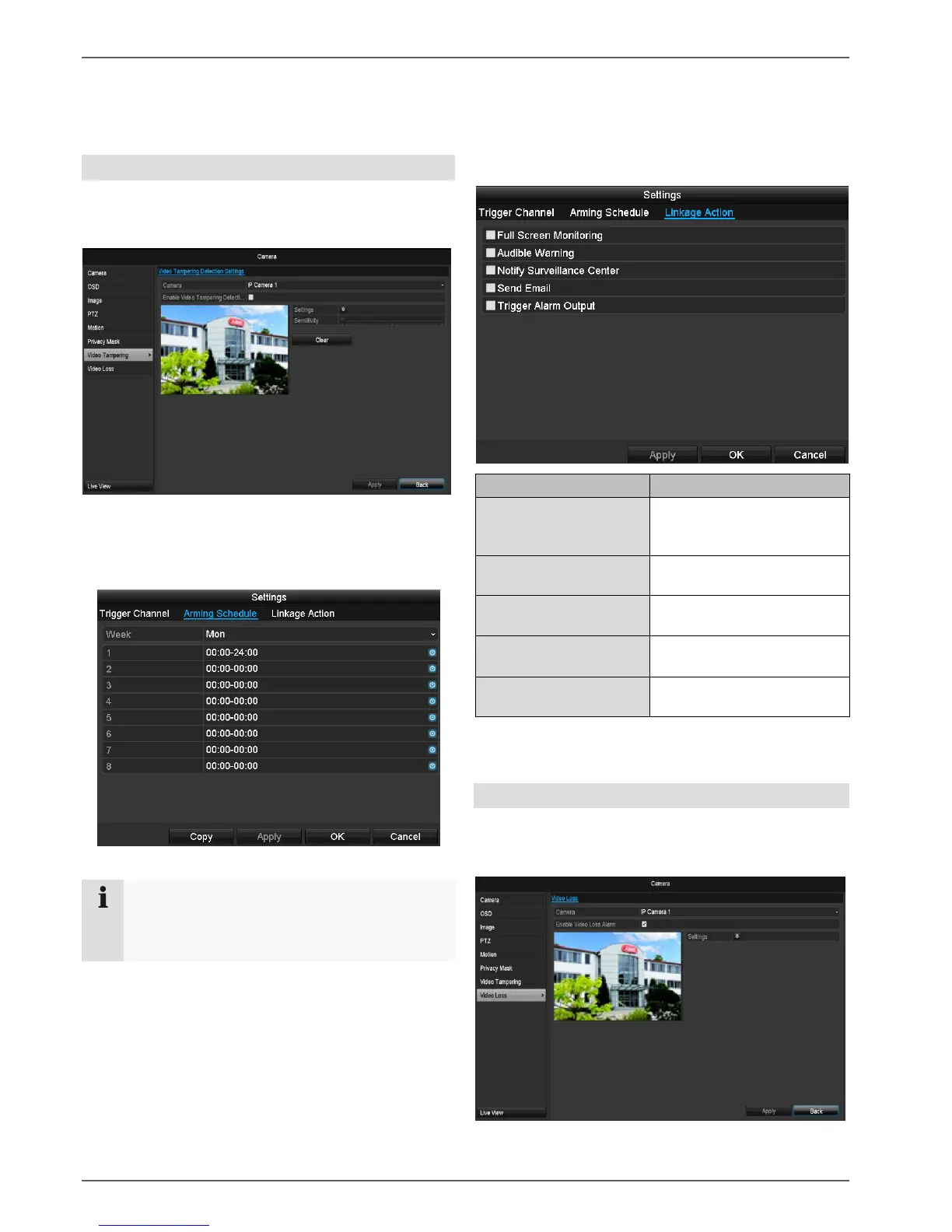
Tamper monitoring
Select the camera channel under “Camera”.
Select the checkbox for activating tamper monitoring.
Armin Schedule
Select the TAB Arming Schedule.
Here you set the times when the reactions in the TAB
Reaction are triggered.
1. Select the day and enter the schedule.
Note
You can define up to 8 time periods (each from
00:00 to 00:00). The times in the individual peri-
ods must not overlap.
2. Select whether the settings should be applied to all
days of the week with using Copy.
3. Confirm the settings by clicking Apply and leave the
menu with OK.
Handling
Click on the TAB Handling.
Here you can configure the behavior of the recorder dur-
ing a detected event (for example: motion got detected)
by clicking the respective check box.
The camera is displayed as
a full-screen picture in live
cast
The device emits a repeating
tone.
The CMS emits an audible
warning tone.
An email is sent to a specific
email address. See page 29
The alarm output is triggered
in the event of an alarm.
Confirm the settings by clicking Apply and leave the
menu with OK
Video signal loss
Select the camera channel under “Camera”.
Set the checkmark for the alarm in the event of a “Video
Loss”.


 To Next Page
 Loading...












