Access Sensor Technologies UPAS User Guide 11
Installing / Removing Inlet, Filter Cartridge, and Sampling Filter
Removing / Installing the Cyclone Inlet
1 Place the UPAS Sampler on a flat surface.
2 Remove the Cyclone Inlet by firmly holding the UPAS on the flat surface
while unscrewing the Cyclone Inlet (turn counter-clockwise).
CAUTION: Never run the UPAS without a 37 mm filter cartridge with filter in place.
It is possible to get contaminants in the unit. Dust and other particulates may
damage the pumping elements.
Install the Cyclone Inlet by carefully screwing the Inlet back onto the UPAS body.
Be careful not to cross-thread the Inlet.
Removing / Installing the Filter Cartridge
1 Place the UPAS Sampler on a flat surface.
2 Remove the Cyclone Inlet. (See above).
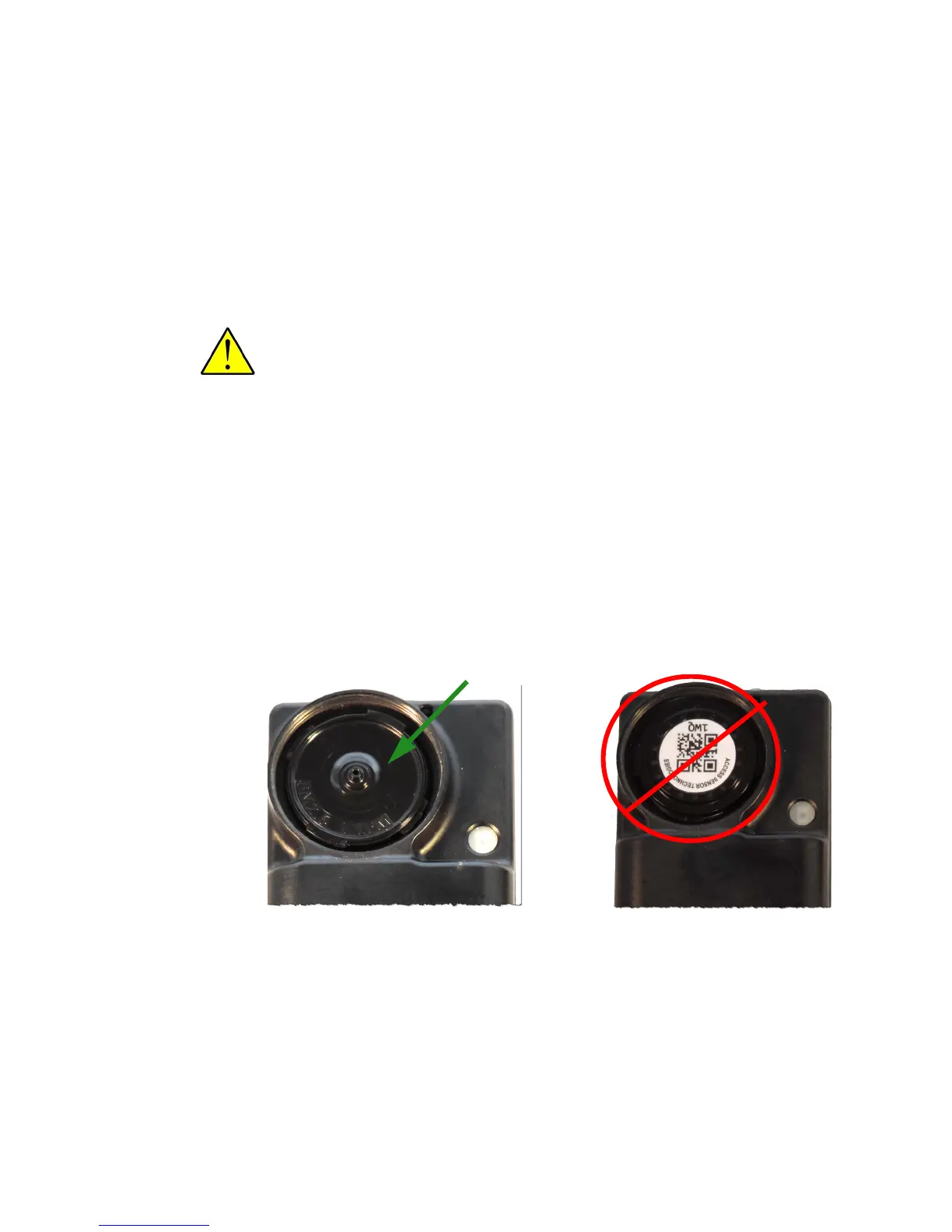
3 Place the filter cartridge, label down, into the inlet socket of the UPAS.
See the following photos. Make certain the cartridge is centered in the
UPAS inlet socket.
.
4 Firmly screw Cyclone Inlet cap down, just beyond finger tight.
Filter cartridge is installed
upside down in UPAS
Filter cartridge properly
installed in UPAS
Filter Cartridge


 To Next Page