Access Sensor Technologies UPAS User Guide 21
Using an External Battery to Extend Available Runtime
If the added weight and complexity are acceptable, connecting an external
battery pack to the UPAS micro-USB port via cable adds the capacity of the
external pack to the UPAS internal battery capacity. The Voltaic model V15
(https://www.voltaicsystems.com/v15
)and model V44
(https://www.voltaicsystems.com/v44
)battery packs in Always-on mode are the
only known packs that reliably provide appropriate extension to the UPAS. Other
packs without the Always-on mode may fall asleep due to the nature of the UPAS
charging circuit.
Installing / Removing the microSD Card
Before powering-on the UPAS Sampler, ensure a microSD card is installed in the
slot in the bottom of the UPAS. MicroSD cards of any speed class and memory
capacity may be used in the UPAS. You do not need to format the microSD card.
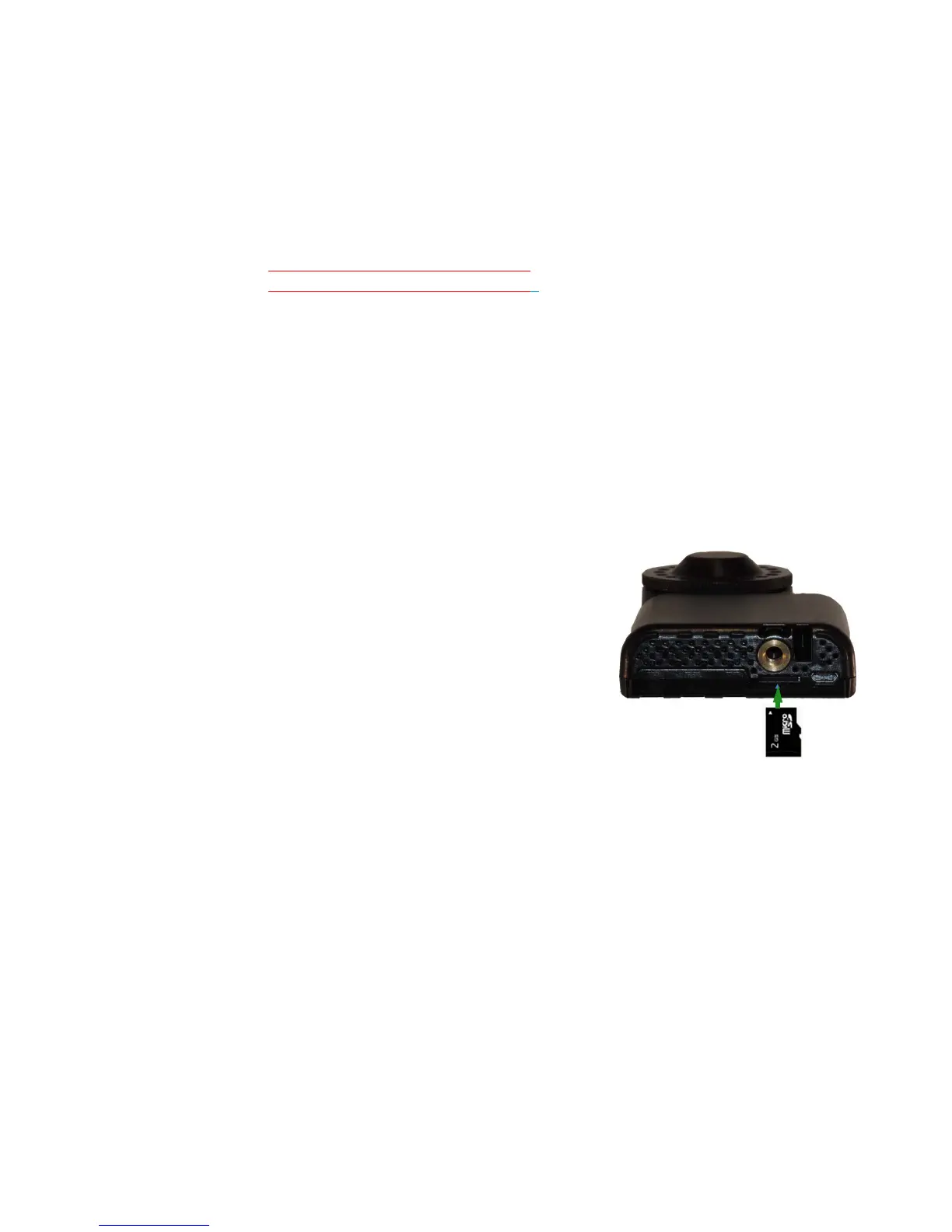
Installing a microSD card in the UPAS
1 Insert the microSD card into the slot on
the bottom of the UPAS (under the
threaded mounting hole). The gold
metal tabs on the microSD card face
the back of the UPAS.
2 Gently push the card in with a small
coin, paper clip, ball point pen tip, or
finger nail until you feel it click at its
stop position.
3 Release the card. It rebounds slightly
and then stops in the installed position
(set in from the UPAS bottom ~1 to 2 mm). Verify that the card is in this
position and not protruding from the housing face. If it is protruding,
attempt to push it back in (Step 2).
Removing the microSD Card
To remove the microSD card, simply press and release the microSD card with a
small coin, paper clip, ball point pen tip or fingernail. The microSD card pops out and
can be removed with your fingers or tweezers, etc.


 To Next Page