Access Sensor Technologies UPAS User Guide 47
4 Accessing and Interpreting
Sample Log Files
Various sample run data is stored in an individual log file for each sample run on
the removable microSD card installed in the UPAS.
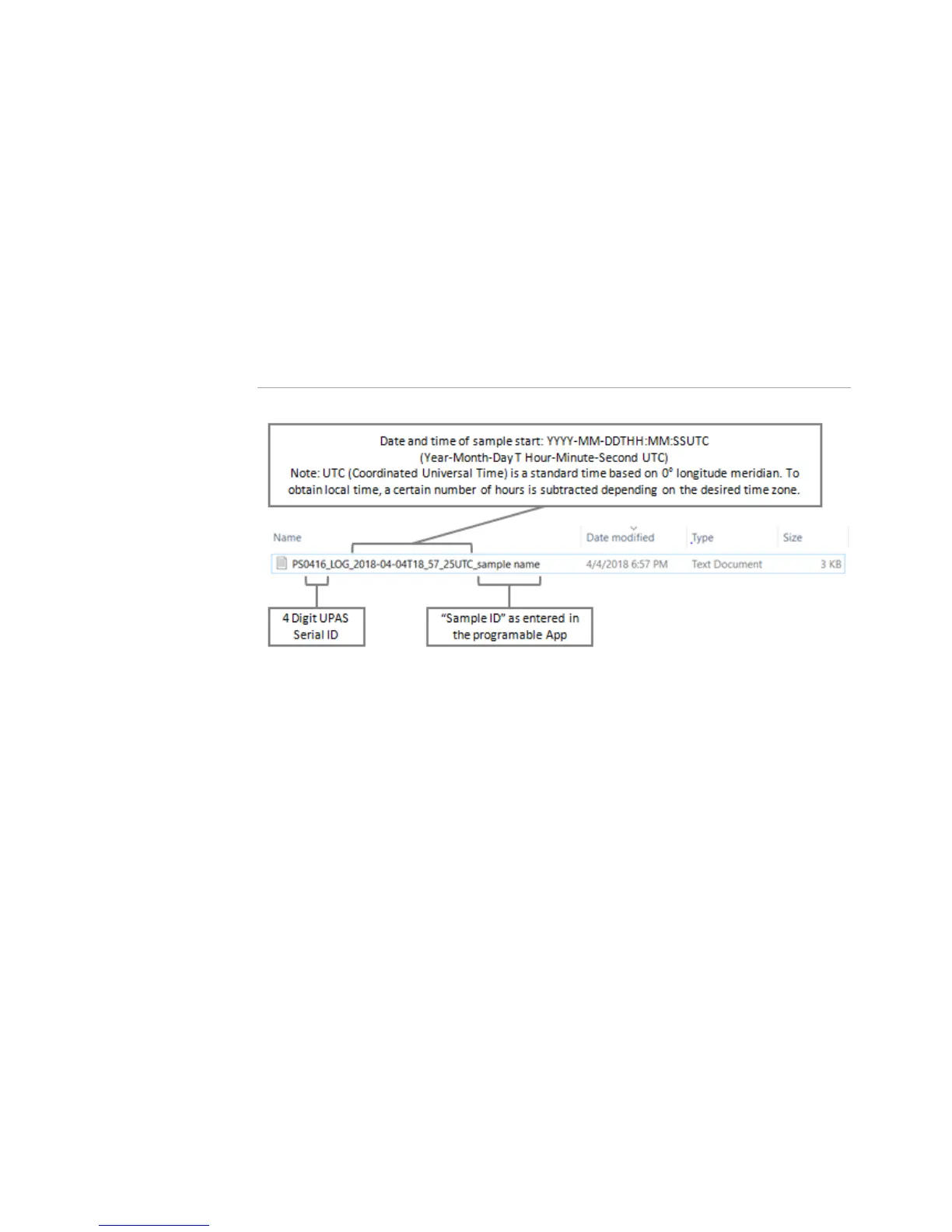
The file name contains identifiers specific to each sample run as shown below.
Transfer the Log File to a PC from the microSD Card
1 Eject the microSD card from the UPAS.
2 Insert the microSD card into the computer using an adapter.
3 Locate and transfer the .txt file from the microSD card to the computer.
4The .txt file is a comma-separated (CSV) format. Import the file into your
spreadsheet for analysis.
Download App Log File via Bluetooth from Android Devices
1 On your mobile device, locate the Download folder. Create a folder named,
UPAS in the Download folder. Note: you may need to install a File Manager
application on your mobile device to perform this step.
Alternately, connect your mobile device to a computer which allows you to
navigate and create the new UPAS folder.
2 With the App connected to the UPAS, click the Begin File Download button
(on an Android device) or the Download Log Files button (on an iOS device).


 To Next Page