Access Sensor Technologies UPAS User Guide 25
5 Power-on the UPAS, connect to the App in the standard manner, and set
up a sample run of arbitrary length of time at the desired flow rate you
wish to check (100% duty-cycle is recommended for ease of
measurement).
6 Start the sample run via the Start button in the App.
7 Give the UPAS at least three minutes for flow variation to fully settle
before taking a reading with the flow meter primary (ensure you are
reading in True Volumetric Flow vs. Standard Volumetric Flow, and convert
units to Liters/minute as needed for comparison to the UPAS
specification).
The complete flow measurement apparatus (flow-measurement adapter, tubing,
flow meter primary) must be connected to the UPAS before initializing the
sample run to make a flow measurement. The UPAS adjusts flow slowly thereby
adding the flow-measurement apparatus during a sample run that is already
underway causes a situation where the UPAS takes several minutes to normalize
flow.
8 After testing, disconnect the flow meter and flexible tubing from the
UPAS.
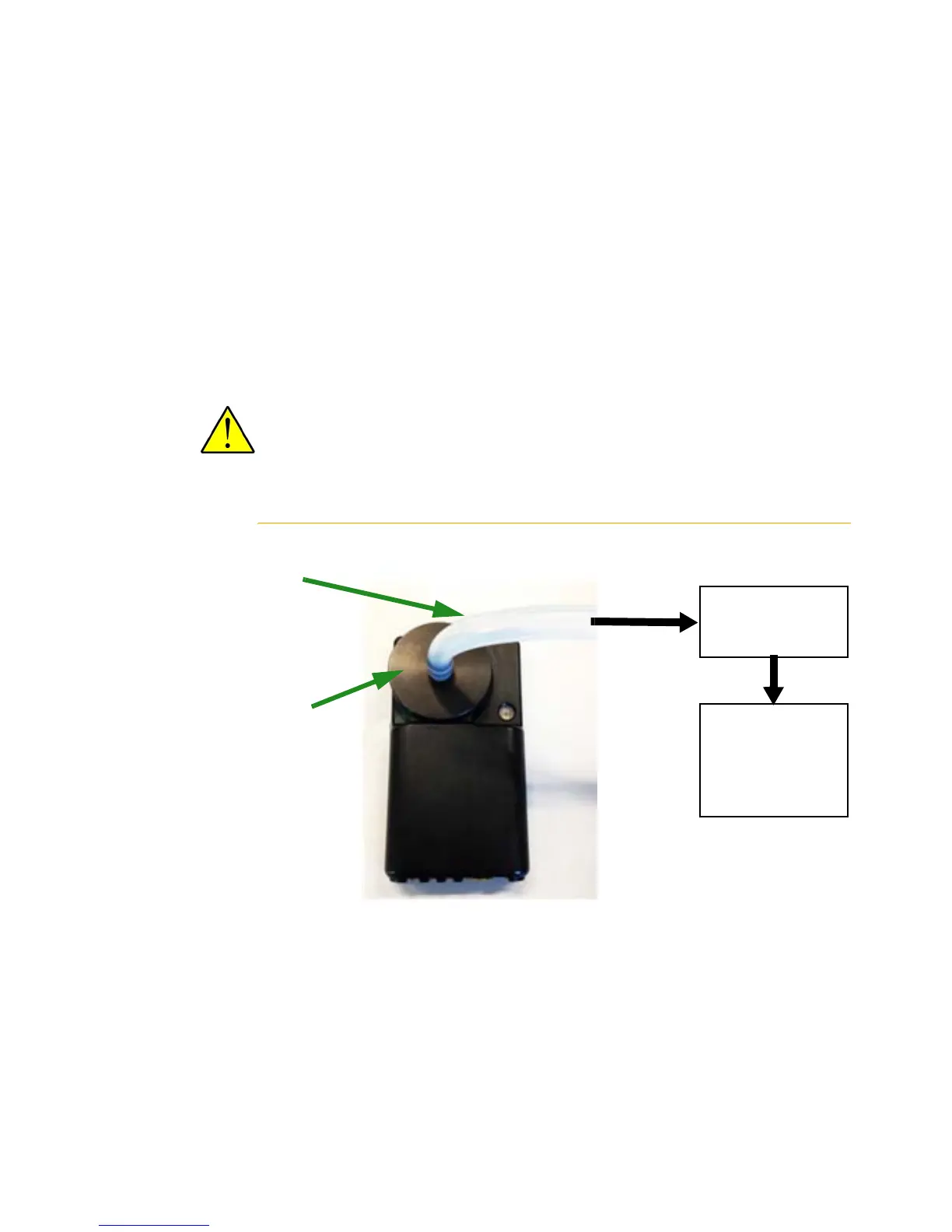
Figure 4 Flow Rate Verification Calibration Train
1/4 inch Tygon tubing
connecting the UPAS to
the Flow Rate meter.
Access Sensor
Technologies Flow Rate
Adapter installed on the
UPAS.
Flow Rate Meter
measuring in LPM
Compare output
measurement to
the 1 LPM
theoretical setting.
Air Flow


 To Next Page