Chapter 3: Tags, IDTAD, & TTS3-20
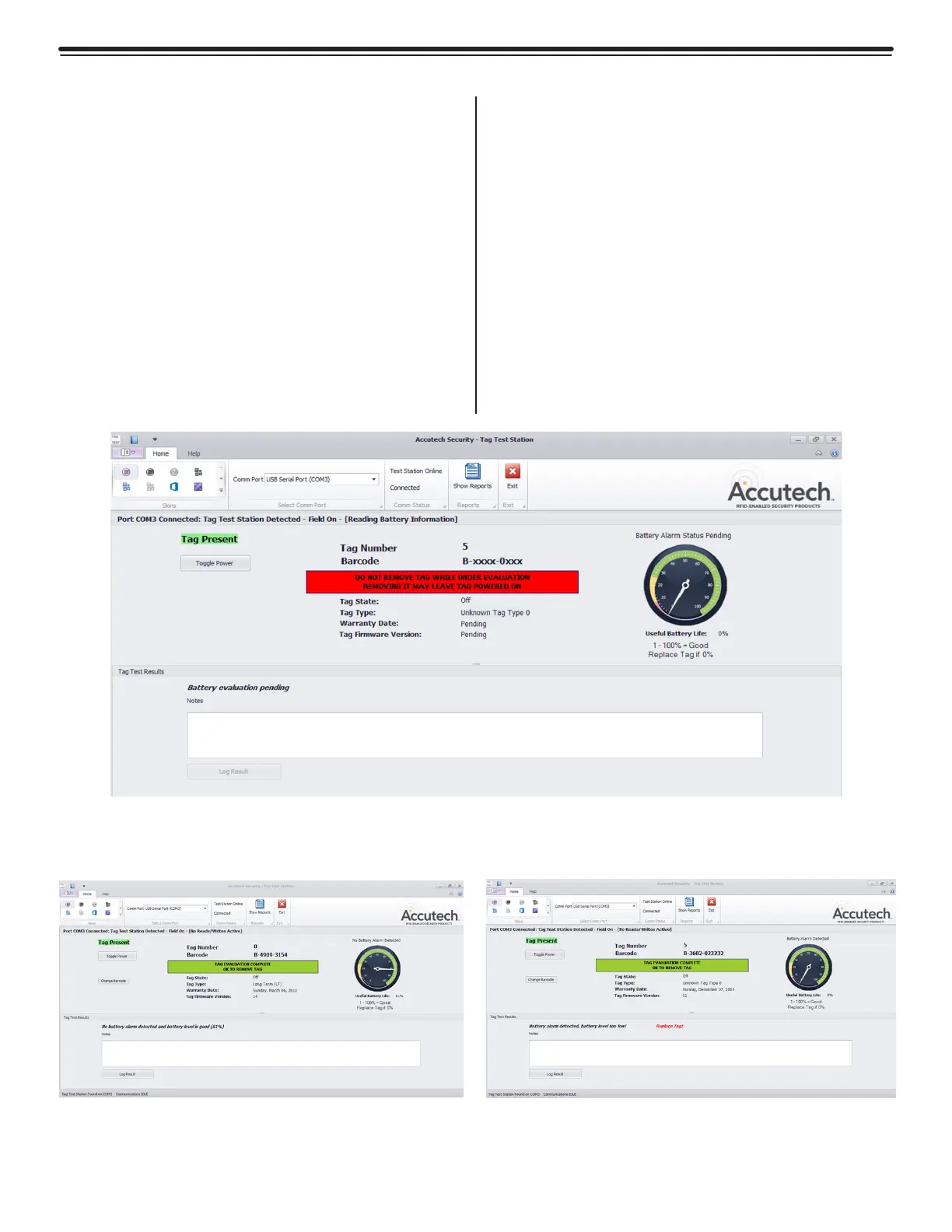
• Tag Number
• Bar Code Number—indicates the
manufacture date. (eg. 4209 indicates week
and year)
• Tag State—whether the tag is in an OFF
or ON state. You can then turn the tag on
for use at this time. Or if the tag is already
on, you can turn the tag off for storage
purposes.
• Tag Type—LT, SB, WW
• Warranty Date
• Battery Level—The software will display
battery flag (figure 3.25). if there is a low
battery. Do not continue to use a tag with
low battery indicated.
TTS Software Data
Once the TTS fully reads the data from the
tag, which will take approx. 25 seconds, the
software (figures 3.23-3.25) will provide:
Figure 3.23
Tag Test Station Software Reading Tag Data
Figure 3.25 - Tag Test Software
Tag Data with Battery Flag
Figure 3.24 - Tag Test Software
Tag Data with No Battery Flag



 To Next Page