SP8026-1909
EVOLUTION ELECTRIC STEAMER
34
OVER-FILL REED SWITCH (Auto-fill only)
1. Unplug Unit & close the supply water
valve.
2. Disconnect the garden hose from
the back of the steamer & drain any
remaining water from the steam
chamber.
3. Remove the Left-Side Panel by removing
the Sheet Metal Screws holding it in
place.
4. Disconnect the REED Switch wires (note
the wire color to its location pin).
5. Turn the unit upside-down and remove
its legs. (Unbolt from stand and then turn
unit upside-down if applicable.)
6. Remove Bottom Cover by removing the
Sheet Metal Screws holding it in place.
(Remove Drain Pan Rails if applicable.)
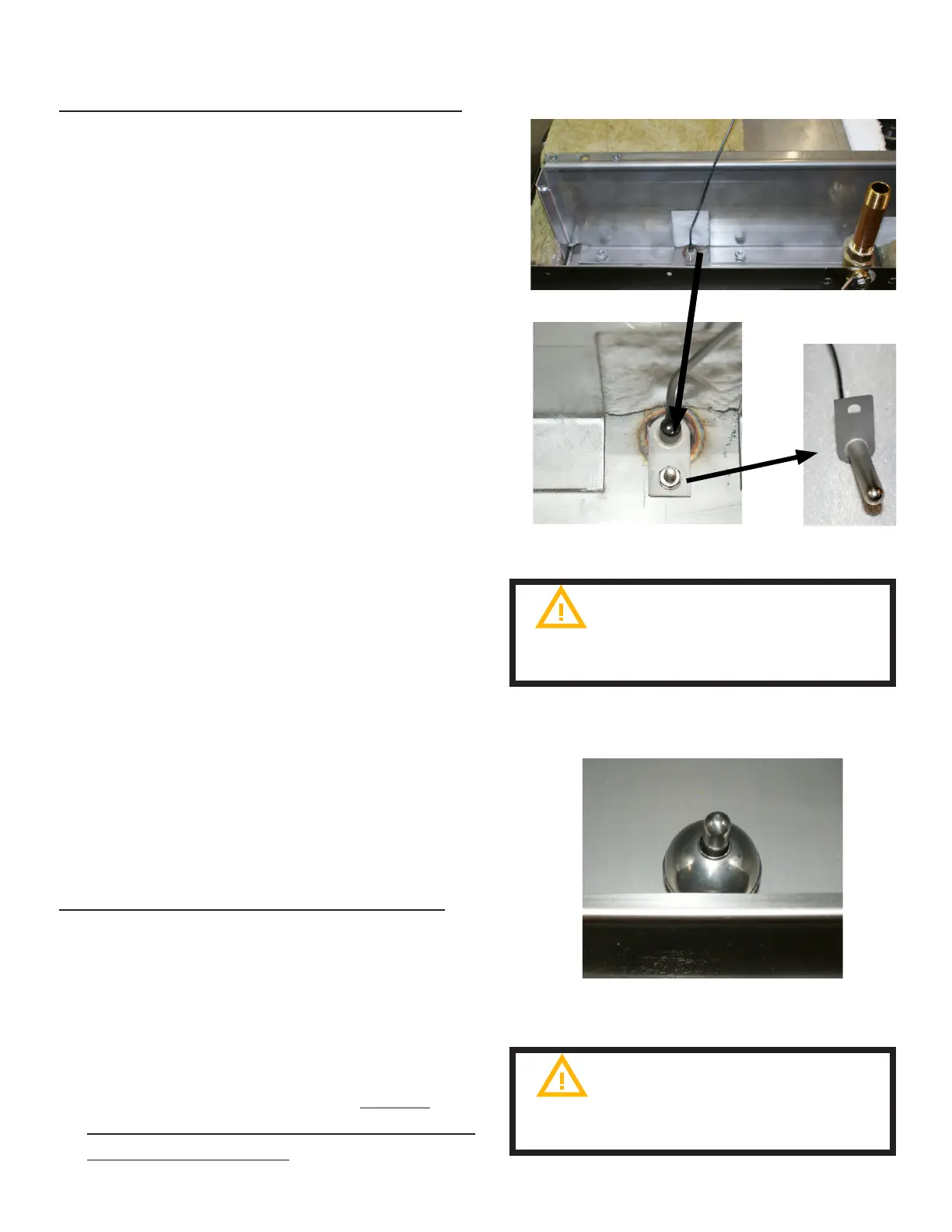
7. Remove the front, insulation pieces that
are laying on-top of the Over-Fill Reed
Switch. (Wire is ran in-between the
insulation pieces.)
8. Remove the retaining nut and lock
washer holding the Reed Switch inside
the Sensor Post.
9. Remove the High Water Reed Switch
(FIG 4.2E).
10. Re-install in reverse order.
MAGNETIC FLOAT BALL (Auto-fill only)
1. Open the steamer door and remove the
left-side pan rail.
2. Lift and remove the steam collection
cover plate.
3. Remove the Float Ball o of the High
Water Reed Switch Sensor Post.
4. Re-install in reverse order. Ensure
Sensor Post & Float Ball hole are clean
before re-installing.
FIG 4.2E
FIG 4.2F
Make sure to route wire through
insulation to avoid heat damage to the
wires
Handle the float ball carefully as
dropping can damage it.


 To Next Page