Getting familiar with your computer6
English
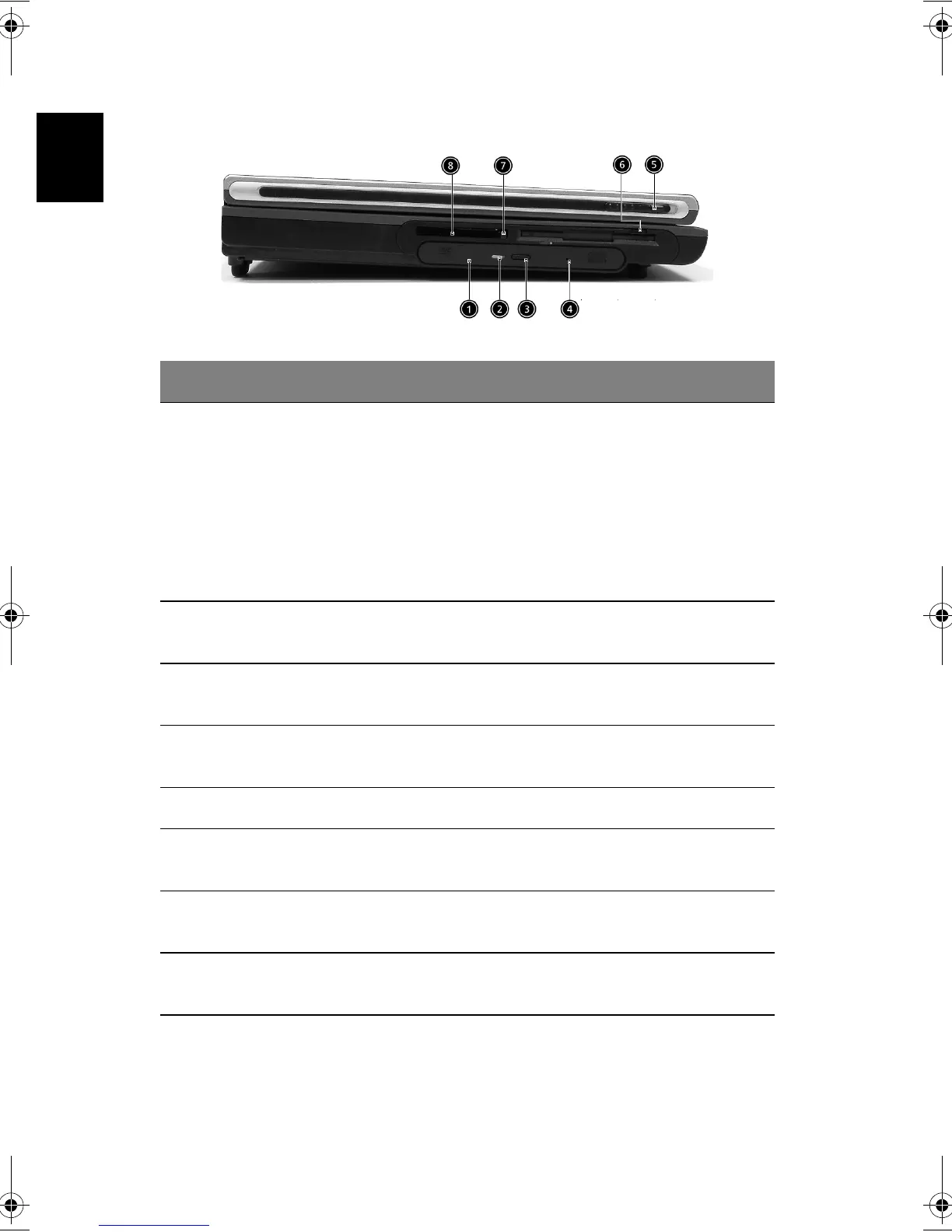
Left view
# Item Description
1 Optical drive Depending on your model, the optical drive
is one of the following:
• CD-ROM drive for reading CDs.
• DVD-ROM drive for reading CDs and
DVDs.
• DVD/CD-RW combo drive for reading
CDs and DVDs, and writing to CD-Rs
and CD-RWs..
2 Optical disc read indicator Light emitting diode (LED) that indicates
when an optical disc is being read.
3 Optical drive eject button Press the eject button to remove a disc from
the optical drive.
4 Optical drive emergency
eject hole
Used to eject an optical disc when the
computer is turned off.
5 Floppy drive Accepts 3.5 inch floppy disk.
6 Left Latch Locks and releases the lid.(One on the right
and one on the left)
7 PC card eject button Press the eject button to remove a PC card
from the PC card slot.
8 PC card slot The slot supports a standard Type II PC card
(PCMCIA).
Bt2811`F/cppl!!Qbhf!7!!Uvftebz-!Nbsdi!22-!3114!!22;5:!BN






 To Next Page