Getting familiar with your computer30
English
Securing your computer
Your computer features hardware and software security solutions, in the form
of a slot for a Kensington lock and a password facility.
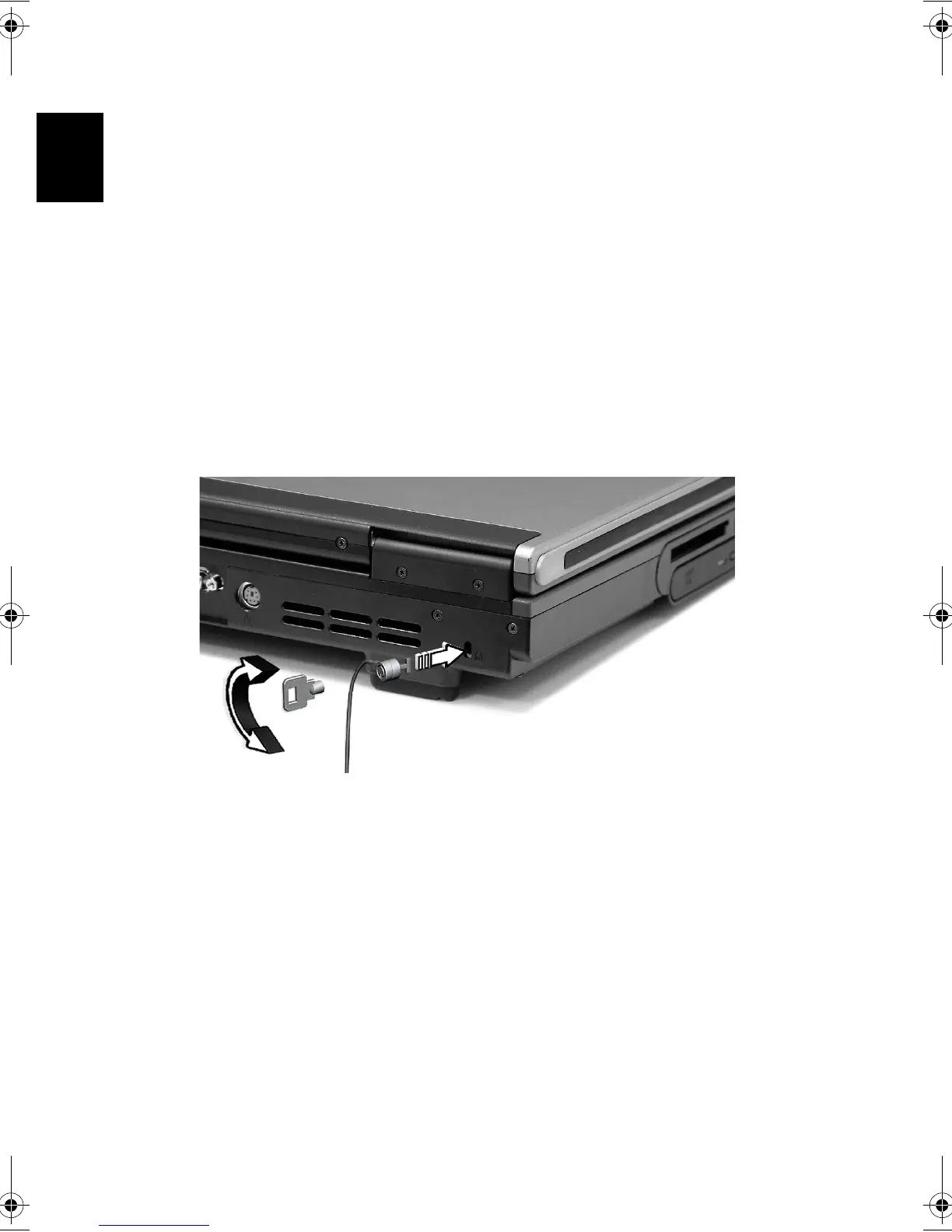
Security slot
A slot for a Kensington slot enables you to physically protect your computer
from theft. Use this feature as follows:
• Wrap a security lock cable around a heavy or immoveable object, such as
a drawer handle on a file cabinet, or a table leg.
• Insert the lock into the slot on the computer, turn it 90°, and then lock it
in place.
Passwords
You can protect your computer from unauthorized access by setting
Windows password protection. The user must enter the password before
beginning a Windows session.
• First, open User Accounts in Windows Control Panel and select your
account.
• Click Create a Password, and then set your desired password.
• Click Performance and Maintenance, Power Options in Control Panel.
Bt2811`F/cppl!!Qbhf!41!!Uvftebz-!Nbsdi!22-!3114!!22;5:!BN









 To Next Page