15
English
English
Keyboard
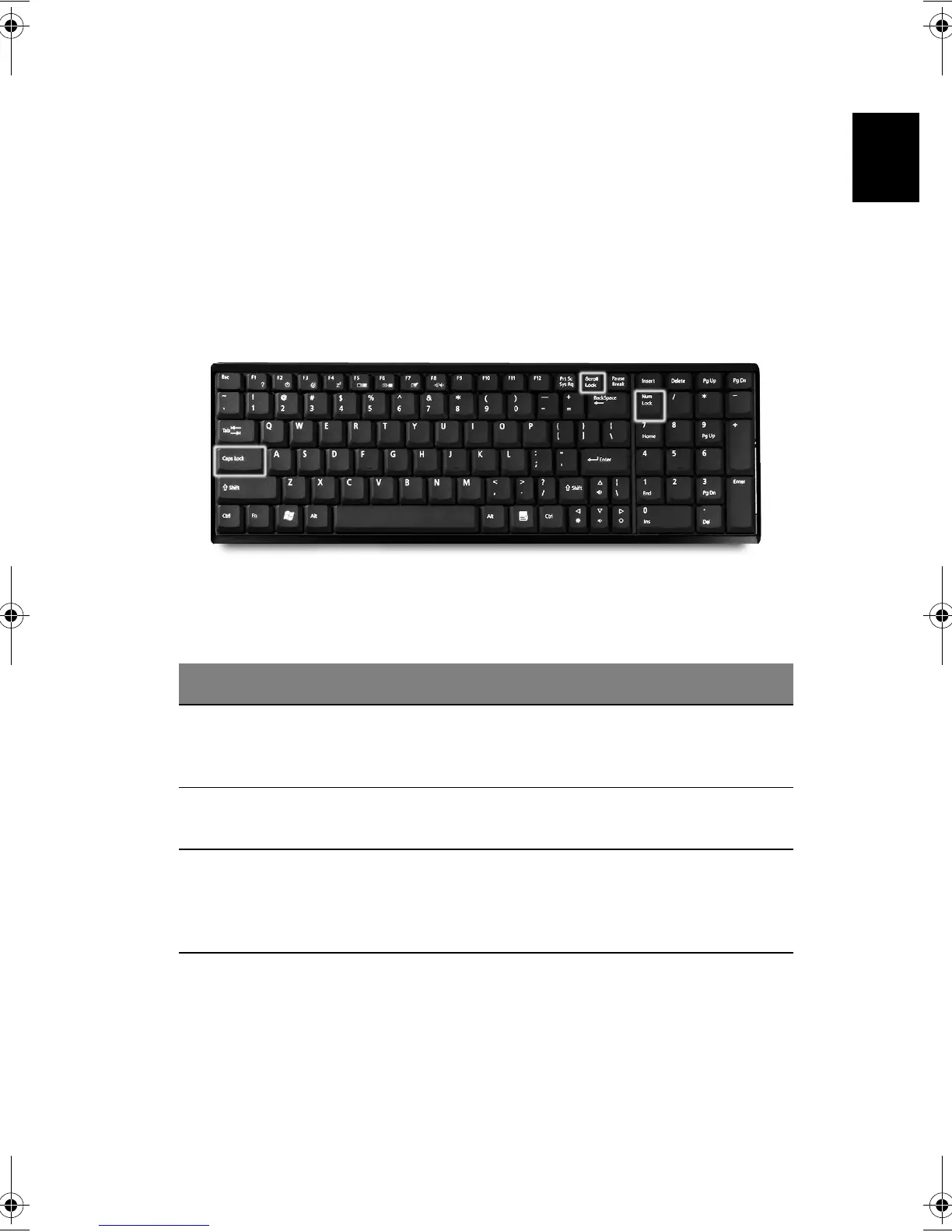
The keyboard features full-size keys with an embedded keypad, separate
cursor control keys, two Windows keys, and twelve function keys (hot keys).
Special keys
Lock keys
The computer features three lock keys, each with its own status indicator
light.
Lock Key Description
Caps Lock When Caps Lock is on, all alphabetic characters are typed in
uppercase. Toggle on and off by pressing the Caps Lock key on the
left side of the keyboard.
Num Lock When Num Lock is on, the embedded numeric keypad can be used.
Toggle on and off by pressing the Num Lock Key.
Scroll Lock When Scroll Lock is on, the screen toggles up or down one line at a
time when the up and down cursor control keys are pressed. Note:
Scroll Lock doesn't work in all applications. Toggle on and off by
pressing the Scrool Lock Key.
Bt2811`F/cppl!!Qbhf!26!!Uvftebz-!Nbsdi!22-!3114!!22;5:!BN









 To Next Page