17
English
English
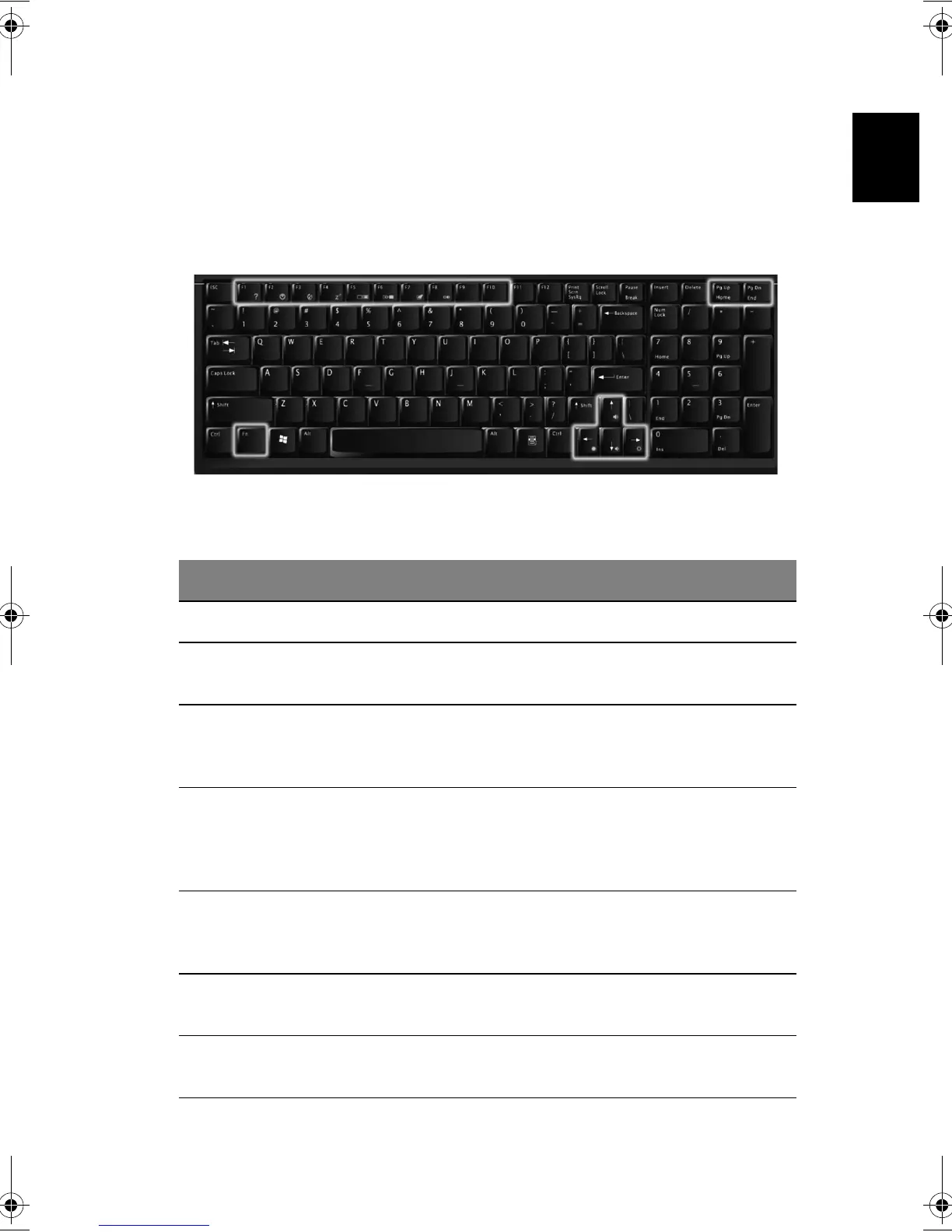
Hotkeys
Using the Fn key with another key creates a hot key, providing a quick and
convenient method for controlling various functions.
To use a hot key, first hold down the Fn key. Next, press the second key in the
combination. Finally, release both keys.
Your computer provides the following hot keys:
HotKey Function
Fn + F1 Hot key help Display this help file
Fn + F2 Device
Manager
Accesses Windows Device Manager
Fn + F3 Power
scheme
toggle
Selects suitable power scheme to the system
Fn + F4 Sleep Puts the computer in Sleep Mode, which can be
defined via the advanced section of the Power
Management Properties in the Windows Control
Panel
Fn + F5 Display
toggle
Switches display output between the system LCD,
an external monitor and both the system LCD and
external monitor.
Fn + F6 Screen blank Turn the LCD backlight off to save power; press
any key to resume
Fn + F7 Touchpad
on/off
Turns the internal touchpad on and off
Bt2811`F/cppl!!Qbhf!28!!Uvftebz-!Nbsdi!22-!3114!!22;5:!BN












 To Next Page