4 Upgrading your computer
68
Upgrading the CPU
Note: Observe the “Installation precautions” on page 47 when
installing or removing a computer component. Also, make sure
that you have removed the computer cover (see
page 49).
To remove the CPU
Before you can replace or upgrade your processor, you need to remove
the previously installed processor on the mainboard.
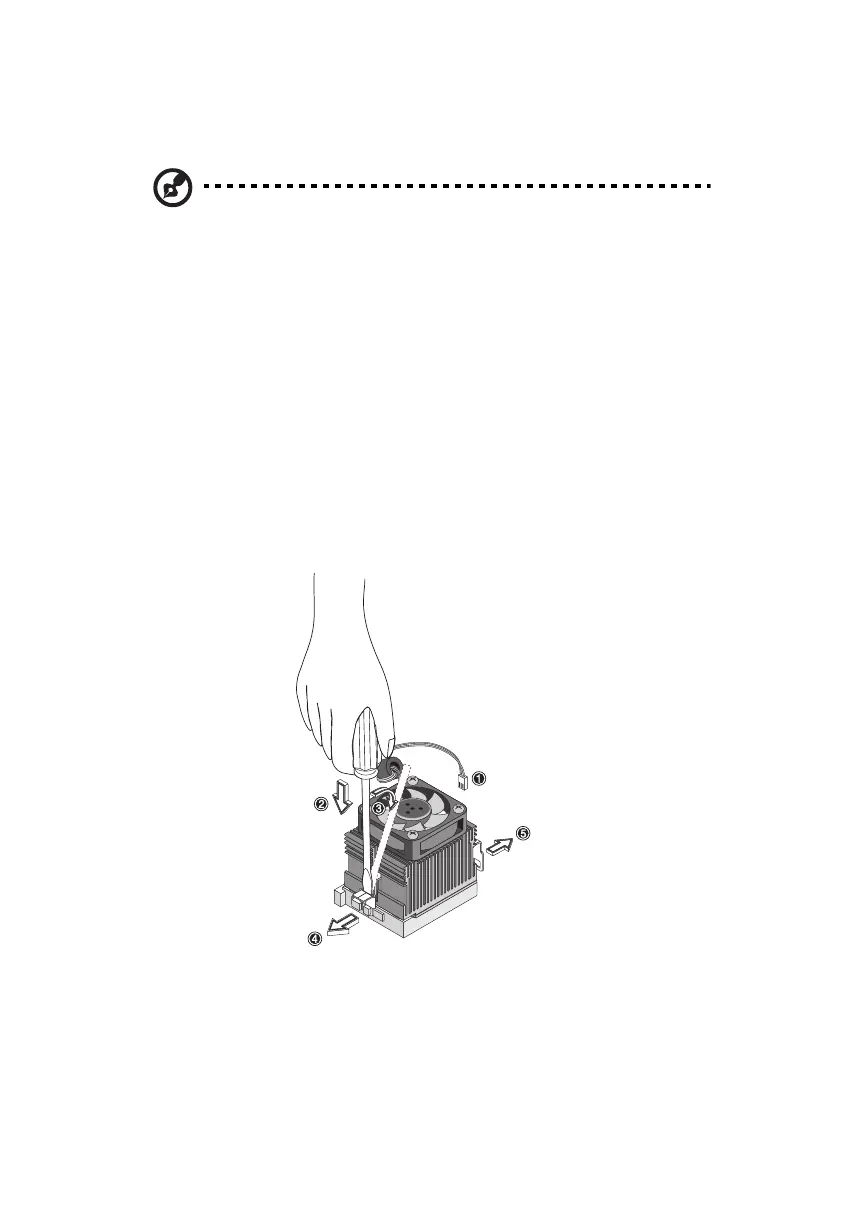
Follow these steps to remove the CPU:
1. On the mainboard, locate the CPU mounted on the socket.
2. Detach the fan/heatsink cable connector. Insert a flat screwdriver
into the fan/heatsink metal bracket, press down and pry the
screwdriver outward to detach the metal bracket from the socket.
3. Remove the fan/heatsink from the CPU.
ver3200AAC-0.book Page 68 Friday, March 2, 2001 3:52 PM












 To Next Page