Your Acer notebook tour - 15
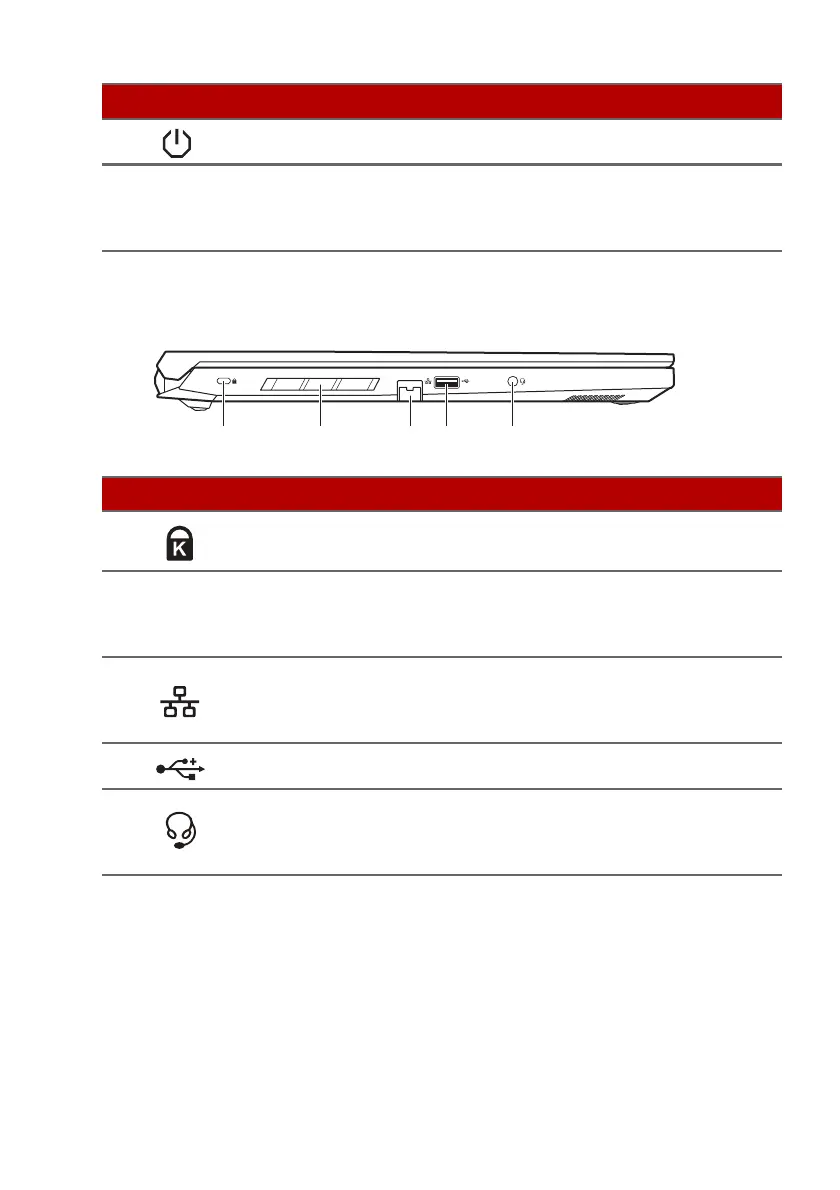
Left view
# Icon Item Description
1
Kensington lock
slot
Connects to a Kensington-
compatible security lock.
2
Ventilation and
cooling fan
Allows the computer to stay cool.
Do not cover or obstruct the
openings.
3
Ethernet (RJ-45)
port
Connects to an Ethernet 10/100/
100
0Mbps/2.5Gbps-based
network.
4
USB port Connects to USB devices.
5
Headset/speaker
jack
Connects to audio devices (e.g.,
spea
kers, headphones) or a
headset with microphone.
USB 3.2 Gen 1 information
• USB 3.2 Gen 1 compatible port(s): blue.
• Compatible with USB 3.2 Gen 1 and earlier devices.
• For optimal performance, use USB 3.2 Gen 1-certified devices.
• Defined by the USB 3.2 Gen 1 specification (SuperSpeed USB).
5
Power button Turns the computer on and off.
6
Ventilation and
cooling fan
Allows the computer to stay cool.
Do not cover or obstruct the
openings.
# Icon Item Description










 To Next Page