42 - NitroSense
Widget cards
Widget cards are always visible on all NitroSense screens by
default. If they are hidden, click the Widget icon .
•In the Scenario Profile tab, you can select your preferred
scenario profile which is differentiated by operating mode,
performance of the fans, and lighting effect. For more detailed
information of available profiles, simply click Details to access
the Scenario Manager.
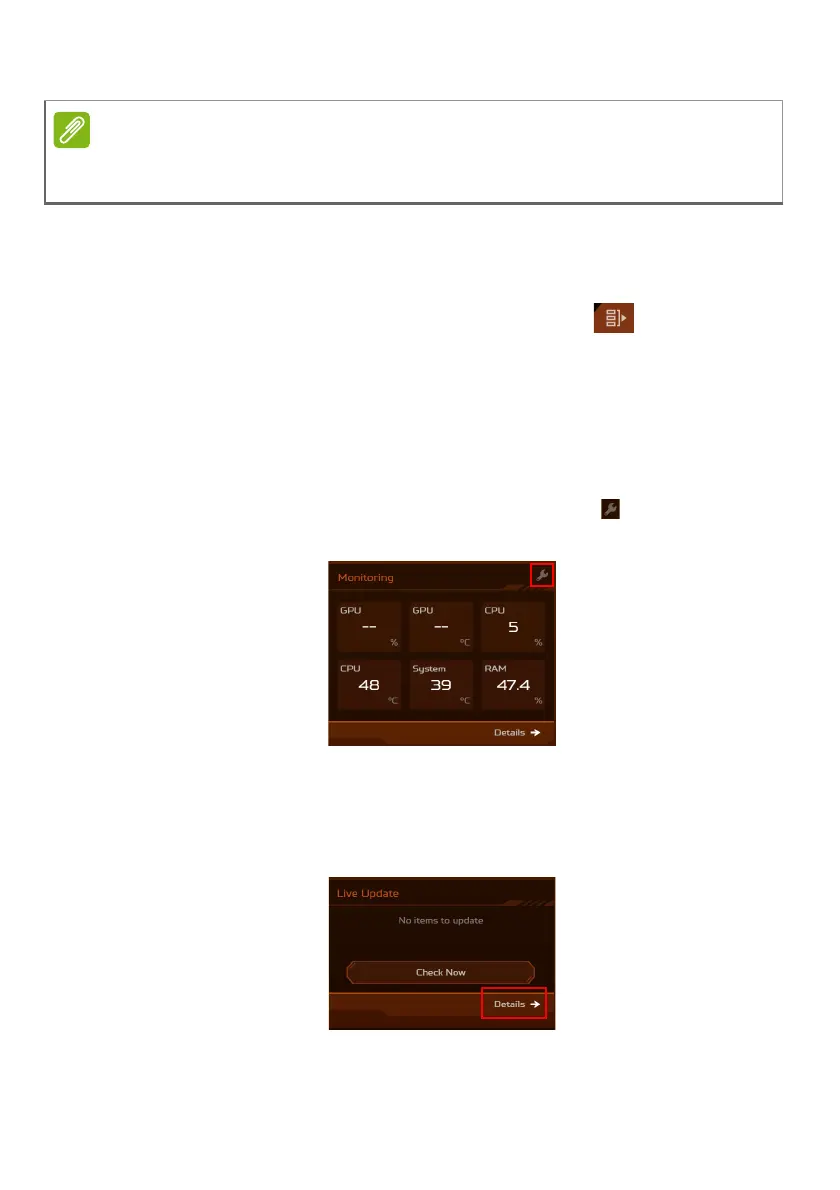
• Under the Monitoring tab, you can view system performance.
To customize the view, click the Adjust icon and select the
items you want to display on the widget.
• Under the Live Update tab, you have the option to manually
check for available updates any time by clicking on the Check
Now button. For more detailed view of available updates,
simply select Details to access the Update List.
The performance parameters and temperatures listed may vary depending
on your computer’s configuration and the power output of the CPU and GPU.



 To Next Page