EasyManua.ls Logo

ACLAS TS5X - Page 28

ACLAS TS5X
70 pages
Print Icon
To Next Page IconTo Next Page
To Previous Page IconTo Previous Page
Loading...
20
4.Click vender Admin
Admin
0.998
0.00
0.00
5.Put Strawberry on the tray
2.002
6.Input the picture of Strawberry on the screen
Strawberry
2.002
3.80
7.61
7.Click vender Admin
Admin
2.002
0.00
0.00
8.Click vender Admin again
Admin
9.Click to print the receipt
10.30
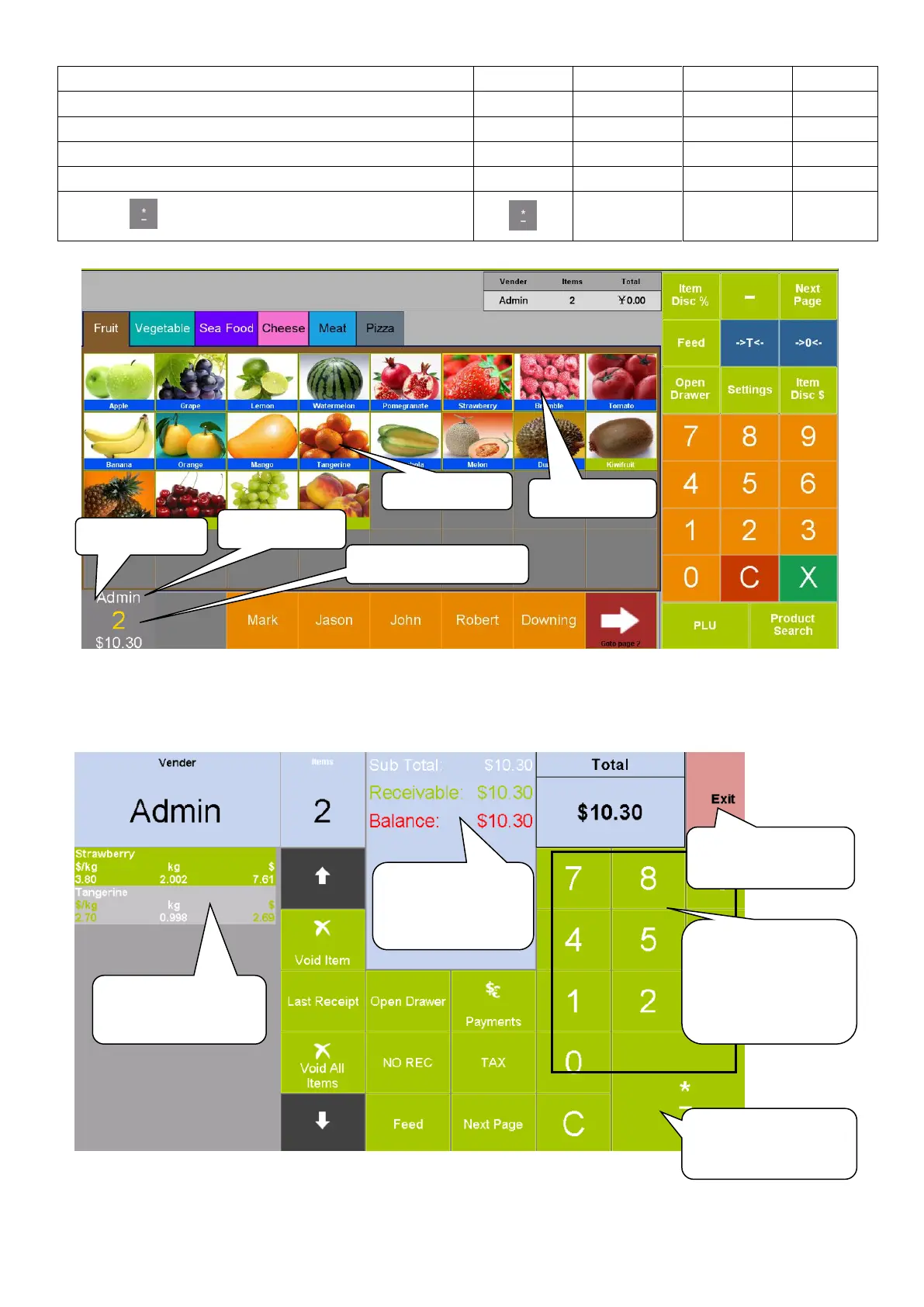
When you click vender Admin, the items is added. When you click Admin again after all the items are
added, the system will switch to the interface of setting accounts. As shown in the following picture:
2. Click here
4. Click here
1. Click here
3. Click here
5. Click here again
You can see the
sales details here
You can see the
payment details
here
You can input the
number of bill that
was paid in this
numerical key
Click here to print
the receipt
Click here to exit
this interface

Table of Contents

Related product manuals