3. Calibration
You need to calibrate the instrument regularly before you start taking measurements.
There are two types of calibration. One is the way using the internal generator, the other is the
way using the pistonphone. Note that calibration is disabled when “Peak measurement” is
selected.
3-1 Calibration using internal generator
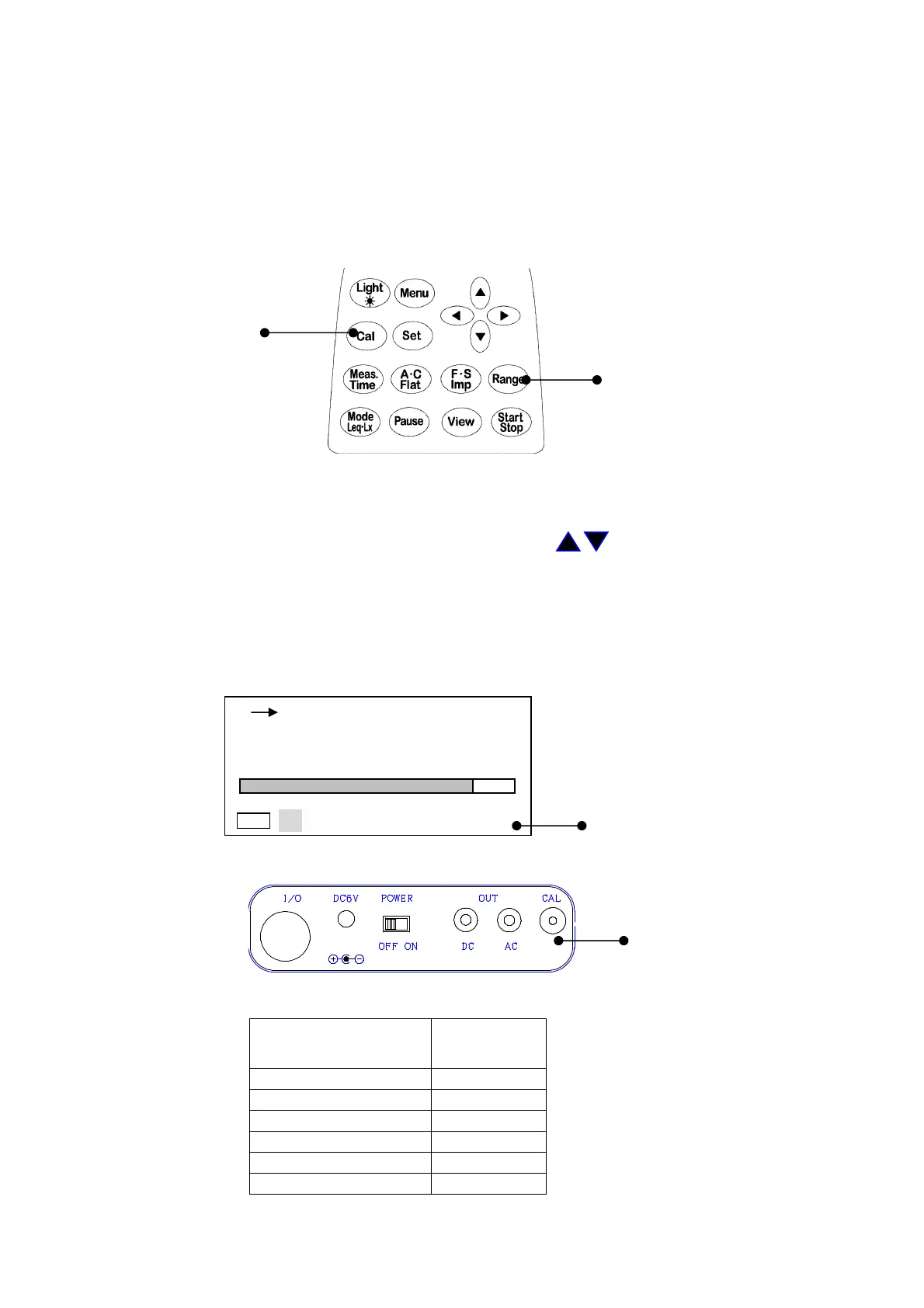
You can calibrate the instrument using the internal generator (1kHz, sine wave)
Cal key
Range key
1) Turn on the POWER switch and check basic setting is
Manu.
When peak is on display,
change it to
Manu
mode (to change the setting ,see page P.23〈Display〉).
2) Press
Cal
key.
3) Press Range key, and choose ‘100dB’ by cursor keys , and press Range key again to
register.
4) Adjust the calibration potentiometer on the side panel until the display shows 94.0dB.
5) If
Cal
key is pressed once again, the calibration is completed.
< Calibration display >
By switching the Rang key,
the figure of 100 blinks.
< Side panel >
Calibration potentiometer
< Reference>
Full scale range and Cal(the display shows)
Full scale Range
(dB)
CAL
(dB)
80 74.0
00h 000h00m00s
FAST
L
A
dB
20 100
Cal
94.0



 To Next Page