©2018 ACP, Inc.
Cedar Rapids, IA 52404 Page 40 of 80
Part No. 16400033
Original Instructions
Service Test Mode
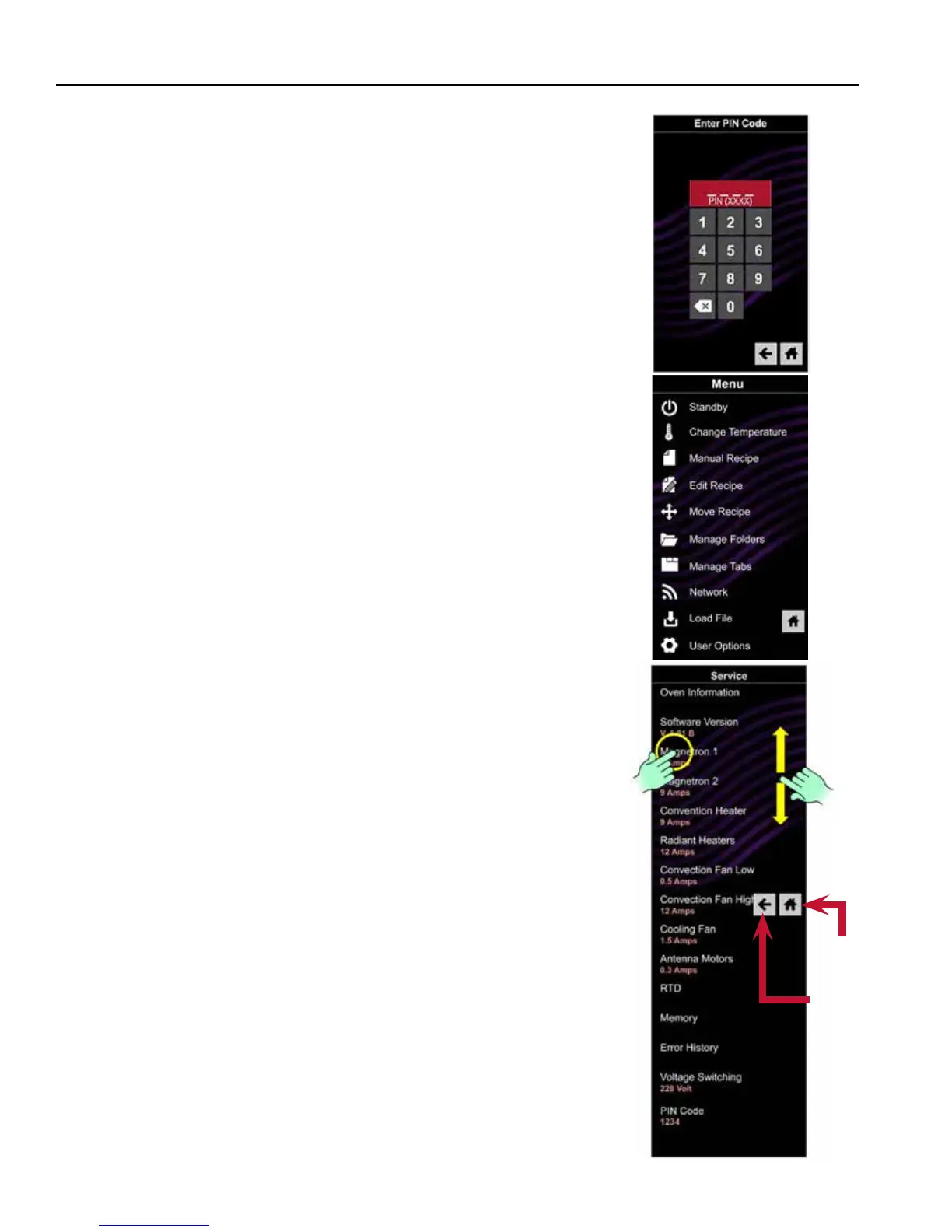
7. Press the Blue Menu Icon and the PIN Code prompt will display.
8. Enter, in order, 1, 3, 5, 7, 9 and the Service Mode is initiated.
Once the Service Mode is initiated a menu of options and
information is displayed. The Menu Screen can be navigated by
swiping up or down if needed.
Some components can be activated from this Menu – See example
of Magnetron 1, by pressing Start to start or Stop to stop. Pressing
the Back Arrow Icon will return back one screen. Pressing the Home
Icon returns to opening screen.
7
Home
Back
(Left)
Arrow
Swipe
Press





 To Next Page