©2018 ACP, Inc.
Cedar Rapids, IA 52404 Page 45 of 80
Part No. 16400033
Original Instructions
Error Codes
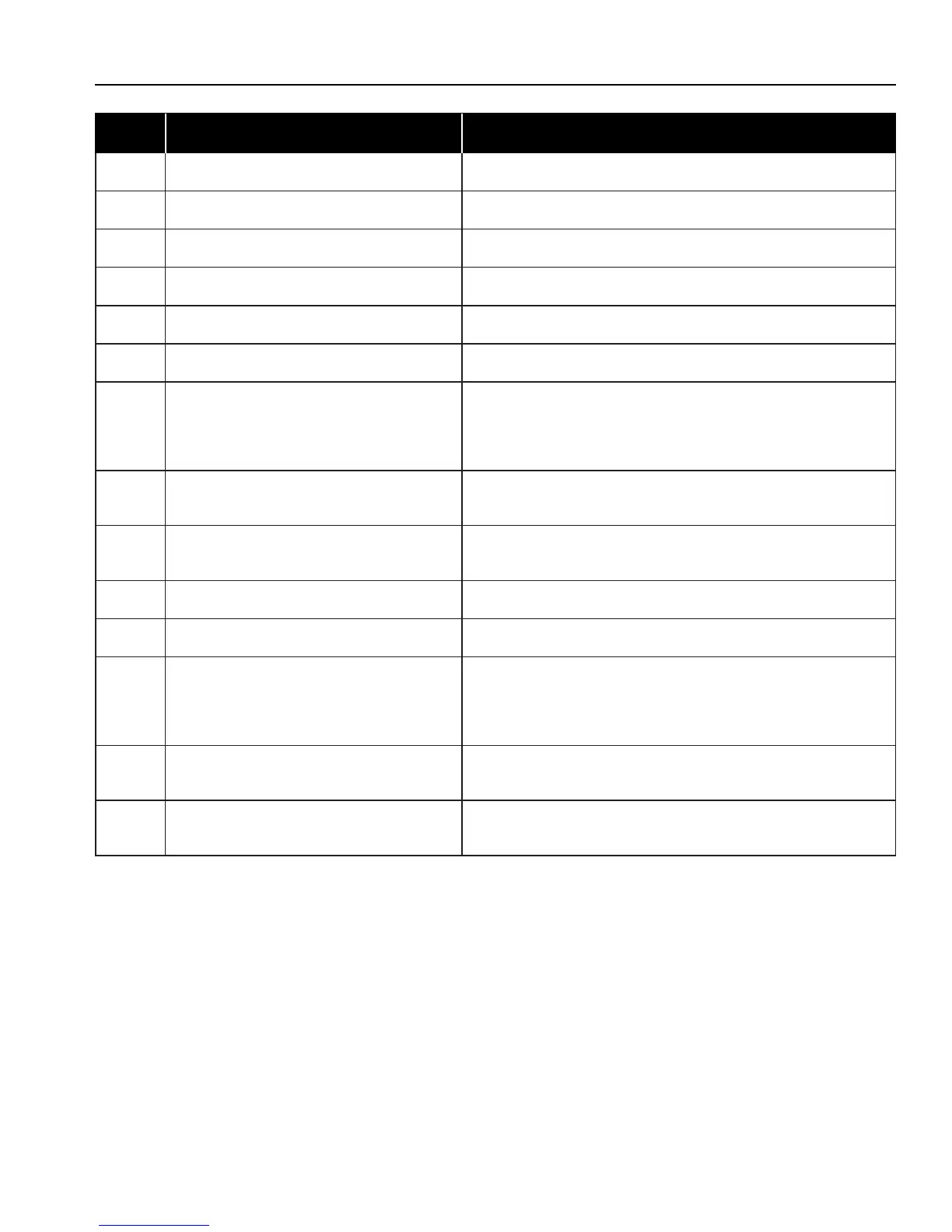
Code Description Corrective Action
A2 Invalid Display Firmware Update Firmware or Replace Touch Control
B1 Touch Screen Error Replace Touch Control
B2 Wi-Fi Error Reset Touch Control. If continued failure, replace Touch Control
B3 Wi-Fi Error Reset Touch Control. If continued failure, replace Touch Control
D0 Convection Temp Sensor (RTD)-Open Replace Temp Sensor (Top Left of Oven)
D1 Convection Temp Sensor (RTD)-Shorted Replace Temp Sensor (Top Left Oven)
G0 Oven Exceeded Max. or Min. Temperature After oven cools, press the Oven Thermal Cutout’s reset button
found on the back, right-hand bottom corner of oven. If unable to
reset, replace the Oven Thermal Cutout.
NOTE: Cutout may trip if subjected to sub-freezing temperatures
G2 Open Magnetron TCO Board Senses an Open Magnetron TCO. Inspect Cooling Fans
operation and airow, TCO’s and Wiring.
H0 Zero Cross Failure No or Intermittent Voltage at J1 Connector on Main Control. Test
Main Control and wiring. Repair or replace as needed.
H2 Invalid System State Test Main Control Board and replace as needed.
H3 Invalid EEPROM/FLASH Test Main Control Board and replace as needed.
I1 Current Sense-No/Low Amps from
Microwave Circuit
Perform Service Test (Magnetron #1 & #2).
Test Door Switches are activating. Check for weak door hinges.
Correct as needed. Adjust Secondary/Monitor Switch assembly for
correct actuation.
V0 Low Voltage <188VAC Detected by the Main Control Board. Check and correct
incoming voltage.
V1 High Voltage >263VAC Detected by the Main Control Board. Check and correct
incoming voltage.
Important Note: Error Code History cannot be cleared. Oldest codes will automatically be deleted when the history log is full.





 To Next Page