4-18
4.2 Operation and features SPM-32A ... SPM-36A
4.2.1.2 Wideband measurements
To set the instrument to measure levels with the wideband
receiver:
• Select the input and the input impedance:
Use the keys in the group marked "Z/Ω" and the shift key:
[*] [1], [*] [2] or [*] [3]
---> (see section 4.2.2 on page 4-22)
• Select the wideband receiver by pressing [WIDE].
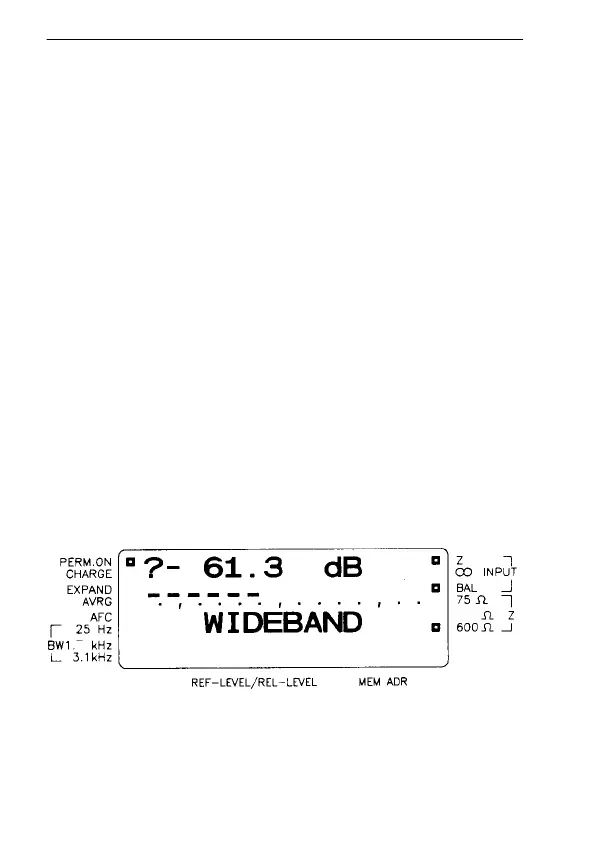
"WIDEBAND" appears in the 3rd row of the display.
• Select absolute voltage level/power, level difference or
level in dBm0:
Use [ABS], [ABS-REF] or [dBm0]
--->(see section 4.2.5 on page 4-46)
• If necessary, select expanded bargraph and the
averaging facility:
Use the keys in the group marked "SCALE": [*] [7] or
[*] [8]
---> (see section 4.2.6 on page 4-56)
Reading the display in wideband mode
Fig. 4-2 Wideband mode display; the "?" in row A indicates that
the input level is too low (in this case the input is open-
circuited)
150
74



 To Next Page