21
Chapter 4 Configuring Wireless Settings
4HISGENERATESTHEh7IRELESS!DVANCED3ETTINGSvSCREEN)NTHISSCREENTHESECURITYOF
the wireless network can be activated and fortified.
Wireless Security
4HEFIRSTSECTIONOFTHE7IRELESS!DVANCED3ETTINGSSCREENINVOLVESWIRELESSSECURITY
(securing wireless traffic as it transmits through the air). The Gateway offers three
TYPESOFWIRELESSSECURITY7%07%0XAND70!
WEP
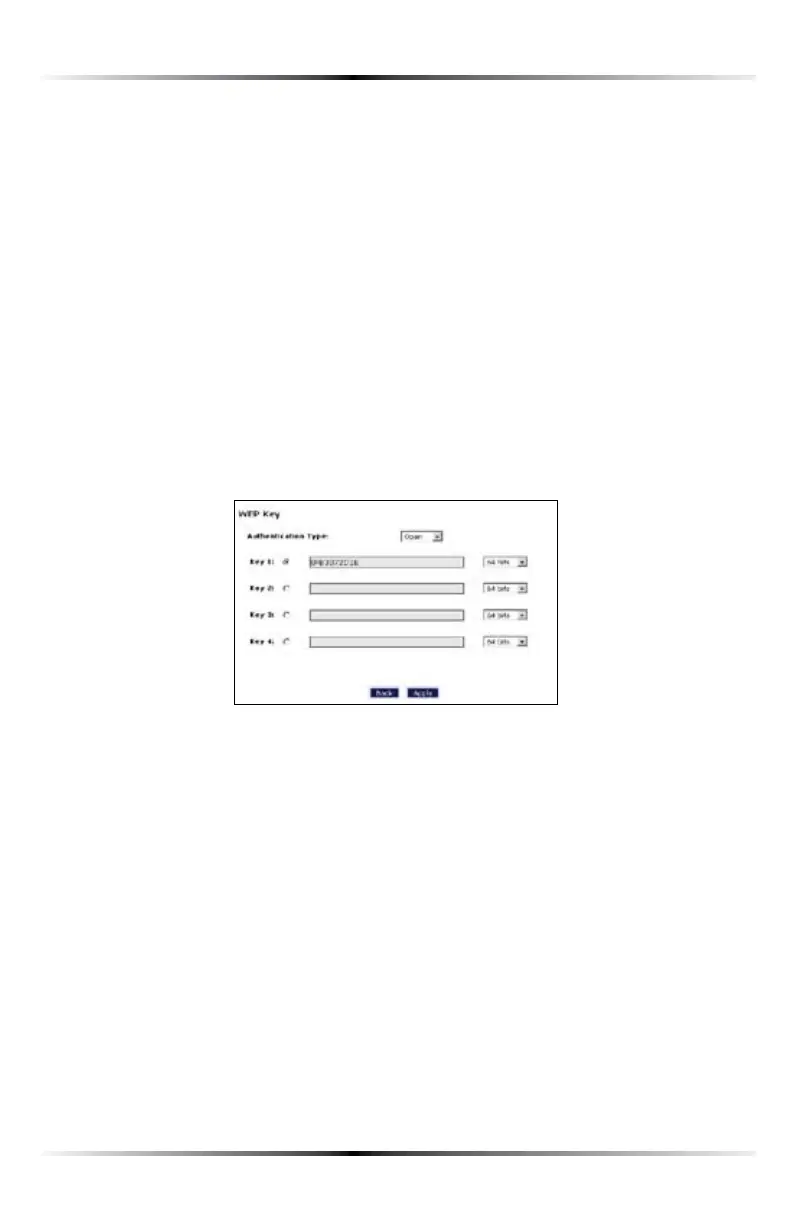
Selecting WEP INTHE7IRELESS!DVANCED3ETTINGSSCREENGENERATESTHEhWEP +EYv
screen. Here, the authentication type, encryption level, and WEP keys are entered
to activate WEP (Wired Equivalent Privacy) security encryption for the wireless
network.
Authentication Type - There are three authentication types: Open, Shared, and
Both. Open authenticaton allows any wireless-enabled device to recognize the
network, even if the WEP key is invalid. Shared allows only wireless-enabled
devices with the correct WEP key to recognize the network.
64-bit WEP - 64-bit WEP requires one or more keys, each key comprising five hexa-
decimal pairs. One key (Key 1) is automatically generated by the Gateway at start-
up, based on the Gateway’s -!#address. This key is also displayed on a sticker on
THEBOTTOMOFTHE'ATEWAY!HEXADECIMALDIGITCONSISTSOFANALPHANUMERICCHAR-
acter ranging from 0-9 or !&!NEXAMPLEOFA64-bit WEP key is: 4%!-D-68-72.
To create a new set of 64-bit WEP keys, activate one or more keys by clicking in the
appropriate circles, then enter five hexadecimal digit pairs in each activated Key
text box (Key 1-, Key 2-, Key 3-, Key 4-!FTERACTIVATING64-bit WEP, a computer
with wireless capability can join the network only if these same keys are entered in
the computer’s wireless encryption scheme.



 To Next Page