23
Chatper 2 - Connections
www.adcom.com
GFR-700HD Owner’s Manual
Speaker Placement
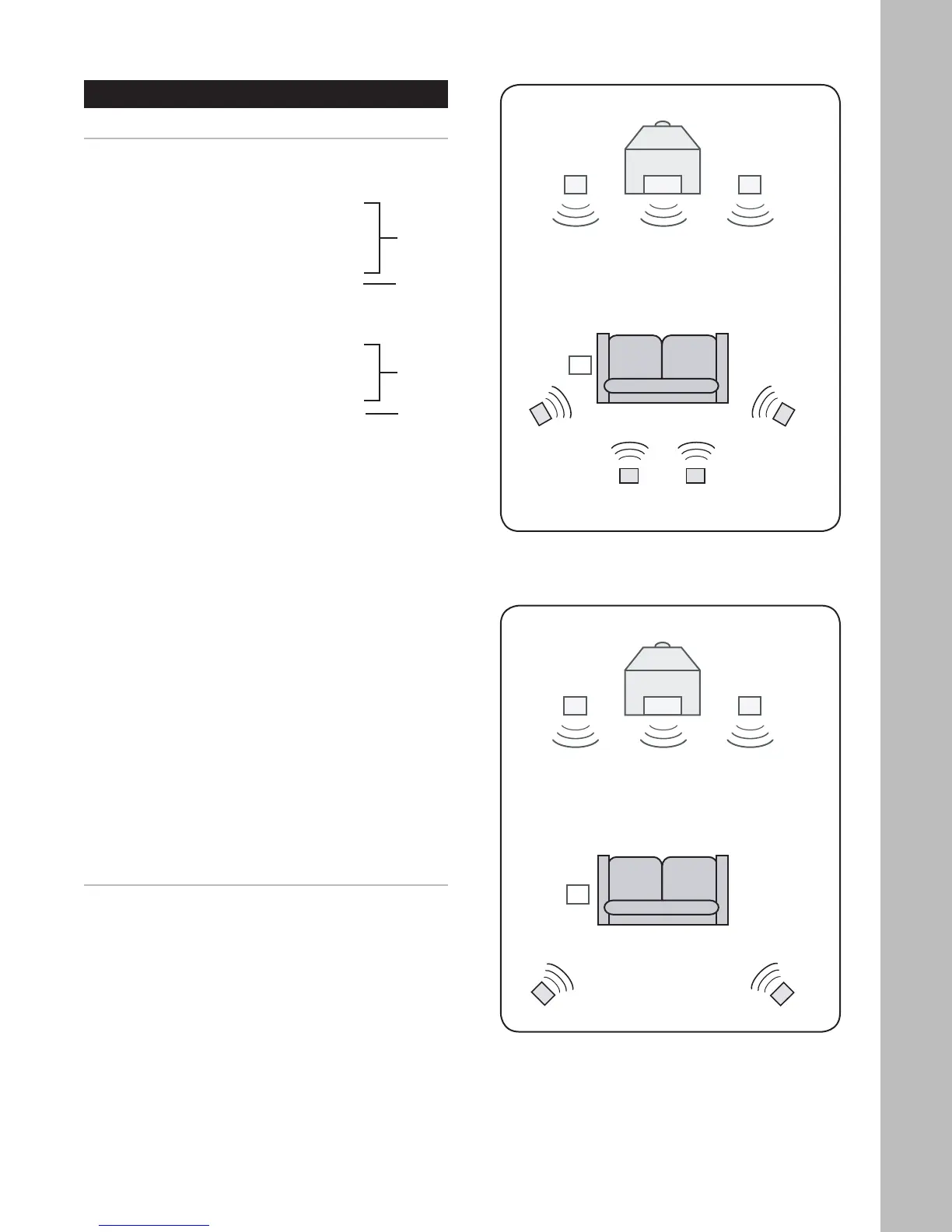
Placing your Speakers
To enjoy the full effect of your home theater system,
it is recommended that you connect a complete set
of 7.1-channel surround sound speakers, including:
• Front Speakers (LF/RF)
• Center Speaker (C)
• Surround Speakers (LS/RS)
• Surround Back Speakers (LB/RB)
• Subwoofer (S)
If that’s not possible, the next best thing is a 5.1-
channel setup, including:
• Front Speakers (LF/RF)
• Center Speaker (C)
• Surround Speakers (LS/RS)
• Subwoofer (S)
Refer to the diagrams at right for approximate place
-
ment of your speakers within each of these scenar-
ios.
While the above arrangements are ideal, the system
is flexible enough to accommodate virtually any com
-
bination of speakers, with the minimum setup being
two front speakers.
Notes:
• The best speaker placement for your particular room
will depend on its size, furnishings, seating arrange-
ment, and the acoustical properties of the space,
including wall type, coverings, and various other
factors.
• You will have to experiment with various placement
options to determine the best configuration for your
specific situation.
• If space permits, install surrounds 2-3 feet above
viewers to minimize localization effects.
5.1 Speaker Placement
7.1 Speaker Placement
7
.1
5
.1



 To Next Page