26
Chatper 2 - Connections
GFR-700HD Owner’s Manual
Video Recorder Connections
It’s not always about playback. Sometimes you want
to record, and these days that means DVD recorders,
HDD recorders, and PVRs (such as TiVo®), in addition
to the old standby, the VCR.
Once you’ve connected a dual playback/record de
-
vice to the Video 3 or Video 4 inputs (see page 15),
follow these steps to connect the GFR-700HD back
out to the device for record capability.
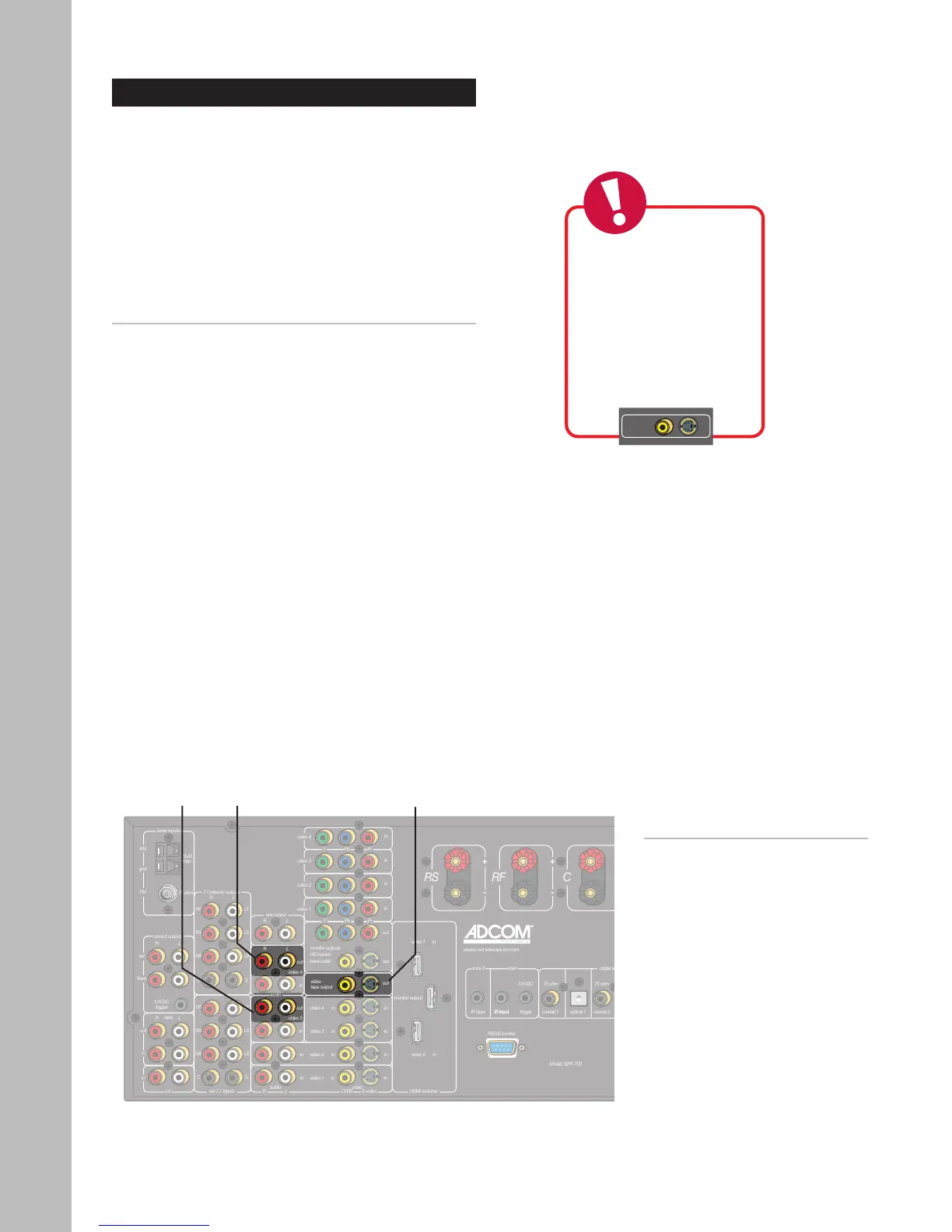
Connecting a Video Recorder
1 Connect video.
• Using a video cable, connect the Video Tape
output on the GFR-700HD to the video input
on your video recorder.
• For higher quality video, use an S-video ca
-
ble to connect to your video recorder.
2 Connect audio.
• Using RCA cables, connect the Video 3 or
Video 4 audio outputs on the GFR-700HD to
the audio inputs on your video recorder.
• Choose Video 3 or Video 4 depending on
which input your recorder is connected to.
• If you have two video recording devices con-
nected, you can use the Aux output for audio
recording.
Notes:
• For tips on recording, see page
59.
Video Tape
Output
Audio
Output
(Video 4)
Audio
Output
(Video 3)



 To Next Page