9
5 OPERATION
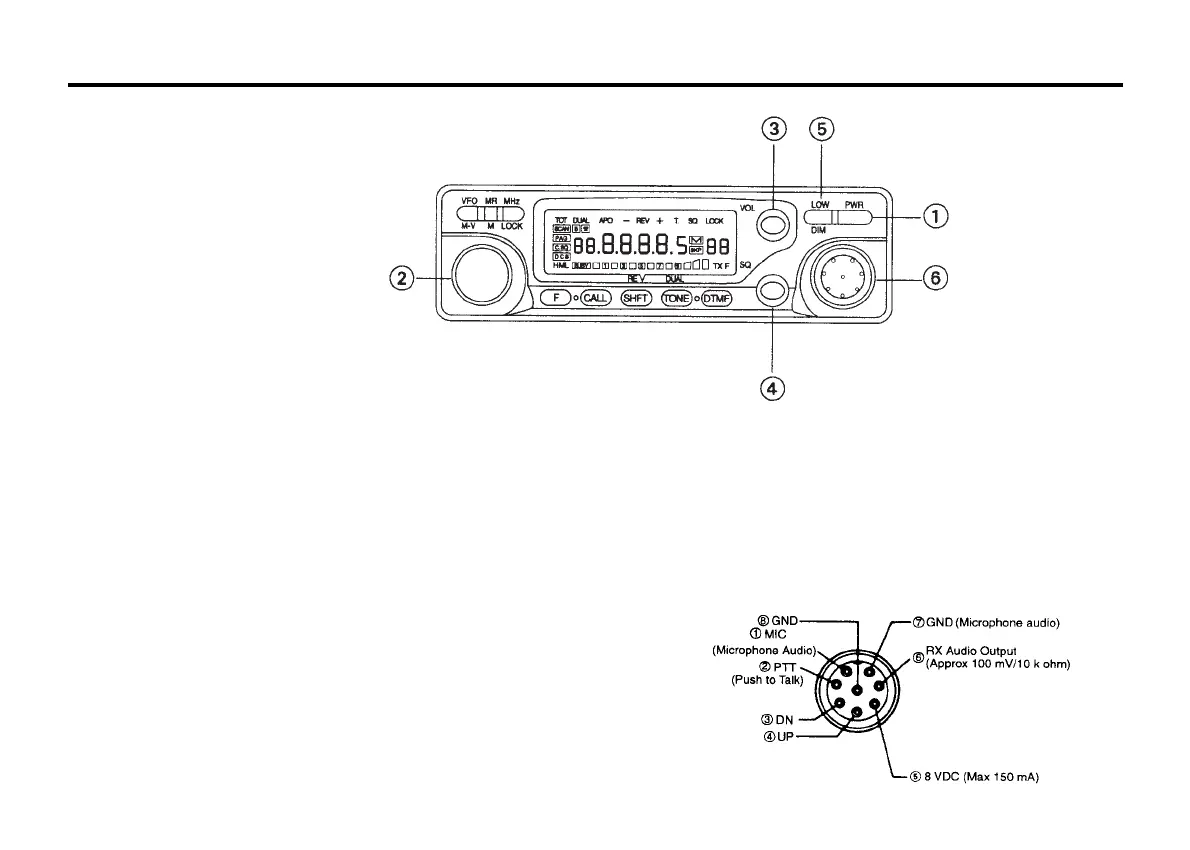
5-1-1 CONTROL FUNCTIONS
POWER switch
Press to turn the transceiver on or off.
Press the VFO/MV or MR/M key and switching the power on will
reset the VFO or MEMORY.
Tuning control
This control is used to select the desired transmit/receive
frequency, MHz step, memory channel, frequency step, tone
frequency, scan direction, etc.
VOL control
This control is used to adjust the volume from the internal and
external speaker (if used). Clockwise rotation will increase the
volume and counterclockwise rotation will decrease the volume.
SQ(Squelch) control
This control is used to select the desired squelch threshold level.
LOW/DIM key
LOW
This function is used to select the transmit output power level (HI,
MID or LOW)
DIM
This function is used to select the intensity of the front panel
display illumination.
Pressing the F key for longer than 1 second and then press the
LOW/DIM key while the F indicator is flashing will turn the time-out
timer function on and off.
Microphone connector
Attach the supplied microphone to this connector. The pin out of
the connector is shown in the accompanying illustration.



 To Next Page