24
MIDI OPERATION
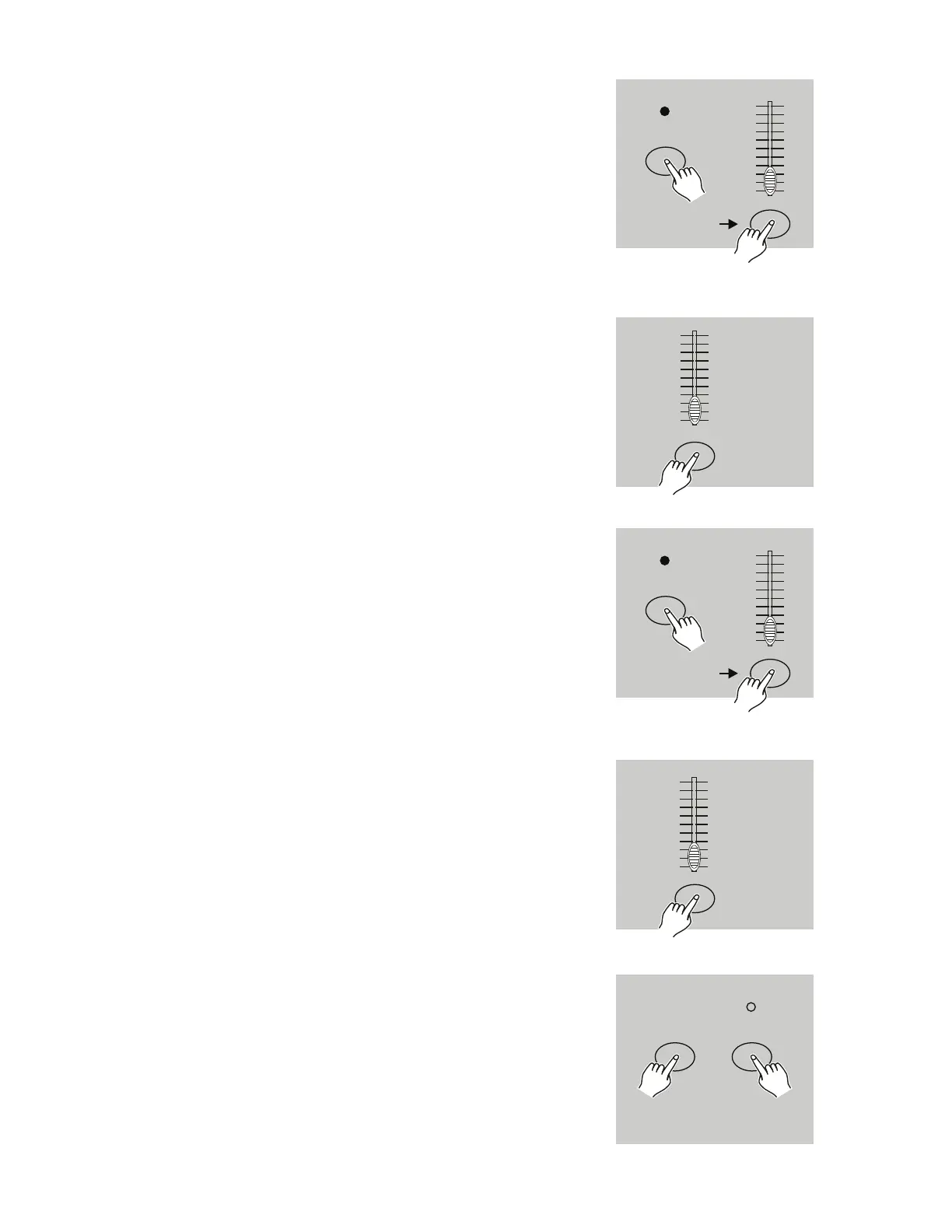
1. Tap the Flash button 1 three times while holding down
the Record button. The segment display should read
“CHI”, indicating that MIDI IN channel setup is avail-
able.
2. Tap the Flash button numbered from 1-16 to set a MIDI
IN channel. The relevant channel LED will illuminate to
indicate that the MIDI IN channel has been set.
1. SETTING MIDI IN
RECORD
Flash button 1
Tap this button
three times
10
8
6
4
2
0
10
8
6
4
2
0
Flash buttons
1-16
10
8
6
4
2
0
10
8
6
4
2
0
1. Tap the Flash button 2 three times while holding down
the Record button. The segment display should read
“CHO”, indicating that MIDI OUT channel setup is avail-
able.
2. Tap the Flash button numbered from 1-16 to set a MIDI
OUT channel. The relevant channel LED will illuminate
to indicate that the MIDI OUT channel has been set.
2. SETTING MIDI OUT
RECORD
Flash button 2
Tap this button
three times
10
8
6
4
2
0
10
8
6
4
2
0
Flash buttons
1-16
10
8
6
4
2
0
10
8
6
4
2
0
Press and hold down the Record button. While holding
down the Record button, tap the Rec Exit button to exit
MIDI setting.
3. EXIT MIDI SETTING
RECORD
REC
EXIT


 To Next Page