INSTALLATION
17
[5]
[6]
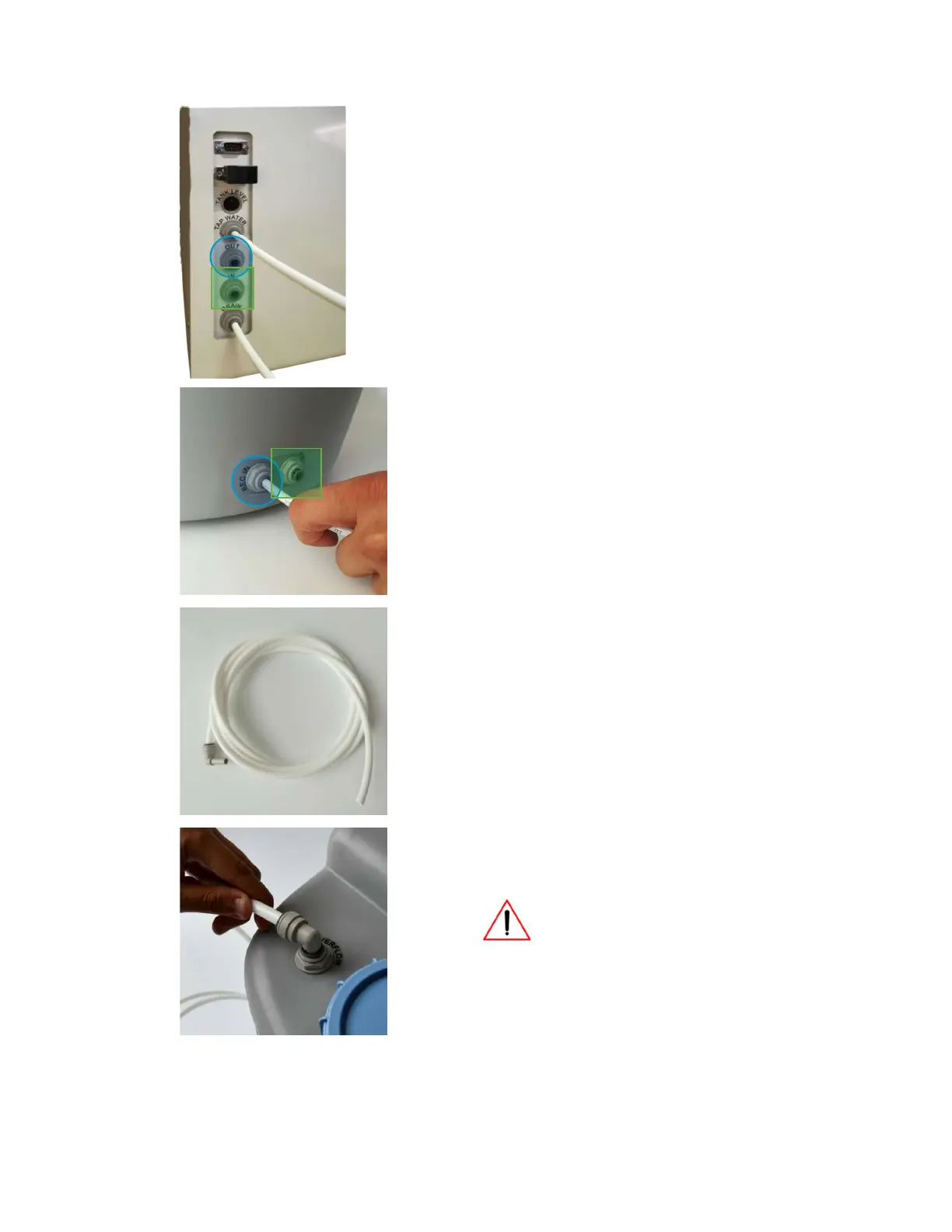
The next step is tank connection to the system:
1 – locate IN and OUT connections on the Q-
Front lower left side of the side panel [pic.
5];
2 – locate REC IN and REC OUT connections
on the tank’s rear panel [pic. 6];
3 – use two 1/4” JG plastic tubes for
connection [pic. 2];
4 – connect IN on Q-Front system [pic. 5] with
REC OUT on the tank [pic. 6] (marked with
GREEN square);
5 – connect OUT on Q-Front system [pic. 5]
with REC IN on the tank [pic. 6] (marked
with BLUE circle)
[7]
Locate 3/8” JG tube with JG elbow adapter
[8]
Connect OVERFLOW port of the tank to the drain
using the 3/8” JG tube with JG elbow adapter
(3/8”)
When installing the tank, connect the
fitting marked “OVERFLOW” to the
drain. Make sure that the drain level is
lower than the OVERFLOW fitting level. This will
prevent water leakage in case of tank level
sensor failure.



 To Next Page