587
Advanced Diagnostics USA Manual for MVP & TCODE PRO – Copyright 2014 Advanced Diagnostics USA INC.
continued...
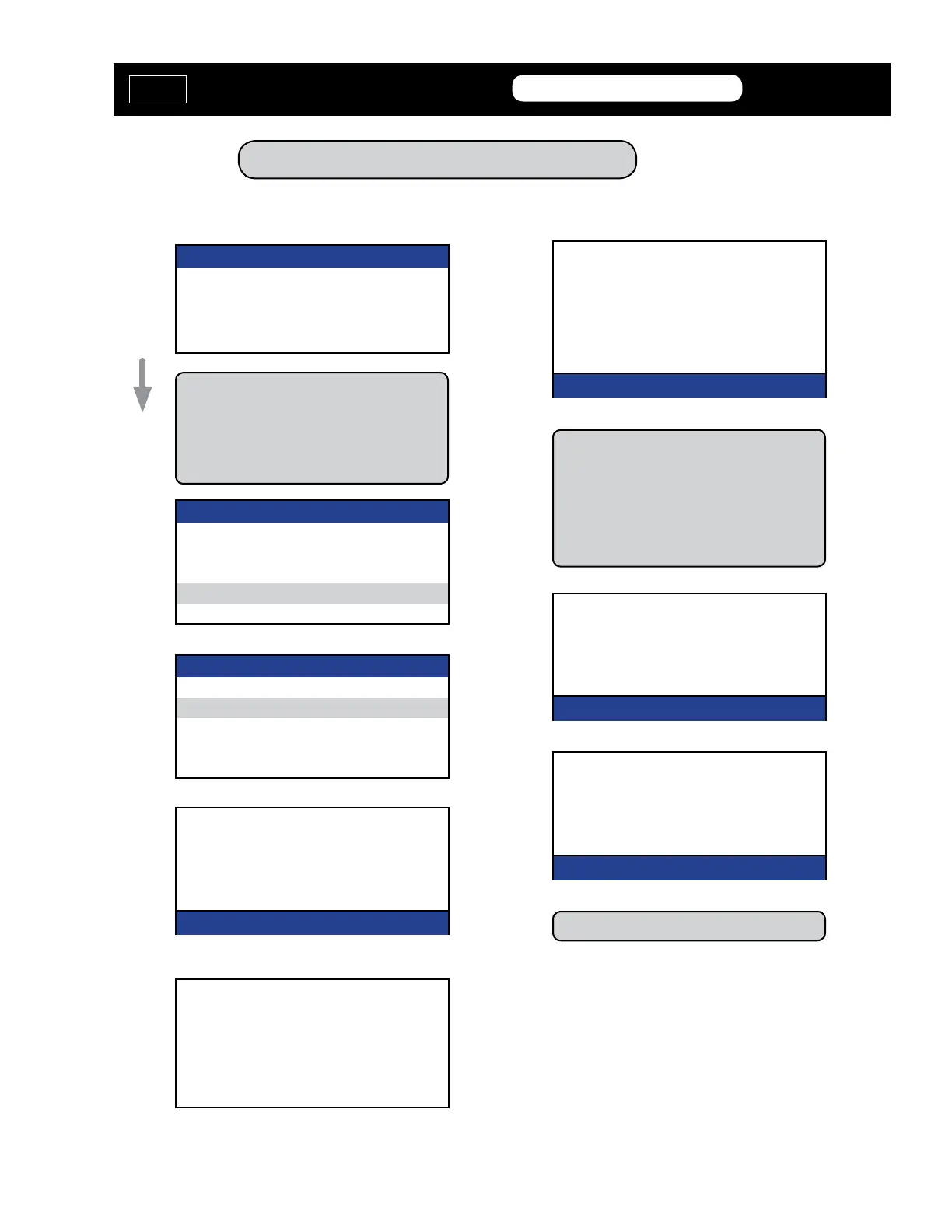
Program RKE / PROX - Type 5
PROGRAM KEYS
KEYS PROGRAMMED
KEYS X
PRESS ENTER KEY
PROGRAM KEYS
WITH ORIGINAL KEY
PRESS THE LOCK BUTTON
PROGRAM KEYS
WITH NEW KEY
PRESS LOCK & UNLOCK
TOGETHER FOR 1 Sec.
PRESS LOCK BUTTON
PRESS ENTER KEY
KEYS PROGRAMMED
KEYS X
PRESS ENTER KEY
You should be all done at this point.
PROGRAM KEYS
PROCEDURE COMPLETE
PRESS ENTER KEY
Hold the Prox up in the general area
around the center of the steering wheel
when pressing the buttons.
Registration may take up to 5 seconds.
Pressing “unlock again or any other but-
tons may cause the procedure to fail.
ECU IDENTIFICATION
TOYOTA/LEXUS REMOTE TYPE3
PRESS ENTER KEY
DIAGNOSTIC MENU
ECU IDENTIFICATION
FAULT CODES
> SPECIAL FUNCTIONS
It’s normal for the ECU ID screen here to
read TYPE3 even though we are actually
selecting PROXIMITY TYPE5
DIAGNOSTIC MENU
> PROGRAM REMOTE
ERASE REMOTE
RESET ECU
MVP &
TCODE
TOYOTA
ADVANCED DIAGNOSTICS USA
powered
by



 To Next Page