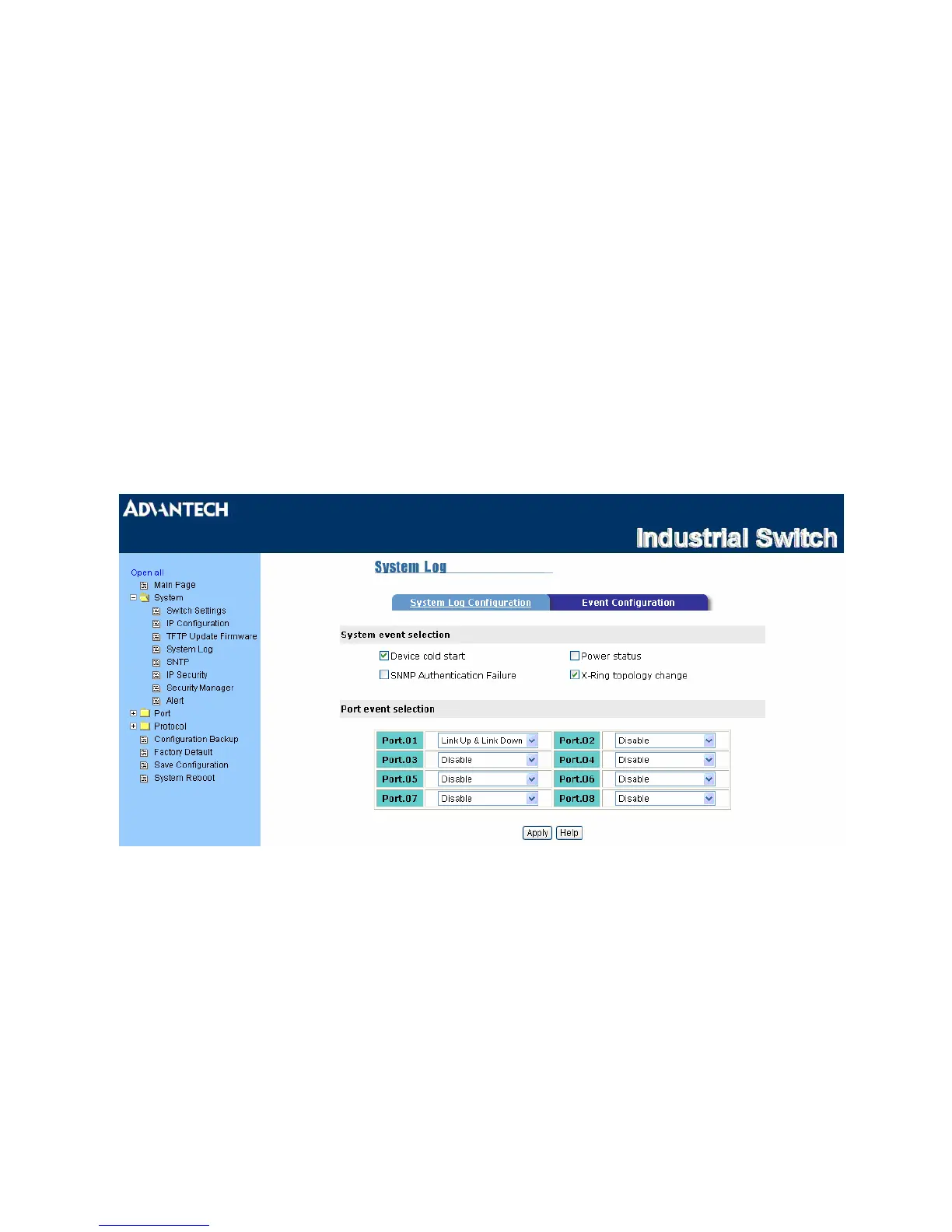
System Log – Event Configuration
• System event selection: There are 4 event types—Device cold start, Power status, SNMP
Authentication Failure, and X-ring topology change. Tick the check box beside the event label to collect
the log information.
¾ Device cold start: When the device executes cold start action, the system will issue a log
event.
¾ Power status: When the power status of the device changes, the system will issue a log event.
¾ SNMP Authentication Failure: When the SNMP authentication fails, the system will issue a
log event.
¾ X-ring topology change: When the X-ring topology has changed, the system will issue a log
event.
• Port event selection: The drop-down menus have 3 selections—Link UP, Link Down, and Link UP
& Link Down. Disable means no event will be sent.
¾ Link UP: The system will issue a log message when port connection links up.
¾ Link Down: The system will issue a log message when port connection links down.
¾ Link UP & Link Down: The system will issue a log message when port connection is up and
down.
Figure 3.1-8 Event Configuration
EKI-2548I_Manual_ed2 28



 To Next Page